

SaveRewinder
Undo mistakes and bookmark key moments. Auto-saves at key points, press S to rewind, and manage saves from the Saves menu.
| Last updated | a week ago |
| Total downloads | 1558 |
| Total rating | 1 |
| Categories | Mods Libraries Misc |
| Dependency string | Liafonx-SaveRewinder-1.6.1 |
| Dependants | 0 other packages depend on this package |
This mod requires the following mods to function

README
Save Rewinder
English | 简体中文
Undo mistakes. Experiment freely. Never lose progress.
Save Rewinder automatically creates save points as you play Balatro, letting you rewind to any recent moment with a single keystroke.
- 📸 Automatic snapshots — Creates save points for every action (blind selection, hands, shop).
- ⚡ Instant Undo — Press
S(keyboard) orL3(controller) to rewind immediately. - 🔁 Quick Saveload — Press
L(keyboard) orR3(controller) to instantly reload. - ⭐ Key Saves — Mark important saves and filter the list to key saves only.
- ✏️ Rename Saves — Rename save entries in the save list.
- ⬇️ Export Saves — Export selected save files to any directory on your system.
- 💀 Game Over Rewind — Rewind to your last save directly from the game over panel.
- 🧪 Experiment Freely — Test strategies without fear; stepped-back saves stay available until you make a new action.
- 🛡️ Score Overflow Protection — Rewind/save-load safely with extreme
naneinf/infscores (optional clamp to1.8e308).
Screenshots
| Save List (Blind Icons) | Save List (Round Numbers) |
|---|---|
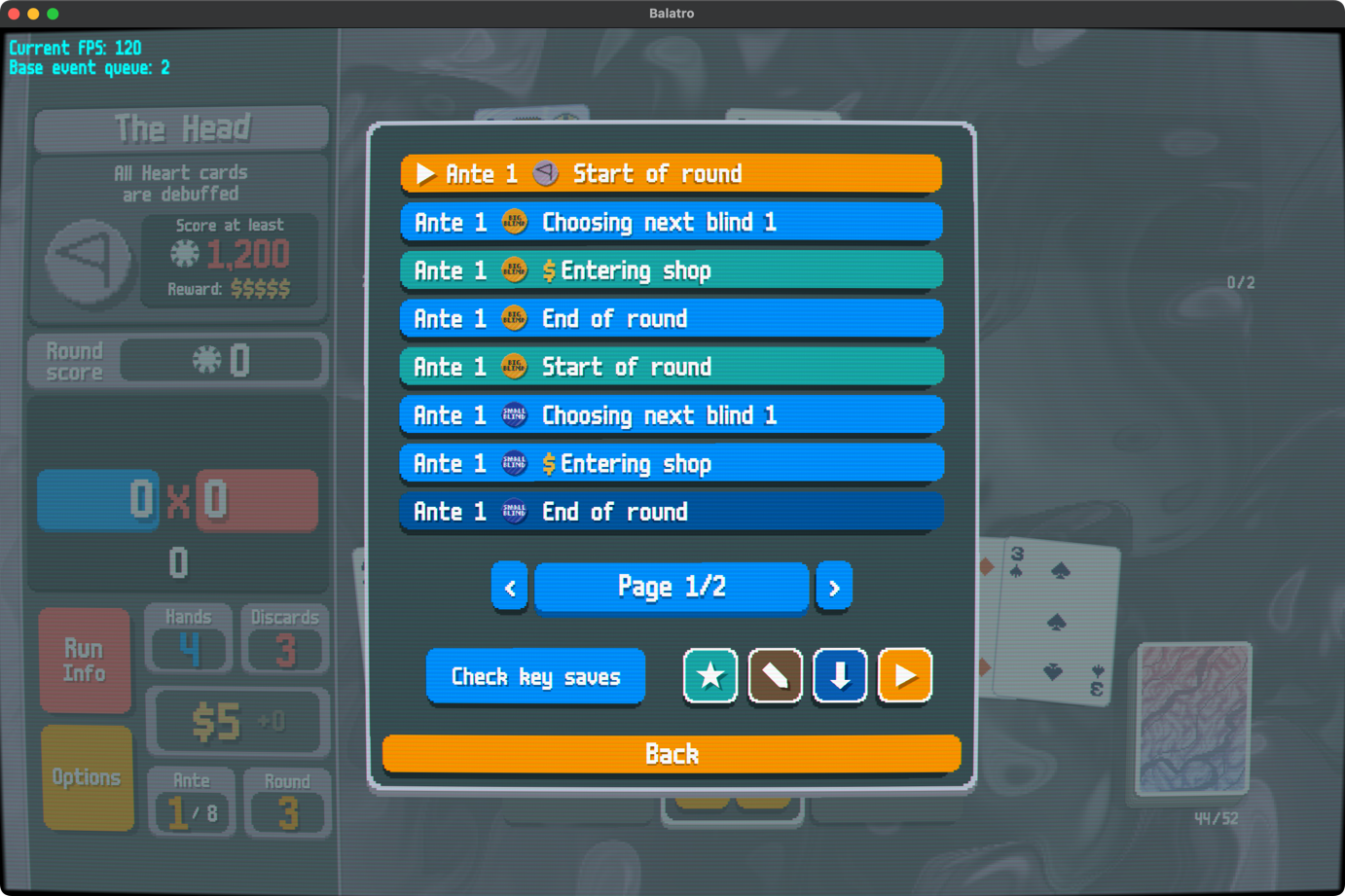 |
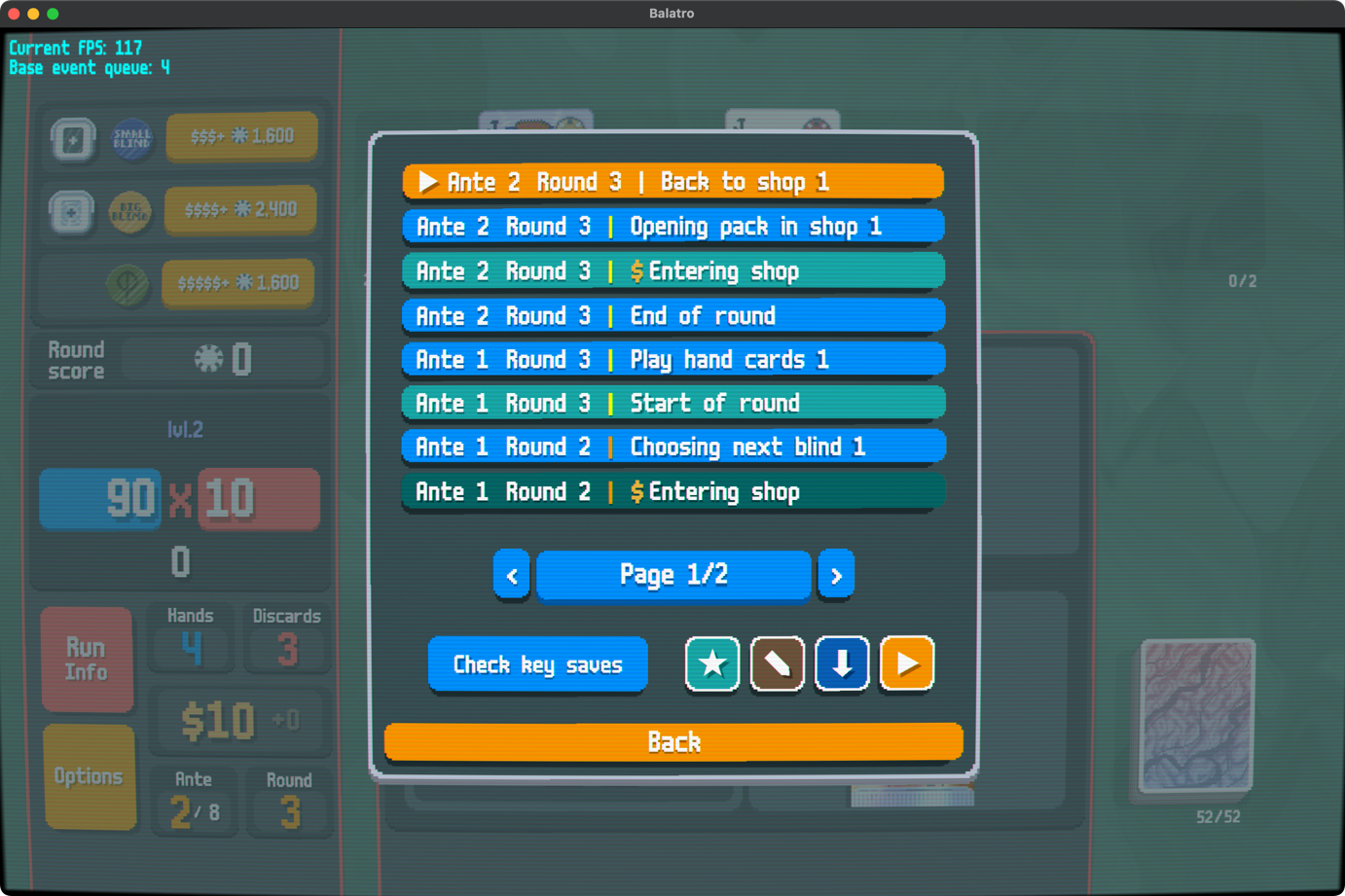 |
| Key Saves List | Mod Settings |
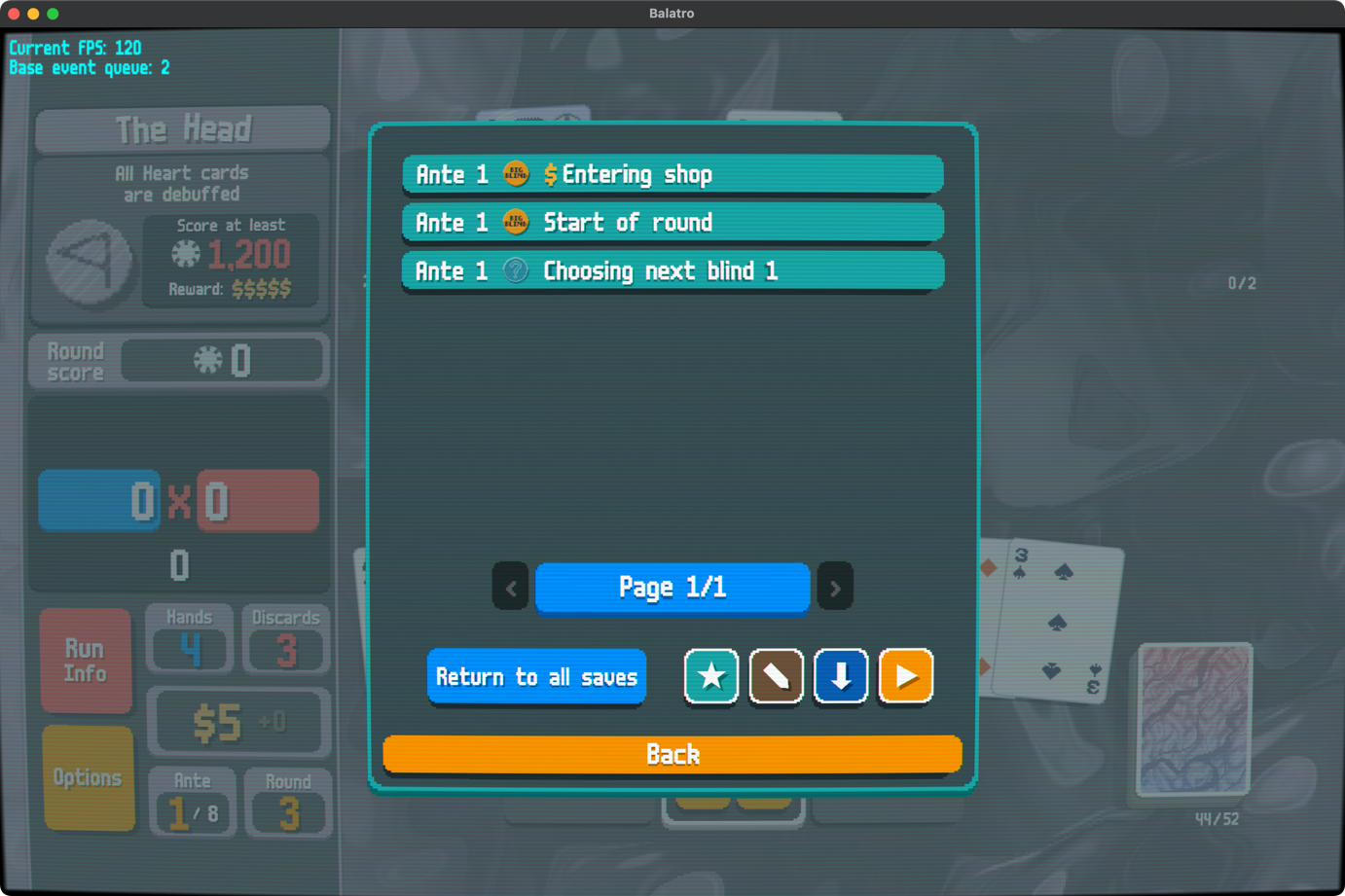 |
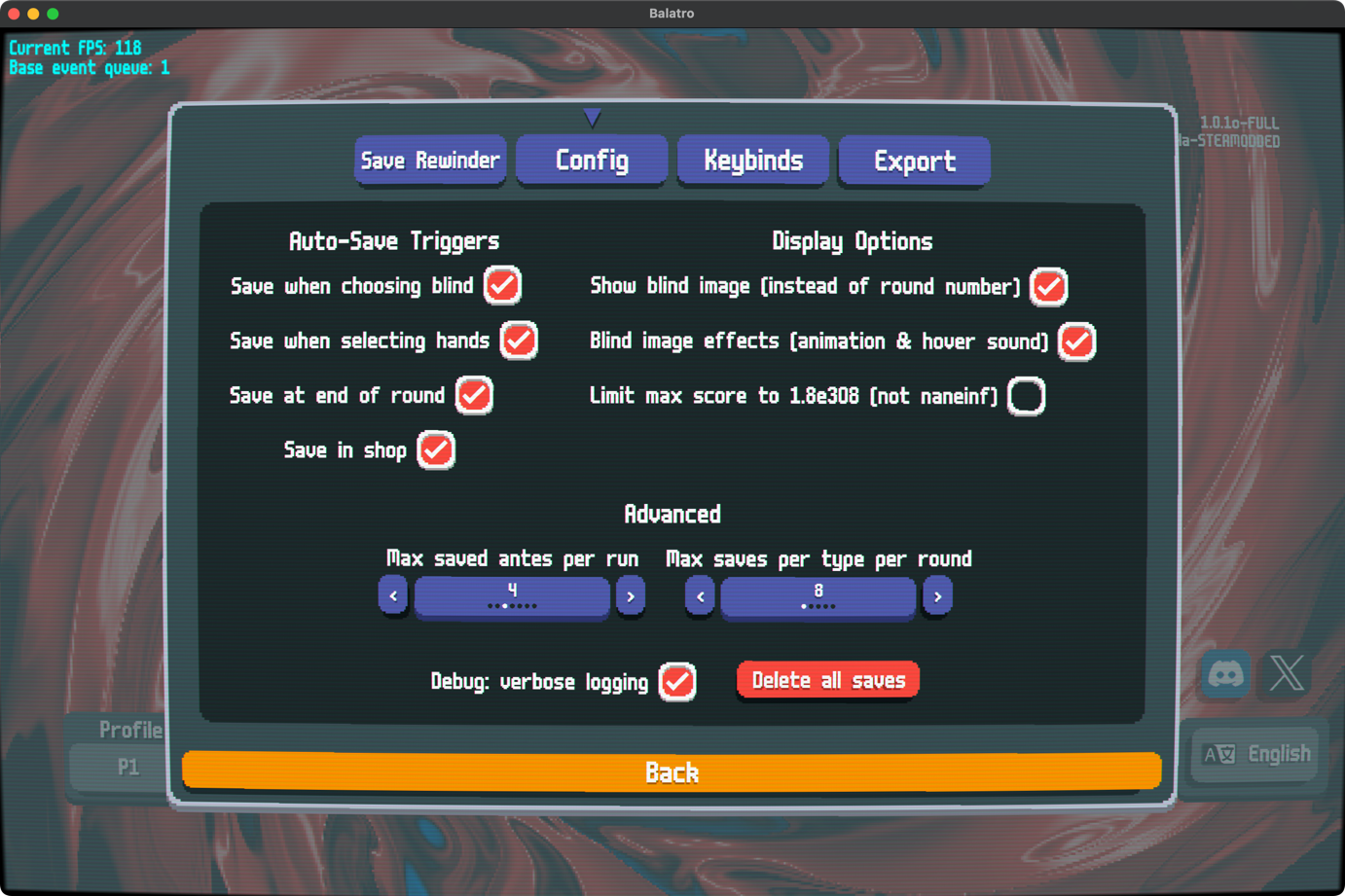 |
Installation
- Install Steamodded for Balatro
- Download and extract the latest release — it contains a
SaveRewinderfolder - Copy the
SaveRewinderfolder into your game'sModsfolder - Launch Balatro — you'll see Save Rewinder in the mods list
⚠️ Important: Ensure
Mods/SaveRewinder/contains mod files directly (likemain.lua), not another nestedSaveRewinderfolder.
📦 Thunderstore Users: Files are at the zip root. Create
Mods/SaveRewinder/and extract all files into it. Final structure:Mods/SaveRewinder/main.lua.
Quick Start
Controls
| Action | Keyboard (default) | Controller (default) |
|---|---|---|
| Step back one save (configurable) | S |
Click Left Stick (L3) |
| Quick saveload (configurable) | L |
Click Right Stick (R3) |
| Open saves list (configurable) | Ctrl+S |
X (in Pause Menu Only) |
Tip: Open the Pause Menu → Options and click the orange "Saves" button (or press
Ctrl+S/X) to browse and restore any save.
Save List Icon Buttons
- Check key saves — Text button. Shows only key saves.
- ★ Edit key saves — Star icon button. Enters mark mode so you can add/remove key marks.
- ✏️ Rename mode — Pencil icon button. Enter rename mode to edit save titles inline.
- ⬇ Export mode — Download icon button. Enter export mode to select and export saves.
- ▶ Current save — Triangle icon button. Jumps to your currently loaded save.
Mark flow:
- Press ★ Edit key saves.
- Click save rows to toggle key marks (pending changes show a white dot badge).
- Press ★ Save marking changes to apply. Close the panel to discard pending edits.
- Use Check key saves to filter, and ▶ Current save to jump back to your current position.
Rename flow:
- Press the ✏️ button to enter rename mode.
- Click a save row and edit its title.
- Click the row again (or switch rows) to stage the draft (pending rename show a white dot badge).
- Press ✏️ again to commit staged rename drafts.
Export flow:
- Press the ⬇ button to enter export mode.
- Click save rows to select them (selected rows show a white dot badge).
- Press ⬇ again to export the selection. If nothing is selected, pressing ⬇ exits export mode.
Enter Key Behavior (Saves Overlay)
When the saves overlay is open:
- Mark mode + Enter — Same as clicking ★ Save marking changes (commits mark edits / exits mark mode).
- Rename mode + editing a row + Enter — Same as clicking that row again (stages current row draft and exits row editing).
- Rename mode + not editing a row + Enter — Same as clicking ✏️ (commits staged rename drafts and exits rename mode).
- Export mode + Enter — Same as clicking ⬇ (exports selection if rows are selected, otherwise exits export mode).
Game Over Rewind
When you lose a run, the game over panel includes a button so you can jump straight back into the timeline.
Configuration
In the Steamodded config menu for Save Rewinder:
- Choose when to save (Blind, Hand, Round, Shop).
- Toggle blind icons and animations.
- Set max antes to keep (Default: 4).
- Set max saves per type per round (Default: 16).
- Configure overflow score handling (cap at 1.8e308 or keep as naneinf).
- Customize keyboard and controller keybinds.
- Configure export directory, seed display, and
.metasidecar options.
Save Data Location
Saves are stored in [Profile]/SaveRewinder/.
⚠️ Note: Saves are for the current run only and are cleared when starting a new run. Quitting and continuing later preserves your full history.
Exported saves are written to [Balatro folder]/SW-Exports/[Profile]/ by default. You can override this in the Export tab of the mod settings.
Languages
- English
- 简体中文 (Simplified Chinese)
