
FactoryMutiplier
工厂生产速度超频, 并且工作电量同步加倍。OverClock your factorys to produce faster,power consumption grown up with too.
| Last updated | 2 weeks ago |
| Total downloads | 13769 |
| Total rating | 4 |
| Categories | Assembling Machines Game Breaking Power |
| Dependency string | waRNing525-FactoryMutiplier-3.0.0 |
| Dependants | 0 other packages depend on this package |
This mod requires the following mods to function

README
工厂倍速(功耗同步增加)
- 加快工厂设施生产速度,包括:熔炉、化工厂、精炼厂、制造台、对撞机、矩阵研究站、轨道弹射器、垂直发射井、射线接收站等。
- 所有相关设施的工作耗电会按倍率同步增加。
- 可调整分馏塔产出重氢的概率;倍率越高功耗增长越明显,但在较低倍率(约 50x 以下)时,单位产出通常仍优于对撞机。
配置说明
- 配置文件路径:
BepInEx\\config\\waRNing.dsp.plugins.FactoryMultiplier.cfg - 首次运行游戏后会自动生成配置文件。
- 修改配置后需要重启游戏才会生效。
- 将倍率设为
1可恢复对应设施为默认速度与功耗。
注意
- 修改后会直接作用于当前与新建的相关设施,无需重建建筑或改配方。
- 请确保电力充足,否则高倍率下可能导致大面积断电。
更新日志
3.0
- 适配游戏版本。
- UI 更新为游戏自带样式。
2.2.0
- 适配最新游戏版本。
2.1.3
- 修复研究站在生产模式下使用增产剂时,额外产物未按倍率增加的问题。
2.1.2
- 由于 DSP 0.9.24.11271 已加入分馏塔功耗随流速变化机制,移除 2.1.0 中分馏塔功耗随堆叠数增加的逻辑。
2.1.1
- 修复 2.1.0 中未修改设施出现异常功耗的问题。
- 若你使用 2.1.0 保存过存档,请先用 2.1.0 将所有倍率重置为
1并保存,再升级到 2.1.1。
2.1.0
- 重构代码,提升对后续游戏更新的兼容性。
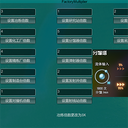
- 新增设置窗口,按
LeftCtrl + R打开,输入倍率后可立即生效。 - 分馏塔功耗会随输入氢堆叠数增加:
1/2/3/4 -> 1.0/1.5/2.0/2.5。 - 新增采集类倍率(采矿机、大型采矿机、抽油机、抽水站),其功耗也会同步增加。
1.3.0
- 适配 DSP
0.7.18.6931。 - 增加位面熔炉倍率修改。
1.2.4
- 修复大部分设施倍率二次修改无效的问题。
1.2.3
- 修正分馏塔功耗增长计算错误,
30x现为正确效率临界点。
1.2.2
- 新增研究站研究速度倍率。
- 提高分馏塔功耗增长幅度,高于约
30x后单位重氢功耗会高于对撞机。
安装
- 安装 BepInEx。
- 将
FactoryMultiplier.dll解压到:steamapps/common/Dyson Sphere Program/BepInEx/plugins
Factory Multiplier (Higher Speed, Higher Power Consumption)
- Speeds up factory facilities, including Smelters, Chemical Plants, Refineries, Assemblers, Particle Colliders, Labs, Rail Ejectors, Launch Silos, and Ray Receivers.
- Power consumption for related facilities is multiplied accordingly.
- You can adjust the Deuterium output probability of Fractionators. Power usage rises quickly at high multipliers, but at lower multipliers (roughly below 50x), efficiency is generally still better than Particle Colliders.
Configuration
- Config file path:
BepInEx\\config\\waRNing.dsp.plugins.FactoryMultiplier.cfg - Run the game once to generate the config file.
- Restart the game after editing the config.
- Set multiplier to
1to restore default behavior.
Warning
- Changes apply directly to all existing and newly built relevant facilities.
- Ensure enough power supply, or blackout may happen at high multipliers.
Update
3.0
- Adapted to the current game version.
- Updated the UI to match the game's native style.
2.2.0
- Supports the latest game version.
2.1.3
- Fixed an issue where Lab extra products were not multiplied when using Proliferator in production mode.
2.1.2
- DSP
0.9.24.11271introduced Fractionator power scaling with fluid speed, so the stack-count-based power increase logic from2.1.0was removed.
2.1.1
- Fixed incorrect power consumption on unrelated facilities introduced in
2.1.0. - If you saved with
2.1.0, reset all multipliers to1in2.1.0, save your game, then upgrade to2.1.1.
2.1.0
- Rebuilt the code for better compatibility with future updates.
- Added a UI window (
LeftCtrl + R) for instant in-game multiplier updates. - Fractionator power scales with Hydrogen stack count:
1/2/3/4 -> 1.0/1.5/2.0/2.5. - Added mining-related speed multipliers (Mining Machine, Advanced Mining Machine, Oil Extractor, Water Pump), with corresponding power scaling.
1.3.0
- Compatibility update for DSP
0.7.18.6931. - Added Plane Smelter multiplier support.
1.2.4
- Fixed an issue where multiplier changes became invalid after repeated edits.
1.2.3
- Corrected a Fractionator power calculation error;
30xis now the proper efficiency threshold.
1.2.2
- Added a Lab research speed multiplier.
- Increased Fractionator power growth; beyond around
30x, unit Deuterium cost becomes higher than with Particle Colliders.
Installation
- Install BepInEx.
- Unzip
FactoryMultiplier.dlltosteamapps/common/Dyson Sphere Program/BepInEx/plugins.
