
Please disclose if your mod was created primarily using AI tools by adding the 'AI Generated' category. Failing to do so may result in the mod being removed from Thunderstore.
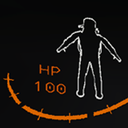
Treys Health Text
Displays Player Health as a Number
| Last updated | 2 years ago |
| Total downloads | 276562 |
| Total rating | 19 |
| Categories | Mods Tools Misc BepInEx Client-side |
| Dependency string | Treyotech-Treys_Health_Text-1.3.3 |
| Dependants | 278 other packages depend on this package |
This mod requires the following mods to function

BepInEx-BepInExPack
BepInEx pack for Mono Unity games. Preconfigured and ready to use.
Preferred version: 5.4.2100README
Trey's Health Text Mod
Installation
To install my Health Text Mod, follow these steps:
-
Download the Mod:
- Download the latest version of TreysHealthText
-
Install BepInEx:
- If not already installed, download and install BepInEx for Lethal Company.
-
Place Mod Files:
- After downloading the mod, extract the files (If they are zipped)
- Place the extracted TreysHealthText.dll into the
BepInEx/pluginsdirectory in your Lethal Company installation folder.
-
Celebrate:
- The mod should be working, run the game and have fun :D
Configuration
Navigate to your BepInEx/config directory in your Lethal Company installation folder and edit TreysHealthText.cfg in the text editor of your choice.
These are the config options
- HPTextPosition: Defines if the label should be above, below, left, or right the number.
- UnderlineTopLine: Separates the top and bottom row with a line.
- HPLabelName: Replaces the "HP" text with whatever you want! You could have your text say "100 men" if you wanted idk.
- TextColor: Sets the color of the text using the RGB format.
- XOffset: Moves the text left and right.
- YOffset: Moves the text up and down.
- RainbowText: Set to true if you want the color to change every frame (might cause lag idk)
- RainbowSpeed: Changes how fast the text updates. Set the value as a float (default 0.3)
