
BetterPeakVoiceFix
Fixes voice connection issues with auto-reconnect, host synchronization, and a visual status overlay. | 支持切换中文。修复了语音连接问题,新增了自动重连、主机同步以及可视化状态显示功能。
| Last updated | a month ago |
| Total downloads | 1902 |
| Total rating | 2 |
| Categories | Quality Of Life Client Side All Clients Optimization |
| Dependency string | AiAeT-BetterPeakVoiceFix-1.0.2 |
| Dependants | 1 other package depends on this package |
This mod requires the following mods to function

BepInEx-BepInExPack
BepInEx pack for Mono Unity games. Preconfigured and ready to use.
Preferred version: 5.4.2100README
Version: v1.0.2 | Game Version: PEAK 1.54a | 👉中文说明和更新日志
1. Mod Overview
- Based on the
PEAK VOICEFIX from @chuxia,supports switching between Chinese and English. It includes optimized reconnection logic and additional monitoring features. Press theJto view the voice status of all players in the room. If you experience voice issues, useALT+Kto manually disconnect and reconnect (this can only be done once if the connection is stuck for over 20 seconds). - For the host's voice server broadcast to work, both the host and clients must have the mod installed. If only one party has the mod, its functionality will be limited to viewing the team's voice status and manual reconnection.
- I have made some optimizations to the text in version 0.3.5. The previous expressions like "MY IP" could indeed lead people to mistakenly believe that their IP would be exposed.
- To facilitate maintenance, the Chinese and English versions will be combined and re-released. You can select the language in the configuration options and it will take effect upon restart.

2. UI
A. Simple Overlay UI (Default: On)
A small status bar displayed on the screen (default: right side).
- Local Voice: Displays current connection status (e.g., Connected 🟢).
- Voice Connection Count: Format is
n/N.- Automatically hides when everyone is perfectly connected with no misalignment (Configurable).
- Displays notifications when a player's status changes.
B. Detailed Information Panel (Toggle with J)
This is the core window of the mod, containing three sections of information.
① Top: Connection Status & IP
- Local (Voice) Server IP: The voice server address you are currently connected to.
- Host (Voice) Server IP: The voice server address the room host is connected to.
- [Sync] 🟢: You and the host are on the same channel; you can hear each other.
- [Abnormal] 🔴: You are on a different channel from the host (Status: "Isolated"). Reconnection is required.
② Middle: Player List Status (Key Feature)
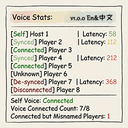
Each row represents a player in the game. The mod assigns different status tags via an intelligent algorithm:
| Status Tag | Color | Trigger Condition & Meaning |
|---|---|---|
| [Connected] | Green 🟢 | Perfect State. ID matches, and voice is in the room. |
| [Misaligned] | Pale Green 🟢 | v0.3.4 Core Feature. The player appears disconnected, but a "Nameless Ghost" occupies a voice slot. Meaning: Their voice is likely working, but the ID is stuck. Do NOT ask them to reconnect. |
| [Connecting] | Yellow 🟡 | Player just joined (first 25s) or is verifying. Please wait patiently for it to turn green. |
| [Disconnected] | Red 🔴 | Joined over 25s ago, and there is no corresponding ghost in the voice room. Meaning: Completely failed to connect; cannot hear or speak. Needs to press Alt + K. |
| [Isolated] | Yellow 🟡 | Local client connected to the wrong voice server. Different servers cannot communicate with each other. |
③ Top/Bottom: Smart Statistics Bar
Display Format: n / N (m ID Misaligned)
- n (Current Voice Count): Sum of Normal Connections + Misaligned (Ghost) Connections.
- If n = N (Full): Displayed in Green 🟢.
- If Misalignment exists: Displayed in Pale Green 🟢.
- If n < N (Not Full): Displayed in Yellow 🟡.
- If n = 1 (Isolated): Displayed in Red 🔴.
- N (Total Game Players): Total number of players currently in the room.
- (m ID Misaligned): Only displayed when ghost connections are detected, indicating how many people are in a "Misaligned" state.
C. Debug Console (Press Alt + J)
Intended for advanced users to view raw data streams.
- Data Columns:
ID | Name | IP | Ver | [Status] - [Ghost] Tag: Clearly identifies which IDs are residual "dead bodies" (stale data).
- Ver: Displays the mod version installed by the other player (e.g.,
v0.3.4; requires the other player to also have this version). - Function Buttons: Supports one-click log export to a file for bug reporting.
3. Core Features
Connection & Synchronization Logic
This mod is not a simple "Reconnector"; it is a distributed voice coordination system based on PUN (Photon Unity Networking). It uses a rigorous decision tree to ensure all players eventually reach the same destination.
A. Host: Lighthouse Broadcast Mechanism
The Host is the reference point for the voice network.
- Mechanism: The Host client scans its own voice connection status at high frequency (every second). Once connected, the mod writes the current Voice Server IP into the Host's PUN Player Custom Properties (
PVF_IP). - Synchronization: This property is synced across the network. This means any client in the room with the mod installed can read the Host's current voice IP in real-time.
- Change Broadcast: If the Host switches voice servers due to network fluctuation, the mod immediately updates the property and broadcasts a log: "Host IP Changed: Old -> New", guiding all clients to follow.
B. Client: Intelligent Decision Tree
Clients do not blindly follow the Host. Instead, they use a "Majority Priority" intelligent decision logic to prevent the whole team from failing if the Host drops alone.
When a Client needs to reconnect, it executes the following logic:
[Start Reconnection Decision]
      │
      ▼
1. 【Majority Rule】
   Count the voice IPs of all players in the cache.
   IF (A certain IP has count ≥ 2 AND is the majority)
      └─ Decision: Connect to this "Majority IP" (Follow the crowd)

      ▼ (If everyone is scattered)

2. 【Follow Host】
   Read the Host's PVF_IP property.
   IF (Host has a valid IP)
      └─ Decision: Connect to Host's IP

      ▼ (If Host is also disconnected)

3. 【Blind Connect / Auto】
   Do not specify an IP; let Photon assign automatically.
   └─ Decision: Leave it to fate (Auto)
Significance: This logic ensures that even if the Host disconnects, the remaining players can provide broadcasting functions for late joiners (assuming at least two people in the room have the mod, and the new player also has the mod).
SOS & Snapshot Cache
A. Snapshot Cache
The mod maintains a local PlayerCache (Roster).
- Function: PUN player lists sometimes vanish instantly due to network fluctuations (causing data loss). The local cache "remembers" the last known Name, IP, Version, and Status of every player.
- Value: This is why the
Alt + Jpanel can still show a player's "Last Known IP" and "Ghost Status" even after they drop, instead of them simply disappearing.
B. SOS Distress Signal
When the mod executes an auto-reconnect or a player presses Alt + K, it broadcasts a data packet with Event Code 186 to the whole room.
- Content:
[Type: SOS, Target IP, Source IP] - Receiver Reaction:
- A warning pops up at the bottom of the UI.
- Records the player's "accident scene" (where they dropped from, where they are trying to go).
- Practical Use: When you see someone consistently failing to connect, checking the SOS log might reveal their "Target IP" differs from the group's "Majority IP," allowing you to immediately judge if they are on the wrong server rather than having a broken microphone.
Manual Intervention (Alt + K) Scenarios
- Scenario 1: Current Status is [Isolated]
- Action: Active Disconnect.
- Logic: Calls
punVoice.Client.Disconnect()-> Sends SOS signal "Manual Disconnect". - Purpose: Soft restart. When you realize you are on the wrong channel, try actively disconnecting to rejoin.
- Scenario 2: Current Status is [Disconnected] / [Connecting]
- Action: Force Reconnect.
- Logic: Immediately triggers
HandleClientLogic-> Runs the "Intelligent Decision Tree" above -> Forces specific IP -> Initiates connection. - Loop Strategy: If it fails 3 times consecutively, the mod gives up on the specific IP and switches to "Blind Connect Mode" to attempt a breakthrough.
- Known Issue: Manual switching may cause the local UI to freeze momentarily and may lead to ID misalignment (does not affect voice).
4. Configuration & Shortcuts
⌨️ Shortcuts
- J: Toggle UI display mode (Hidden -> Simple -> Detailed).
- Alt + K: Manual Reset (SOS).
- Safety Mechanism: If currently [Connected] / [Misaligned], the first press will Disconnect. You must press again to execute a Force Reconnect.
- If currently [Disconnected], a single press triggers direct reconnection.
- Alt + J: Open/Close Debug Console.
⚙️ Configuration File
(Path: BepInEx/config/chuxiaaaa.Aiae.BetterVoiceFix.cfg)
- UI Settings
- UI Position: Dropdown to select
LeftorRight.
- UI Position: Dropdown to select
- Network Settings
- Reconnection Timeout: Default
25 seconds. The max time the yellow [Connecting] status lasts after joining before turning red. - Enable ID Drift Fix: Default
True. Recommended to keep enabled, otherwise you may see "Unknown". - Enable Manual Reset (Alt+K): Default
True. Allows forcing voice disconnection or reconnection viaAlt + K. - Retry Interval (s): Cooldown time between automatic reconnection attempts.
- Reconnection Timeout: Default
- Advanced & Debug
- Enable Virtual Player: Generates a dummy on the UI for layout testing.
- Ping Alignment Offset: Horizontal pixel offset for Ping display to align it separately to the right.
- Auto Hide Simple UI: Automatically hides the Simple Mode UI when everyone is connected normally.
- Enable Debug Logs: Outputs detailed network logs to the BepInEx console (Default: only shown in Alt+J interface).
- Show Ping in Simple Mode: Displays local latency under the Simple Mode UI.
- Virtual Player Name: Used for adjusting font size and ping offset testing.
5. Compatibility
| Other Player's Status | Interaction Result |
|---|---|
| No Mod Installed | Sync and reconnection mechanisms are ineffective, but you can see their true status (Disconnected/Connected) one-way. |
| Compatible PeakVoiceFix | Theoretically, the synchronization (Broadcasting and receiving Host IP) mechanism is compatible, but the UI behaves like they have no mod. |
| Old Version (< v0.3.0) | Functional. You can see their IP and connection status, but you won't see their detailed connection steps (e.g., "Verifying...") or their version number. |
| > v0.3.5 | Fully Functional. You can see detailed connection steps, version numbers, and IPs. |
6. FAQ
Q: Why does the count show 10/10, but it's followed by (2 ID Misaligned)?
A: This means there are indeed 10 connections (Full) in the voice room. 8 are normal, and 2 are ID Misaligned. Because Misaligned = Can Speak, the total counts as full (Green/Pale Green). This is good news, indicating voice is working for everyone.
Q: I am in [Misaligned] status. Do I need to press Alt + K to fix it?
A: NO. As long as you can speak and hear others, do not touch it. [Misaligned] only means the ID doesn't match the slot, but it does not affect voice functionality. Forcing a reconnect might cause you to completely freeze or disconnect.
Q: Why can't I see myself in the Alt + J list after joining the game?
A: This means you are the one who is misaligned.
The Dump list prints "IDs inside the Voice Server." Your Game ID is new, but your Voice Client is still using the old ID (Ghost). Because the old ID cannot find a corresponding player name, it might show as [Ghost] or be categorized into the misalignment statistics.
Q: Why is everyone yellow when I first join the room?
A: This is the 25-second grace period. Connecting to voice takes time; the mod doesn't report errors immediately but displays the yellow [Connecting] status while waiting for data synchronization.
Q: When should I use Alt + K?
A: You should try manual disconnection/reconnection only when you are displayed as [Isolated] or [Disconnected]. If it still doesn't work, please restart the game and Steam, check your network, or check your mods (especially LocalMultiplayer).
To be honest,I'm a novice. I used AI to assist me in organizing the code and the documentation. After nearly one month of testing in a multi-person room (8~12 player), the current version is now basically stable.
