
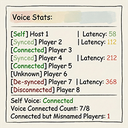
BetterPeakVoiceFix EnFork
A team voice status management tool that offers an overview view (J) and synchronization function, allowing for manual disconnection (alt+K) and reconnection./n一个队伍语音状态管理工具,提供概览视图(J)和同步功能,可手动断开(alt+K)重连。
By AiAeT
| Last updated | 6 hours ago |
| Total downloads | 33 |
| Total rating | 1 |
| Categories | Quality Of Life Client Side All Clients |
| Dependency string | AiAeT-BetterPeakVoiceFix_EnFork-0.3.4 |
| Dependants | 0 other packages depend on this package |
This mod requires the following mods to function

BepInEx-BepInExPack
BepInEx pack for Mono Unity games. Preconfigured and ready to use.
Preferred version: 5.4.2100README
Better Voice Fix User Manual
Version: v0.3.0 | Game: PEAK | 中文版说明书
1. Introduction
Better Voice Fix is designed to resolve common voice chat issues in PEAK, such as connection failures, ID Drift (players showing as [Unknown]), and lack of status feedback. Version 0.3.0 introduces a new "Visualized Connection" protocol, making the voice connection process transparent and significantly enhancing reconnection stability.

2. Core Features & Mechanisms
A. Smart Name Fix (ID Drift Solution)
When the game's underlying data desynchronizes (causing Alt+J to show Unknown or Name: ""), the mod automatically triggers a 3-stage search mechanism:
| Priority | Method | Description | |||
|---|---|---|---|---|---|
| 1 (Fastest) | Local Cache | Retrieves the last known correct name from memory. | |||
| 2 (Standard) | Steam Lookup | New in v0.3.0. Queries the Steam servers directly using the player's Steam ID. | |||
| 3 (Fallback) | Scene Scavenger | Scans all objects in the game scene (including hidden UI elements) to "scavenge" the name. |
Result:
Unknownnames are eliminated from the player list. Even if the game logic fails, the names remain correct.
B. Connection Status Visualization
v0.3.0 visualizes the real-time connection steps instead of just showing "Disconnected" or "Connected".
Plaintext
[ Join Room ]
      │
      ▼
[ Connecting... ] ──────────────────────────────┐
      │                                         │
      ├─ (Time < 25s) ──▶ [ Status: Verifying / Joining ] (Yellow)
      │                                         │
      ├─ (Success) ─────▶ [ Status: Connected ] (Green)
      │                       │                 │
      │                       └─ (Lag/Drop) ────┘
      │
      └─ (Time > 25s) ──▶ [ Status: Disconnected ] (Red)
3. Shortcuts & Operations
⌨️ Key Bindings
| Key | Function | Description | |||
|---|---|---|---|---|---|
| J | Toggle Detail Panel | Opens the detailed voice status panel at the top right. Press again to switch modes or close. | |||
| Alt + K | Force Reset (SOS) | Panic Button. Use this if you can't hear others or they can't hear you. | |||
| Alt + J | Debug Console | For developers only. Displays raw logs and underlying data events. |
🛠️ Alt + K Logic Flow
When Alt + K is pressed, the mod intelligently decides the action based on your current state:
Plaintext
[ User Presses Alt + K ]
          │
          ▼
    < Check Current Status >
          │
          ├─ Is Connected? ──┐
          │                  │
          │                  ▼
          │        [ Action: Disconnect ]
          │                  │
          │                  ├─ Send SOS: "Manual Disconnect"
          │                  └─ UI: Show Yellow "Manual Operation..."
          │
          └─ Is Disconnected / Connecting? ──┐
                                             │
                                             ▼
                                   [ Action: Force Reconnect ]
                                             │
           ┌─────────────────────────────────┴─────────────────────────────────┐
           ▼                                 ▼                                 ▼
 [ Strategy 1: Majority IP ]       [ Strategy 2: Host IP ]           [ Strategy 3: Blind Connect ]
 (Connect to the channel           (If no majority found,            (If all else fails, use
  where most players are)           follow the host)                  default auto-connect)
4. UI Panel Guide (Press J)
Top: Local Status
- Local IP: The voice server IP you are currently connected to.
- Host IP: The voice server IP the room host is connected to.
[Sync]: You and the host are on the same channel.[Abnormal]: Red. You are on a different channel from the host (voice isolation).
Middle: Player List
Format: [Status] [HostTag] PlayerName | Ping: xxms » Details
Status Color Legend:
| Tag | Color | Meaning | |||
|---|---|---|---|---|---|
| [Connected] | 🟢Green | Voice is working normally. | |||
| [Connecting] | 🟡Yellow | New in v0.3.0. Player is verifying, joining, or within the 25s grace period. | |||
| [Disconnected] | 🔴Red | Player failed to connect after 25s or explicitly disconnected. | |||
| [Left] | ⚫Grey | Player has left the game or died (and voice is gone). |
Details (») Explanation:
- v0.3.0 Users: You will see specific steps like
» Verifying...,» Joining.... - Old Version / Non-Mod Users: You will only see static info like
» Connected: IPor» Connecting.
Bottom: SOS Snapshot (Black Box)
When a player drops connection or presses Alt+K, a red warning appears:
Detected XXX Disconnected
Target: (127.0.0.1) | Last: 123.456.78.9
- Target: The server they are trying to reach.
- Last: The server they were on before dropping (Fixed in v0.3.0).
- Usage: Helps determine if they are connecting to the wrong server or lost internet entirely.
5. FAQ
Q1: Why does it show [Connecting] for a long time?
A: The mod gives every joining player a 25-second grace period. If they don't connect within 25s, the status turns to a red [Disconnected]. This prevents false red alarms when players are just loading in.
Q2: I can't hear a teammate, and they are marked [Disconnected].
A: Ask them to check their internet or press Alt + K. If they don't have the mod, they must restart the game.
Q3: Why does Alt + K say "Manual Disconnect" first?
A: To prevent accidental resets. If you are currently connected, the first press disconnects you safely. Press Alt + K again to trigger the forced reconnection logic.
Q4: Can players with older versions see my status?
A:
- You see them: Yes (Basic Disconnected/Connected status).
- They see you: Yes, but they won't see the detailed "Verifying..." steps, only a jump from Disconnected to Connected. It is recommended that everyone updates to v0.3.0.
Q5: What does "Host IP Changed" log mean?
A: If the host disconnects and reconnects to a different voice server, the mod detects and broadcasts this. All clients should press Alt + K to follow the host's new IP.
To be honest,I'm a novice. I used AI to assist me in organizing the code and the documentation. After nearly one month of testing in a multi-person room (8~12 player), the current version is now basically stable.
