
| Last updated | a month ago |
| Total downloads | 14 |
| Total rating | 0 |
| Categories | |
| Dependency string | TheTimesweeper-FPSOptions-0.0.1 |
| Dependants | 0 other packages depend on this package |
README
Resolution Options for the modern age
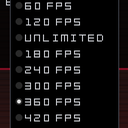
A quick mod For us maniacs with higher than 120 refresh rate monitors.
If you're an even bigger maniac and want an even higher number than 500 feel free to reach out to thetimesweeper on discord either through DM or in the RAM Modding Server
Installation
- Wait for r2modman to be fixed and use that. If not, thanks BurgerMinus for instructions on discord
- Download "ModLoader-Self-Setup_7.0.1-WIN.zip" from https://thunderstore.io/c/random-access-mayhem/p/GodotModding/GodotModLoader/
- Extract addons folder and place it in your game directory (next to RAM.exe and RAM.pck)
- Create a folder called "mods" in your game directory (next to RAM.exe and RAM.pck) and place the mod zip in the mods folder
- Add the "--script addons/mod_loader/mod_loader_setup.gd" launch flag in Steam, go to game properties under launch options
- Profit (probably)
