
ValuableTracker
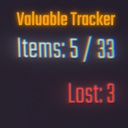
Real-time HUD to track extracted, lost, and in-cart items. Includes in-game settings menu to configure visibility of HUD (by pressing F4).
| Last updated | 4 months ago |
| Total downloads | 31938 |
| Total rating | 3 |
| Categories | Mods Tools Client-side |
| Dependency string | RJs_REPO_Mods-ValuableTracker-1.0.8 |
| Dependants | 5 other packages depend on this package |
This mod requires the following mods to function

BepInEx-BepInExPack
BepInEx pack for Mono Unity games. Preconfigured and ready to use.
Preferred version: 5.4.2304README
Valuable Tracker
Valuable Tracker is a client-side utility mod for R.E.P.O. that adds a real-time HUD to track loot during your run. It solves the mystery of "Did I lose that item, or did it count?" by distinguishing between items extracted via the tube, items currently in your carts, and items lost to the void.
Features
- Real-Time Counter: Displays
Items: X / Yon your HUD, showing how many valuables you have successfully extracted vs. the total on the map. - In Cart Counter: Displays
In Cart: W, summing up items inside all active carts in the level. - Loss Detection: Displays a red
Lost: Zcounter if a valuable falls off the map or is destroyed without being sold. - Smart Positioning: Automatically detects if other mods (like MapValueTracker) are occupying the HUD slot and adjusts its position to prevent overlapping text.
- Visual Feedback: Text turns Green when you have successfully extracted 100% of the reachable loot.
- In-Game Settings Menu: Press F4 to open the settings window.
- In Cart Tracking: A new counter shows exactly how many items are currently sitting in your shopping carts, ready for extraction.
- Customizable HUD: Toggle specific counters (Items, Lost, or In Cart) on or off in real-time
Controls
- F4 Opens the Settings Menu.
- Enable/Disable the HUD.
- Toggle "In Cart" tracking.
- Reset all settings to default.
Recommended Companions
While this mod works perfectly on its own, it pairs beautifully with these mods to give you a complete HUD information suite:
- Map Value Tracker by Tansinator
- Tracks the total dollar value of the loot, while this mod tracks the count.
- LevelNumberUI by ironbean
- Displays the current Level Number on the HUD.
Installation
Recommended
The easiest way to install is using the Thunderstore App or r2modman. Just click "Install with Mod Manager" on the mod page.
Manual Installation
- Install BepInEx: Ensure you have BepInExPack installed.
- Place File: Extract
ValuableTracker.dllinto your game's plugin folder:\steamapps\common\R.E.P.O\BepInEx\plugins\
- Launch: Run the game and look for the HUD in the bottom right (by default).
