
This package has been marked as deprecated, and it's suggested another
alternative is used.

| Last updated | a day ago |
| Total downloads | 55 |
| Total rating | 0 |
| Categories | Valuables |
| Dependency string | meatballfarm-Amogus-1.0.0 |
| Dependants | 0 other packages depend on this package |
This mod requires the following mods to function

README
AutoColliderGenerator for Unity
Automatically generates simple colliders (Box, Sphere, or Capsule) for a 3D model's children based on mesh bounds.
Features
- Adds BoxCollider, SphereCollider, or CapsuleCollider depending on mesh shape.
- Skips GameObjects that already have colliders.
- Tags generated colliders to allow easy removal.
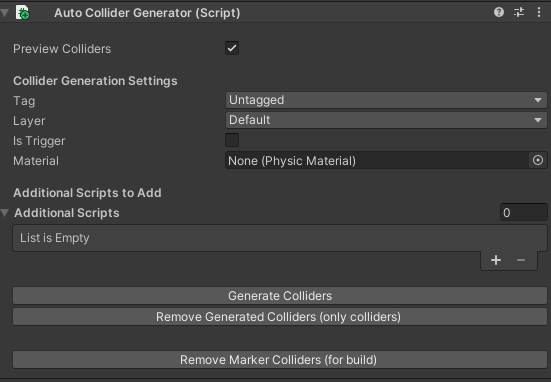
- Editor buttons to:
- Generate colliders.
- Remove generated colliders.
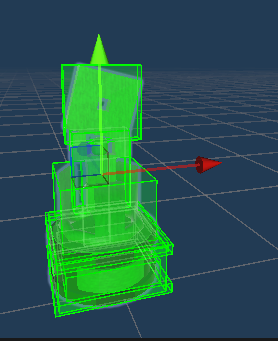
- Toggle preview of potential colliders in the Scene view (Gizmos).
- Clean and recursive handling of nested objects.
How to Use
- Attach the
AutoColliderGeneratorscript to the root of your model or GameObject hierarchy. - In the Inspector, use the following buttons:
Generate Colliders: Adds appropriate colliders to children without affecting existing ones.Remove Generated Colliders: Removes only the colliders generated by this script.Preview Colliders: Toggle to visualize potential colliders using Gizmos.
- Customize logic inside
AutoColliderGenerator.csif needed.
Folder Structure
Assets/ <br>
└── AutoColliders/ <br>
├── AutoColliderGenerator.cs <br>
├── AutoColliderGeneratorEditor.cs <br>
└── GeneratedColliderMarker.cs
Installation
- Copy the
AutoCollidersfolder into your Unity project'sAssets/directory. - Or import the
.unitypackageversion viaAssets > Import Package > Custom Package.
License
MIT License — free to use and modify, with attribution.
Notes
- Capsule detection is based on size ratio (e.g., one dimension significantly larger).
- Sphere detection assumes roughly equal dimensions.
- Previews are drawn using the Gizmos API when the GameObject is selected.
Images
Credits & Special Thanks
Special thanks to Silly (yuikonnu442) for the demonstration image.
