
RUMBLE does not support other mod managers. If you want to use a manager, you must use the RUMBLE Mod Manager, a manager specifically designed for this game.
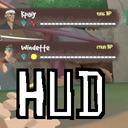
RumbleHud
Adds a HUD to the RUMBLE desktop window for spectator experience.
| Last updated | a month ago |
| Total downloads | 1780 |
| Total rating | 1 |
| Categories | Mods |
| Dependency string | Kpaiy-RumbleHud-1.7.0 |
| Dependants | 0 other packages depend on this package |
This mod requires the following mods to function

LavaGang-MelonLoader
The World's First Universal Mod Loader for Unity Games compatible with both Il2Cpp and Mono
Preferred version: 0.7.1README
RUMBLE HUD Mod
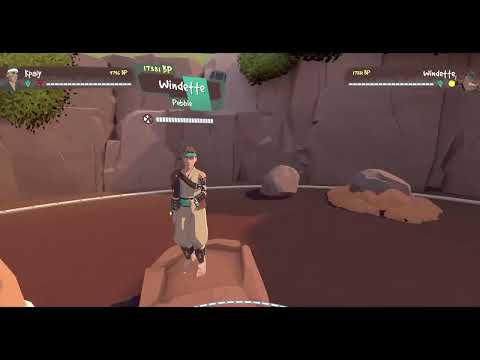
This mod adds a HUD to the RUMBLE display on your monitor, for use in streaming RUMBLE or recording gameplay.
The mod will, for each player, display their:
- Name
- Battle Points
- Current Health
- Equipped Shift Stones
- Player Portrait
- Round scores (if in a match)
- Host status (optional)
Controls
Known Issue: These controls always function, e.g. you could type a "-" in a ModUI text box and the HUD would get smaller.
The mod currently uses the following controls:
Ito toggle HUD on/offOto cycle between host indicator options:- None
- Text only
- Icon only
- Both text and Icon
Pto regenerate player portraits- Your own portrait can only be regenerated while in the gym
-/=(near the backspace key) to decrease/increase HUD scale
The HUD scale currently saves to a settings file: UserData/RumbleHud.xml.
Note: Settings save on game quit, so RUMBLE crashing might mean your settings don't save.
Settings File
| Setting Key | Type | Default Value | Description |
|---|---|---|---|
HudScale |
float | 1.0 | The size of the HUD. Keep it strictly positive. Control in-game using - and =. |
HostIndicator |
None, Text, Icon, or Both |
Text |
How to indicate who is host on the HUD. Cycle in-game using O. |
HideSolo |
boolean (true or false) |
false |
Whether to auto-hide the HUD when you are the only player. Cannot be set in-game. |
LockControls |
boolean (true or false) |
false |
When this is true, keyboard controls are disabled, preventing accidental changes. |
Demo Footage (Click to View)
Dependencies
This mod requires:
- MelonLoader Nightly
Installation Instructions
- Extract the
ModsandUserDatafolders into your RUMBLE install directory.
Known Issues
- Keyboard controls are always listening, even if you're doing something like typing into a text field.
- People can have their portrait taken while they're in awfully unflattering poses, e.g. full scorpion.
- This is funny as hell, not fixing this
- In parks, if you're unlucky, player portraits can be photobombed
- This is also funny as hell, not fixing this
Future Goals
- Extensive config with
rumblehud.xml- Allow deeply customisable HUDs by having element positionings be config values.
- Integrate with RumbleModUI to expose configuration options instead of using keyboard controls:
- Hide or show HUD
- Re-generate player portraits
- Rearrange ordering of players on the HUD.
- Support for NameBending
- Make shift stone icons pulse/shimmer when triggered/active
- Is it possible to use OSC or host a server? Something that could expose this information outside of RUMBLE, so someone familiar with OBS could make their own elements in OBS instead using this info?
- Gort is working on an OBS HUD!
Support
Reach out to me on Discord (kpaiy) if you have issues or feature requests. I can't guarantee fast response times, but I'll do what I can. ^-^
Thanks
- SDRAWKCABMIAY for providing shift stone graphics.
- Pep for helping me with host in park lunacy. He is why I am sane enough to type this.
- Testers:
- Jman
- Rhymenocerous
- Savitarian
