
Some mods target the Mono version of the game, which is available by opting into the Steam beta branch "alternate"
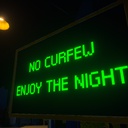
WhatCurfew
A MelonLoader mod for Schedule 1 (v0.4.2f9) that disables the curfew mechanic, allowing players to explore freely at any time of day without restrictions.
| Last updated | 2 months ago |
| Total downloads | 1619 |
| Total rating | 1 |
| Categories | Mods Mono IL2CPP |
| Dependency string | HazDS-WhatCurfew-1.1.0 |
| Dependants | 0 other packages depend on this package |
This mod requires the following mods to function

LavaGang-MelonLoader
The World's First Universal Mod Loader for Unity Games compatible with both Il2Cpp and Mono
Preferred version: 0.7.0README
WhatCurfew
A MelonLoader mod for Schedule 1 (v0.4.2f9) that disables the curfew mechanic, allowing players to explore freely at any time of day without restrictions.
Features
- Removes curfew restrictions - Explore 24/7 without police harassment
- No curfew crimes - Police won't pursue you for violating curfew
- Custom VMS board messages - Replace curfew warning signs with your own text
- 8 color options - Customize the VMS board text color
- Disco mode for VMS boards - Cycle through all colors dynamically
- Toggle on/off - Enable or disable the mod without restarting via mod manager apps
Installation
- Install MelonLoader for Schedule 1
- Copy the appropriate DLL to your
Modsfolder:- Mono version (alternative branch):
WhatCurfew_Mono.dll - IL2CPP version (main branch):
WhatCurfew_Il2cpp.dll
- Mono version (alternative branch):
Configuration
After first run, a config file is created at UserData/MelonPreferences.cfg:
[WhatCurfew]
Enabled = true
VMSBoardMessage = "NO CURFEW\nENJOY THE NIGHT"
VMSBoardColor = "Green"
Options
| Setting | Default | Description |
|---|---|---|
Enabled |
true |
Enable/disable the mod |
VMSBoardMessage |
NO CURFEW\nENJOY THE NIGHT |
Custom text for VMS boards (use \n for new lines) |
VMSBoardColor |
Green |
Text color: Green, Yellow, Red, Blue, Cyan, Purple, Orange, White |
Live Updates
If you have ModManagerPhoneApp installed, you can change settings in-game and they'll apply immediately - no restart required!
