
Some mods target the Mono version of the game, which is available by opting into the Steam beta branch "alternate"
| Last updated | 2 weeks ago |
| Total downloads | 4791 |
| Total rating | 2 |
| Categories | Mods Mono IL2CPP |
| Dependency string | SirTidez-PackRat-1.0.7 |
| Dependants | 0 other packages depend on this package |
This mod requires the following mods to function

LavaGang-MelonLoader
The World's First Universal Mod Loader for Unity Games compatible with both Il2Cpp and Mono
Preferred version: 0.7.0
the_croods-SwapperPlugin
Allows seamless swapping between the il2cpp and mono backends. Can be used to install the mono and Il2Cpp version of a mod seamlessly
Preferred version: 1.2.1README
PackRat
A Schedule One mod that gives every player a persistent, tiered backpack — extra storage that grows alongside your criminal rank.
Screenshots
Backpack Inventory

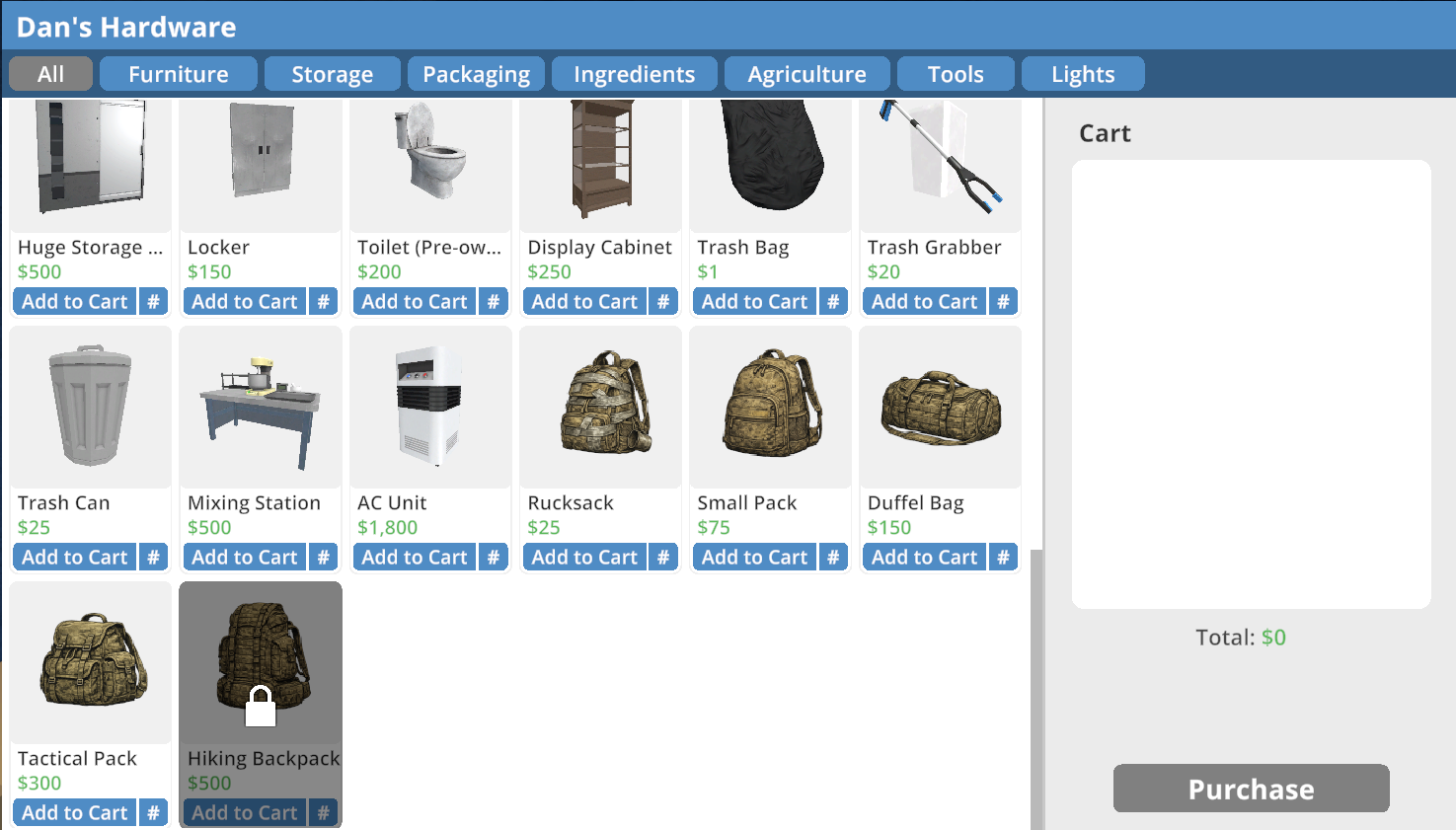
Hardware Store / Shop Integration
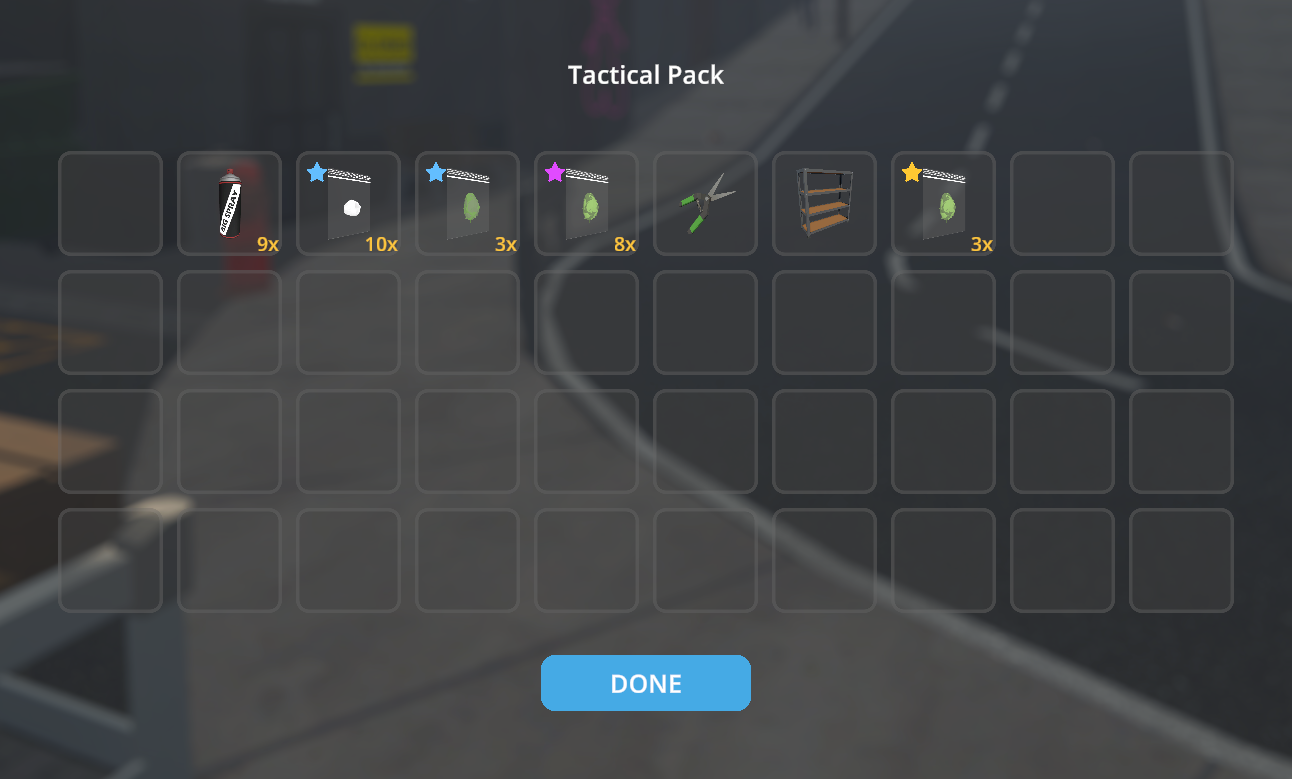
Tactical Pack Tier Example
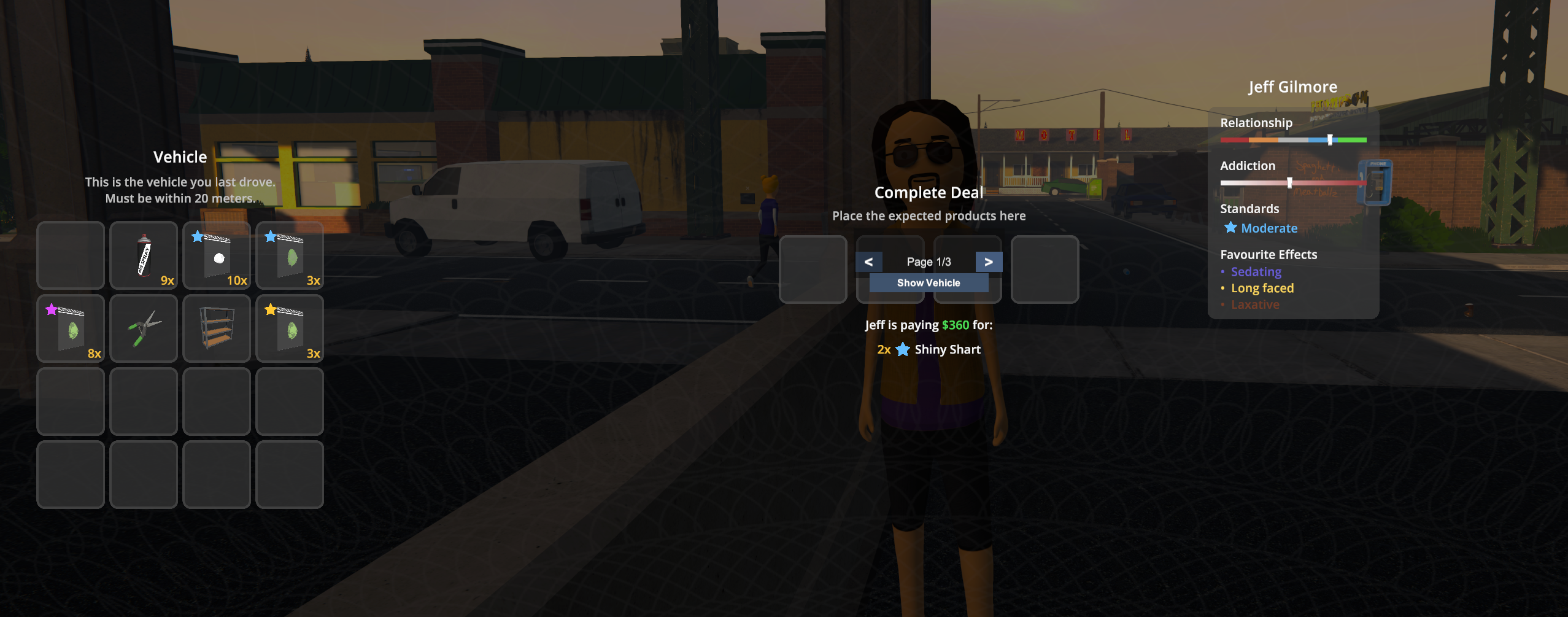
Deal Handover UI (Backpack Integration)
Overview
PackRat adds a backpack to your character that you upgrade by purchasing tiers at the Hardware Store. Once you've reached the required rank for a tier, you buy it with account funds and receive a backpack item in your inventory. Select that item in your hotbar and press B to consume it, apply the tier to your backpack, and open the backpack. Your backpack contents are saved with your game, visible at shops when you're ready to sell, and — for the bigger bags — something the cops will want to check when they stop you.
Tier Progression
Backpack tiers are purchased at the Hardware Store (not automatic). Each tier appears in the store once you've reached its required rank. Buy the tier with account funds, then select the backpack item in your hotbar and press B to apply it and open the backpack.
| Tier | Name | Slots | Can Buy At | Police Search |
|---|---|---|---|---|
| 1 | Rucksack | 8 | Hoodlum I | No |
| 2 | Small Pack | 16 | Peddler I | No |
| 3 | Duffel Bag | 24 | Hustler I | Yes |
| 4 | Tactical Pack | 32 | Enforcer I | Yes |
| 5 | Hiking Backpack | 40 | Block Boss I | Yes |
Features
Extra Storage
Open your backpack at any time with the toggle key (default: B). Your backpack is separate from your hotbar and inventory, giving you dedicated space for stockpiling product, supplies, or anything else you need to haul around.
Hardware Store Tiers
Backpack tiers are bought at the Hardware Store (both locations). Once you've reached the required rank for a tier, it appears in the store; purchase it with account funds (not cash). You receive a backpack item in your inventory. Select that item in your hotbar and press B to consume it, apply the tier to your backpack, and open the backpack. Each tier brings more slots; the game logs the upgrade when you use the item.
Persistent Contents
Everything in your backpack is saved to disk when you save your game. Load back in and it's all still there.
Shop Integration
When visiting a shop to sell, your backpack slots appear alongside your hotbar items. You can sell directly out of the backpack without shuffling things into your inventory first.
Deal Handover Integration
During deal handovers, your backpack storage is injected into the handover UI so you can move required items directly from your bag. Larger tiers are paged, with < and > controls plus a page indicator under the backpack panel. If your last driven vehicle is within 20 meters (the same condition the base game uses for vehicle storage access), a Show Vehicle toggle appears so you can switch between backpack and vehicle storage views. Recent handover updates keep paging and item movement responsive by restricting UI work to the local storage panel instead of broad handover-wide scans.
Cart-Aware Purchasing
When buying from a shop, the purchase warning accounts for your backpack space. If your hotbar is full but the backpack has room, the game will let you know items will spill into it rather than falsely warning you that everything won't fit.
Police Body Searches
Carrying a Duffel Bag or larger makes you a more suspicious target. If police stop and search you while you're rocking a tier 3, 4, or 5 bag, they'll ask to check the backpack too. Anything illegal inside — unpackaged product, contraband — will count against you.
Tip: The Rucksack and Small Pack fly under the radar. If you're moving small amounts and don't want the extra scrutiny, stay at Peddler rank or consider what you're carrying. Config: Set
EnableSearch = falseinUserData/PackRat.cfgif you want to disable backpack police searches entirely.
Multiplayer Support
In a multiplayer session, the host's configuration is automatically pushed to all clients when they join, and the host now acts as the authoritative source for backpack state. Clients request and apply the host's synced backpack snapshot instead of relying on their own local save state, so unlocked tiers and backpack contents stay aligned across the session. Clients don't need to touch their own config files.
Controls
| Action | Default Key | Notes |
|---|---|---|
| Open / close backpack | B |
When the backpack is already unlocked. |
| Use backpack item (apply tier) | B |
When a backpack tier item is in your hotbar, select it and press B to consume it, apply that tier to your backpack, and open the backpack. |
Handover paging and storage view switching use on-screen UI buttons.
The toggle key is fully configurable. See Configuration below.
Installation
- Install MelonLoader v0.7.0 or newer into Schedule One.
- Drop
PackRat.dllinto yourSchedule One/Mods/folder. - Launch the game. A config file will be created automatically at
UserData/PackRat.cfgon first run.
Configuration
PackRat's config file is located at:
UserData/PackRat.cfg
Edit this file while the game is closed. In a multiplayer session, only the host's config is used — changes made by clients while in-session have no effect.
Full Example Config
[PackRat]

# Key to open and close your backpack
# Accepts any Unity KeyCode name: B, Tab, F1, Backslash, etc.
ToggleKey = B

# When false, police body searches will not check backpack contents
EnableSearch = true

# Tier 0 — Rucksack
# First backpack; can buy at Hardware Store at Hoodlum I
Tier0_UnlockRank = Hoodlum : 1
Tier0_SlotCount = 8
Tier0_Price = 25

# Tier 1 — Small Pack
# Can buy at Peddler I; still under the radar
Tier1_UnlockRank = Peddler : 1
Tier1_SlotCount = 16
Tier1_Price = 75

# Tier 2 — Duffel Bag
# Can buy at Hustler I. Police will search this and above.
Tier2_UnlockRank = Hustler : 1
Tier2_SlotCount = 24
Tier2_Price = 150

# Tier 3 — Tactical Pack
# Can buy at Enforcer I
Tier3_UnlockRank = Enforcer : 1
Tier3_SlotCount = 32
Tier3_Price = 300

# Tier 4 — Hiking Backpack
# Largest tier; can buy at Block Boss I
Tier4_UnlockRank = Block_Boss : 1
Tier4_SlotCount = 40
Tier4_Price = 500
Config Reference
| Key | Default | Description |
|---|---|---|
ToggleKey |
B |
Key to open/close the backpack and to use a backpack item in the hotbar. Any Unity KeyCode name. |
EnableSearch |
true |
When false, police body searches never inspect the backpack, even for Duffel Bag and larger tiers. |
Tier{n}_UnlockRank |
See table above | Rank required before the tier appears at the Hardware Store. Format: RankName : TierNumber (1–5). |
Tier{n}_SlotCount |
See table above | Number of storage slots for tier n. Clamped between 1 and 40. |
Tier{n}_Price |
25, 75, 150, 300, 500 | Price (account funds) to buy tier n at the Hardware Store. |
Valid rank names:
Street_Rat, Hoodlum, Peddler, Hustler, Bagman,
Enforcer, Shot_Caller, Block_Boss, Underlord, Baron, Kingpin
Note: The searchable tiers are still fixed. When
EnableSearch = true, only tiers 3, 4, and 5 (Duffel Bag and above) are included in police body searches.
Requirements
- Schedule One (Steam)
- MelonLoader v0.7.0 or newer
