
Please disclose if your mod was created primarily using AI tools by adding the 'AI Generated' category. Failing to do so may result in the mod being removed from Thunderstore.
SkillsReworked
RPG-style leveling and prestige for Valheim. Earn XP for a new Level skill, gain and spend skill points on any skill(including modded skills) based off your Level.
By M2Valheim
| Last updated | 2 weeks ago |
| Total downloads | 5853 |
| Total rating | 8 |
| Categories | Mods Tweaks Server-side Client-side Bog Witch Update |
| Dependency string | M2Valheim-SkillsReworked-1.1.1 |
| Dependants | 7 other packages depend on this package |
This mod requires the following mods to function

denikson-BepInExPack_Valheim
BepInEx pack for Valheim. Preconfigured with the correct entry point for mods and preferred defaults for the community.
Preferred version: 5.4.2333
ValheimModding-Jotunn
Jötunn (/ˈjɔːtʊn/, 'giant'), the Valheim Library was created with the goal of making the lives of mod developers easier. It enables you to create mods for Valheim using an abstracted API so you can focus on the actual content creation.
Preferred version: 2.28.0README
SkillsReworked
SkillsReworked completely reworks Valheim’s progression system and turns it into a more classic RPG-style experience:
- A new Level skill with its own XP bar
- Skill points you can freely spend on your skills
- Rebirth to fully respec your character
- Prestige with permanent bonus points
- Dynamic XP and skill caps based on your world progress
- Optional group XP sharing (with the Groups mod)
- A clean, convenient skills UI directly in-game
Everything is designed to be intuitive – you don’t need to touch config files or understand modding internals to play.
1. What does the mod do?
Instead of every individual skill (Swords, Bows, etc.) leveling “on its own”, there is now a central Level system:
- You gain Level XP when you kill enemies.
- When you level up, you receive skill points.
- You decide which skills to invest those points into.
- Later, you can use Rebirth or Prestige to reset and rebuild an even stronger character.
This gives Valheim a more RPG-like character progression: you choose where your power comes from – not random actions.

2. The new Level system
Level skill & XP bar
- There is a new skill called “Level”.
- Every kill grants Level XP (amount depends on the enemy’s max HP and a server multiplier).
- Under your health bar you’ll see a new XP bar:
- The bar shows your progress towards the next Level.
- The number displays your current Level.

If you are Level 0 and have no XP yet, the bar hides itself to keep the HUD clean.
3. Skill points & the new skills window
Gaining skill points
- Each time you gain a Level, you receive skill points.
- How many points you:
- start with at Level 0, and
- gain per Level
is controlled by the server configuration.
Spending points
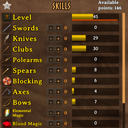
Open the Skills window as usual – there you’ll see:
- Top right:
“Available points: X” – how many unspent skill points you have. - For every skill (except “Level”):
- Two buttons: “+” and “–”
- A small number showing how many points you have assigned to that skill in this session.
How it works:
- Use “+” to assign points to a skill.
- Use “–” to remove points again (as long as you haven’t applied them).
- Changes only become permanent when you click “Apply”.
Buttons in the skills window
-
Apply
Permanently applies all points you assigned in this session. -
Reset
Resets only the points assigned in this session (no permanent loss, just a local undo). -
Rebirth
Opens the Rebirth dialog (see below). -
Prestige
Opens the Prestige dialog (see below, if Prestige is enabled on the server).
4. Skill caps based on boss progression
Skills cannot be pushed to max from the very start. Instead, skill caps depend on which bosses have been defeated in the world.
Examples (default values, server can change them):
- Before Eikthyr: max skill level 30
- After Eikthyr: max 40
- After The Elder: max 50
- After Bonemass, Moder, Yagluth, The Queen, The Fader: caps keep increasing
This means:
- You can’t max out everything before actually progressing the game.
- Skill growth feels more natural and in line with the world’s difficulty.
5. Rebirth – full character respec
Rebirth is your big “start over, but smarter” button:
- All skills (except Level) are reset.
- All previously spent skill points are refunded.
- You can rebuild your character from scratch with all your accumulated knowledge.
Depending on server settings, Rebirth can have costs:
- You might lose X Levels in the Level skill.
- You might need a specific item (for example Coins or a trophy).
- Both can be combined.
- Or Rebirth can be completely free if the server owner prefers that.
If you don’t meet the requirements (not enough Level or items), the dialog will tell you why Rebirth is not available.
6. Prestige – long-term progression
Once you’ve reached a certain Level, you can Prestige.
What is Prestige?
When you Prestige:
- You gain a Prestige rank (Prestige 1, 2, 3, …).
- Your Level is reset back to 0.
- All other skills are reset like with Rebirth.
- Your spent skill points are reset and recalculated.
The important part:
Each Prestige rank gives you permanent extra skill points per Level.
Simplified example:
- Normal: 5 points per Level
- Prestige rank 1: 6 points per Level
- Prestige rank 2: 7 points per Level
- …and so on (exact values are configurable).
Prestige item cost (optional)
Server owners can also require an item for Prestige:
- You must have X × a specific item to Prestige.
- That item will be consumed when you Prestige.
- If you don’t have enough, you’ll receive a message and Prestige won’t go through.
Prestige display in the UI
- At the top left of the skills window you’ll see a star with a number inside:
that number is your Prestige rank. - If Prestige is disabled on the server, the star and button are hidden automatically.
7. XP scaling by biome & Level
To discourage farming only very weak areas, the mod scales your XP based on:
- your current Level, and
- the biome the enemy spawned in.
Core idea:
- If you are at or below the “optimal Level” for that biome → full XP.
- The more you outlevel the biome, the less XP you get, down to a configurable minimum (for example 5%).
- Each biome (Meadows, Black Forest, Swamp, etc.) has its own optimal Level value.
Important:
The biome is remembered when the enemy spawns, not when it dies.
You can’t drag enemies into easier biomes to trick the system.
8. Group XP (optional, with Groups mod)
If your server uses the Groups mod, this mod can award group XP:
- The killer gets their normal, scaled XP as usual.
- Group members within a certain radius of the kill receive a fraction of those XP (for example 30%).
- The killer does not receive additional group XP on top – only the nearby group members do.
- Group XP is also affected by Level/biome scaling.
The radius and XP share percentage are configurable by the server owner.
9. Custom skills support
SkillsReworked is compatible with mods that add new skills via the normal Valheim skill system (e.g. SkillManager-based skills).
- Custom skills appear in the skills window like vanilla skills
- They receive + / – buttons and can use your Level points
- They are affected by skill caps, Prestige and Rebirth just like other skills (except the special Level skill)
Custom skills that are not added to m_skills dictionary will not show up in the UI(exception is blaxxun's SkillManager-based skills). Most custom skills add their Skill to the dictionary when performing actions usually used to level up the skill.
10. Death & XP loss
This mod replaces Valheim’s default death penalty system:
- Normal skills are not reduced across the board.
- Instead, you lose a configurable percentage of one Level of XP in the Level skill.
Example:
- XP loss is set to 25% of a Level.
- You are Level 25 with 12% progress to Level 26.
- You die → you drop to:
- Level 24 with 87% progress.
The exact percentage (0–100% of one Level) is configured by the server.
11. Server & admin information (non-technical overview)
Almost everything is tweakable on the server:
- Starting skill points and points per Level
- XP multiplier
- Biome optimal Levels & XP scaling behavior
- Skill caps per boss
- Rebirth costs (Level loss and/or item requirements)
- Prestige system (enabled/disabled, required Level, max rank, bonus per rank, item costs)
Players automatically receive the active settings when they join the server.
Admin console command (Prestige)
For server admins there is an in-game console command:
sr_setprestige <rank> [player name]
- Directly sets a player’s Prestige rank.
- If no name is given, it affects the local player.
Examples:
sr_setprestige 3
sr_setprestige 2 Alice
sr_setprestige 5 "My Character"
Contact
I am very thankful for any suggestions or feedback. You can message me on my Discord.
