
MapPinDeclutter
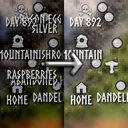
Declutters the world map by hiding pin names in clustered areas and scaling down pin icons as you zoom out.
| Date uploaded | 3 days ago |
| Version | 0.2.2 |
| Download link | birdhimself-MapPinDeclutter-0.2.2.zip |
| Downloads | 113 |
| Dependency string | birdhimself-MapPinDeclutter-0.2.2 |
This mod requires the following mods to function

denikson-BepInExPack_Valheim
BepInEx pack for Valheim. Preconfigured with the correct entry point for mods and preferred defaults for the community.
Preferred version: 5.4.2333
ValheimModding-Jotunn
Jötunn (/ˈjɔːtʊn/, 'giant'), the Valheim Library was created with the goal of making the lives of mod developers easier. It enables you to create mods for Valheim using an abstracted API so you can focus on the actual content creation.
Preferred version: 2.26.1README
MapPinDeclutter
This Valheim mod declutters the world map by hiding pin names in clustered areas and scaling down pin icons as you zoom out.
Configuration
This mod uses BepInEx configuration that can be changed via its configuration file or in-game via ConfigurationManager. The following settings are currently provided:
Hiding names
- HideNamesEnabled (default:
true): enable hiding of pin names on the map. When enabled, pin names will be hidden based on zoom level or proximity to other pins - HideNamesThreshold (default:
0.02): the map zoom level above which pin names are hidden. Higher values mean names are hidden at a greater zoom-out distance. Ranges from0.015to1.0 - HideNamesByDistanceEnabled (default:
true): when enabled, pin names are hidden only for pins that are crowded together, rather than hiding all names at once. Requires HideNamesEnabled to be enbaled - HideNamesByDistanceThreshold (default:
1000): the world-unit radius used to detect crowded pins. A pin's name will be hidden if any other pin falls within this distance, scaled to the current zoom level. Increase to hide names in more sparse areas. Ranges from100to3000
Zooming icons
- ZoomIconsEnabled (default:
true): enable scaling down of pin icons when zooming out. When enabled, icons will shrink as the map is zoomed out to reduce visual clutter - ZoomIconsThreshold (default:
0.3): the map zoom level at which pin icons begin to shrink. Above this threshold, icons scale down proportionally until they reach ZoomIconsMinimumSize. Ranges from0.015to1.0 - ZoomIconsMinimumSize (default:
0.3): the smallest size pin icons can be scaled to when zooming out, as a fraction of their original size (e.g.0.3= 30% of full size). Prevents icons from becoming too small to see. Ranges from0.1to1.0
