
Please disclose if any significant portion of your mod was created using AI tools by adding the 'AI Generated' category. Failing to do so may result in the mod being removed from Thunderstore.
Rune Magic
Hold back the rain, command the earth, and calm the seas! This mod adds powerful magic runes that can be cast or engraved on standing stones for a variety of unique non-combat effects.
| Date uploaded | 2 weeks ago |
| Version | 1.4.0 |
| Download link | hyleanlegend-Rune_Magic-1.4.0.zip |
| Downloads | 2889 |
| Dependency string | hyleanlegend-Rune_Magic-1.4.0 |
README
Rune Magic
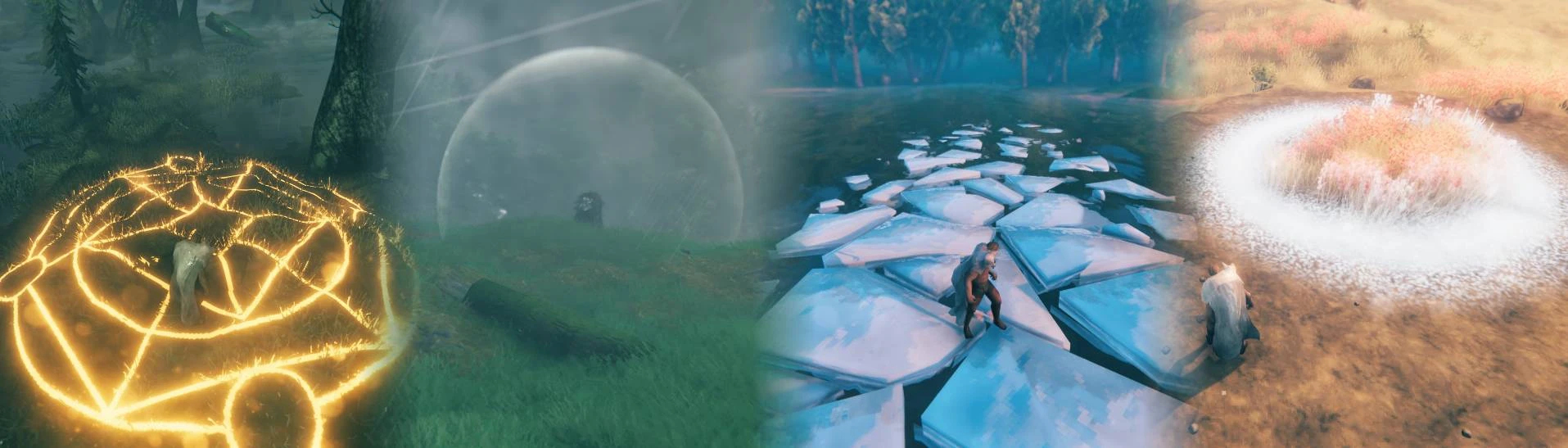
Rune Magic adds a variety of unique non-combat spells and effects, balanced around collecting runic energy from the Runestones scattered across the map. It also includes an optional (but recommended!) rune discovery mechanic to align with standard game progression.
Features
- 25 different runes to cast or engrave on standing stones
- Subtle and powerful visual effects
- Progression system that rewards exploration
- Works seamlessly with pre-existing worlds
- Usable out of the box, but configuration allows tweaking balance as desired
- Server authoritative configuration, so players can't cheat by changing their local config

Getting Started
Crafting a Rune Focus
The rune focus is how you extract and shape runic energy, so the first thing you'll want to do is craft one. To do this, you'll need a workbench of level 2 or higher, along with a few stones and some rubies.
Extracting Runic Energy
Next, you'll need to find a Runestone out in the world. Put your rune focus in the top row of your inventory, then press the key associated with that slot to use the rune focus on the Runestone and extract its energy. The amount of runic energy stored in your focus is indicated by its durability.
Unlocking Runes
Each Runestone has a particular rune associated with it, which you can unlock by extracting runic energy from it. However, which runes a Runestone has the potential to unlock depends on its biome. As you progress to more dangerous areas, you'll be able to unlock more useful and interesting effects.
Using Runes
- The rune focus behaves similarly to the hammer, with a table of possible effects and a single one you can select at any given time. With it equipped, right click to see all of the runes you currently have unlocked.
- Runes in the Casting/Creation tabs are instantanous effects. Click on a valid location (the ground or breakable rock, depending on the rune), and the effect will happen. Some of these can also be resized, by scrolling the mouse wheel. The cost to cast is shown at the bottom of the screen, where the required resources would normally display.
- Runes in the Augments tab are passive effects. So long as you have one of them selected, and the rune focus equipped, its effect will be active. Rather than a one-time cost, these will continuously drain runic energy while active.
- Runes in the Engraving tab are persistent effects. They can be placed on certain rock formations (waystones and menhirs) or on the constructible standing stone (found in the Misc tab of the hammer's build menu). They have a one-time cost to place, and can be removed (middle click with the rune focus) to refund their cost. Note that if the structure they're placed on is destroyed, they'll disappear without refunding their cost.
Detailed Rune Descriptions
Spoiler
Casting/Creation (instant effects)
- Restoration Rune: This will revert any changes to the terrain in the affected area, leaving it in its original state. This includes elevation changes (e.g. from mining) and cultivation/paving. It won't move anything placed on the terrain, so be careful if you raised the ground and then built on it.
- Foundation Rune: This will flatten the terrain in the affected area. The final height is the ground height at the point clicked (by default), but this can be changed to use the ground height under the player using the mod config.
- Shattering Rune: This allows players to precisely break pieces of stone. Mouse over breakable stone, and it'll highlight which chunk will be broken on-click.
- Blasting Rune: When placed, this will destroy stone in a small radius after a short delay, also dealing a small amount of damage to anyone standing too close. It can only be placed on breakable stone.
- Rune of the Stonecaller (various): These summon rock formations from the ground, varying from small boulders to the towering stone pillars of the plains. Be careful before casting these, since once summoned the boulders are ordinary stone and will have to be mined away the old fashioned way if you want to remove them.
Augments (passive effects)
- Rune of Alertness: While selected (and the rune focus is equipped), you'll be able to detect nearby enemies and their direction/distance, indicated by the size/angle of the phantom heads floating around you. Any alerted enemies will have a glowing yellow indicator above their heads, which turns orange if they aggro another player, and red if they're aggroed on you.
- Rune of Ocean Currents: While selected and controlling a ship, this will apply a small force in the direction you're looking. Wind is still the major factor in boat speed, but this makes maneuvering in tight spaces much easier.
- Rune of Frozen Footfalls: While selected and standing near water, icebergs will form beneath your feet, allowing you to walk on the surface of the water. This only costs runic energy if you're actually close enough to water to cause the icebergs to form.
- Rune of Decumberance: While selected (and the rune focus is equipped), this prevents you from being encumbered. However, the cost to maintain the effect scales with the amount you're carrying above your normal maximum.
Engraving (persistent effects)
- Canopy Rune: When placed on an appropriate surface (a summoned waystone or menhir, or a constructed standing stone), this will shield the nearby area from the weather, preventing rain from getting things wet or causing water damage. However, this does not block wind, so while rain won't put out fires, the wind still might.
- Rune of Dry Land: When placed on an appropriate surface, this will lower the water level in an area around it.
- Rune of Calm Waters: When placed on an appropriate surface, water in the nearby vicinity will be calm regardless of how strong the wind is blowing. The rune will glow brighter the more wave activity it's compensating for.
- Rune of Repair: When placed on an appropriate surface, nearby buildings and ships will very slowly regenerate. While nothing in the area is damaged, it will remain quiescent.
- Chimney Rune: When placed on an appropriate surface, nearby fires will burn clean, the smoke they would normally release rising from the rune instead.
- Extinguishing Rune: When placed on an appropriate surface, lava in the vicinity will slowly harden and become safe to walk on, and nearby fires will go out. They can be reignited by interacting with them (no extra fuel needed), but as long as the rune is there they'll quickly go out again.
Configuration
The configuration is split across two files, runemagic_server_config.cfg and runemagic_player_config.cfg, which can be found in the BepInEx/config folder in your local Valheim installation. As with RuneMagic.dll, these should be present on both the client and server. If they're missing, they'll be recreated when the game is started.
The server config contains balance related settings. This is synchronized for all players connected to a server, so while changes you make locally will be active when playing locally, if you connect to a server with this mod you'll use their server settings. More specifically, this configuration allows:
- Changing the stored runic energy/charge time of Runestones, and the chance they'll unlock a new rune when you interact with them.
- Turning off the progression system (so all runes start unlocked).
- Enabling/disabling each rune individually.
- Setting the runic energy cost of each rune.
- A few miscellaneous settings like whether or not the rune focus is equippable while swimming.
The player config contains settings that are purely cosmetic or personal preference. These settings will be active whether you're playing locally or connecting to a different server.
Translation Support
This mod only comes with English built in, but it supports custom translation files. Custom translation files will be read from BepInEx/plugins/Translations/{languageName}/runemagic.json (the list of possible language folder names can be found here. If any individual translation entries are missing, they'll default to the English version.
If you're looking to create a translation file for another language: On startup, if the Translations folder exists, the English version of the translation file will be saved to Translations/English/runemagic.json. This contains all of the localization keys and corresponding text used in this mod.
Manual Installation Instructions
This mod depends on BepInEx, which can be found here. Once that's set up, go to your local Valheim installation and copy RuneMagic.dll to the BepInEx/plugins folder. To install this mod on a server, follow the same process (the server will also need BepInEx).
Note: If this is installed on a server, everyone connecting to the server will also need to have the same version of this mod installed (attempting to connect without it, or with the wrong version, will result in an error message).
To find your local Valheim installation, go to Steam, right click on Valheim in your library, and choose Preferences... In the sidebar on the left, choose Local Files, and then Browse...
Bugs/Feedback
If you run into any bugs/compatibility issues with other mods, please report them on the Rune Magic NexusMods bug tracker.
For general feedback or other comments, feel free to leave a post on the main Rune Magic NexusMods page.
CHANGELOG
| Version | Changes |
|---|---|
| 1.4.0 |
|
| 1.3.2 |
|
| 1.3.1 |
|
| 1.3.0 |
|
| 1.2.1 |
|
| 1.2.0 |
|
| 1.1.27 |
|
| 1.1.26 |
|
| 1.1.25 |
|
| 1.1.24 |
|
| 1.1.23 |
|
| 1.1.22 |
|
| 1.1.21 |
|
| 1.1.20 |
|
| 1.1.19 |
|
| 1.1.18 |
|
| 1.1.17 |
|
| 1.1.16 |
|
| 1.1.15 |
|
| 1.1.14 |
|
| 1.1.13 |
|
| 1.1.12 |
|
| 1.1.11 |
|
| 1.1.10 |
|
| 1.1.9 |
|
| 1.1.8 |
|
| 1.1.7 |
|
| 1.1.6 |
|
| 1.1.5 |
|
| 1.1.4 |
|
| 1.1.3 |
|
| 1.1.2 |
|
| 1.1.1 |
|
| 1.1.0 |
|
| 1.0.5 |
|
| 1.0.4 |
|
| 1.0.3 |
|
| 1.0.2 |
|
| 1.0.1 |
|
