
Please disclose if any significant portion of your mod was created using AI tools by adding the 'AI Generated' category. Failing to do so may result in the mod being removed from Thunderstore.
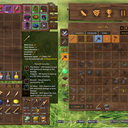
InventorySlots
Custom equipment/quick slots, multicraft, progressive rows, keep-on-death, favorites, scrollable tooltips, crafting grid/search/sort, container stack/restock/sort, item comparison and controller support. Compatible with EpicLoot and Jewelcrafting.
| Date uploaded | a day ago |
| Version | 1.0.3 |
| Download link | sighsorry-InventorySlots-1.0.3.zip |
| Downloads | 179 |
| Dependency string | sighsorry-InventorySlots-1.0.3 |
This mod requires the following mods to function

denikson-BepInExPack_Valheim
BepInEx pack for Valheim. Preconfigured with the correct entry point for mods and preferred defaults for the community.
Preferred version: 5.4.2333README
InventorySlots
All-in-one inventory overhaul: progressive rows, custom equipment/quick slots, multicraft, keep-on-death, favorites, scrollable tooltips, crafting grid/search/sort, container stack/restock/sort, item comparison and controller support. Compatible with EpicLoot and Jewelcrafting.
Visual Overview
Stable Inventory Growth
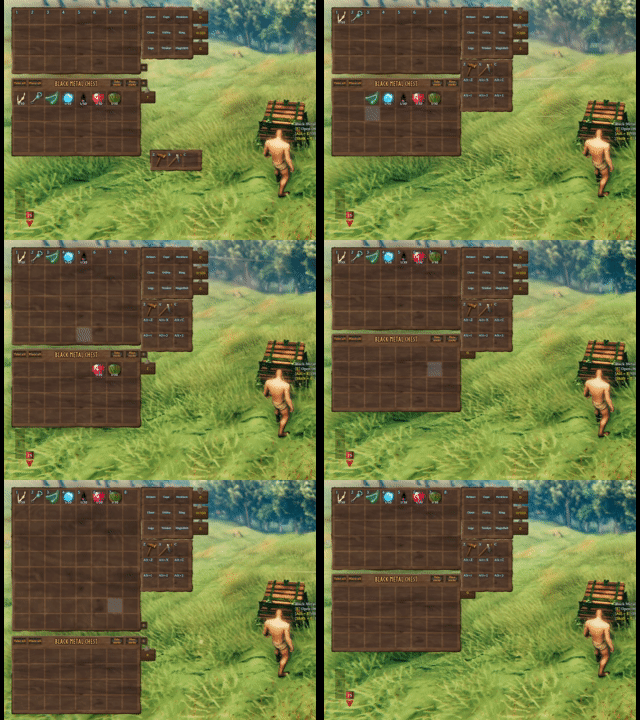
Progressive rows and quick slots unlock over time without reshuffling saved item positions. Clients can expand or collapse the currently visible inventory rows, while equipment slots are defined by InventorySlots.yml.
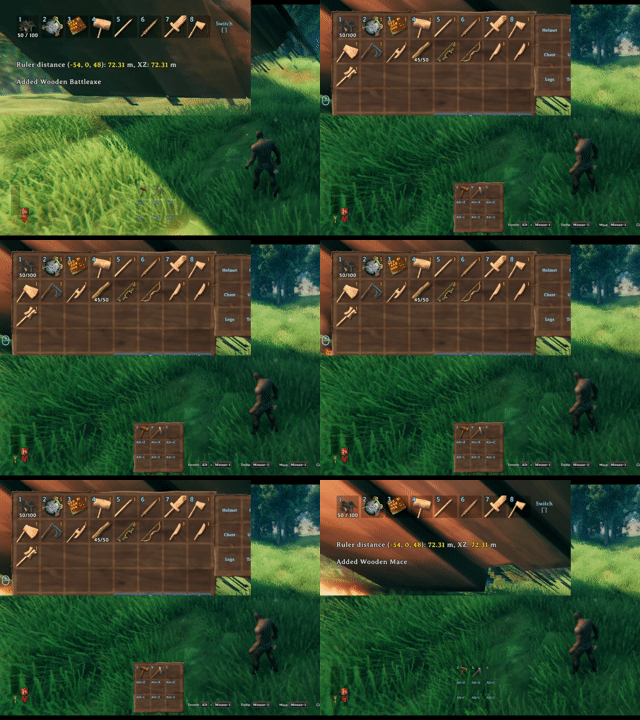
The hotbar switch key rotates the visible hotbar row, keeping a tall inventory practical without moving the underlying item coordinates.
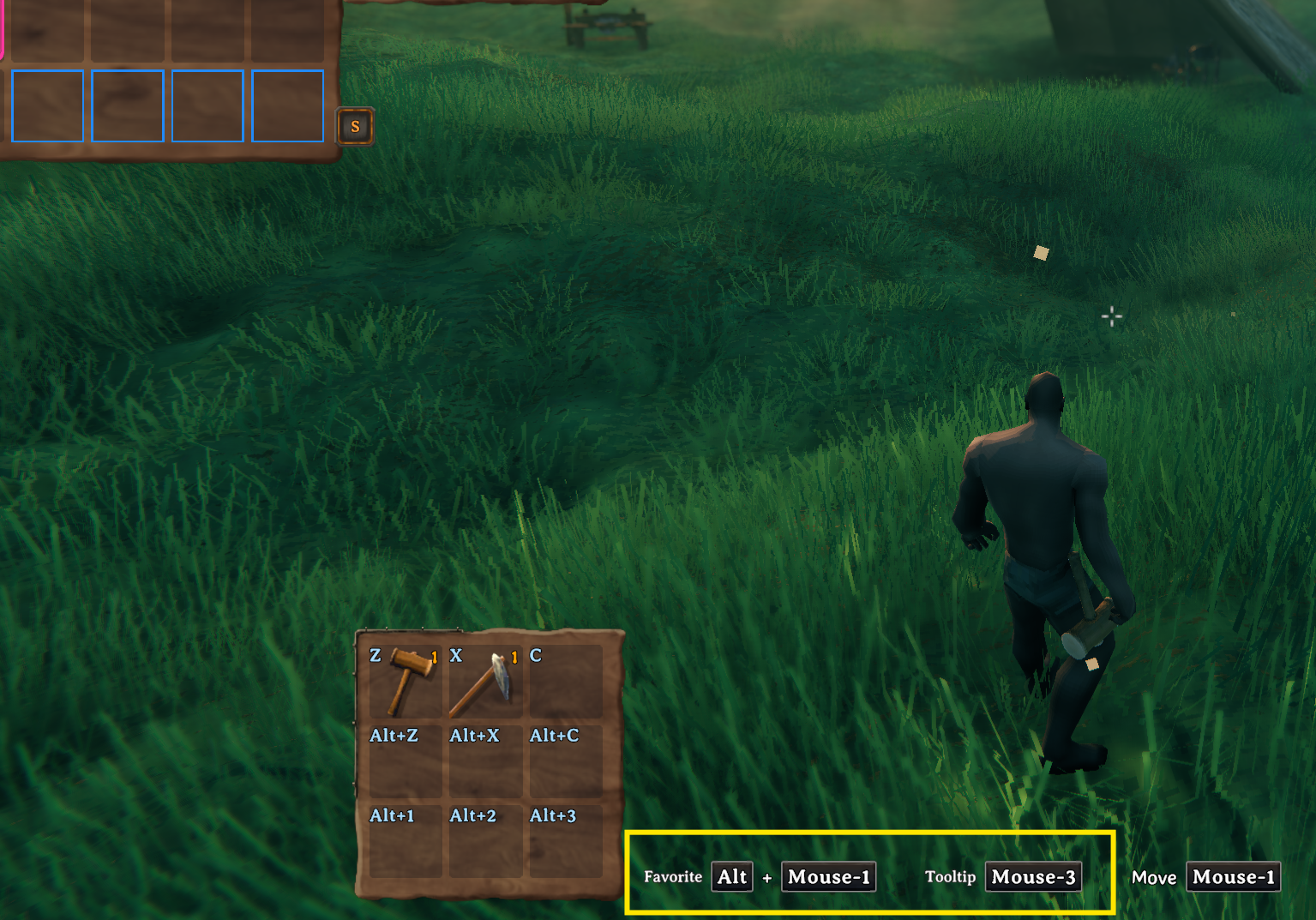
Key hints show the current favorite and tooltip hotkeys, including mouse/controller-aware bindings from the client config.
Crafting Browser

Crafting stations are redesigned into an icon-grid browser with search, group filters, favorites, sorting buttons, page scrolling, and hover/pinned tooltip support.
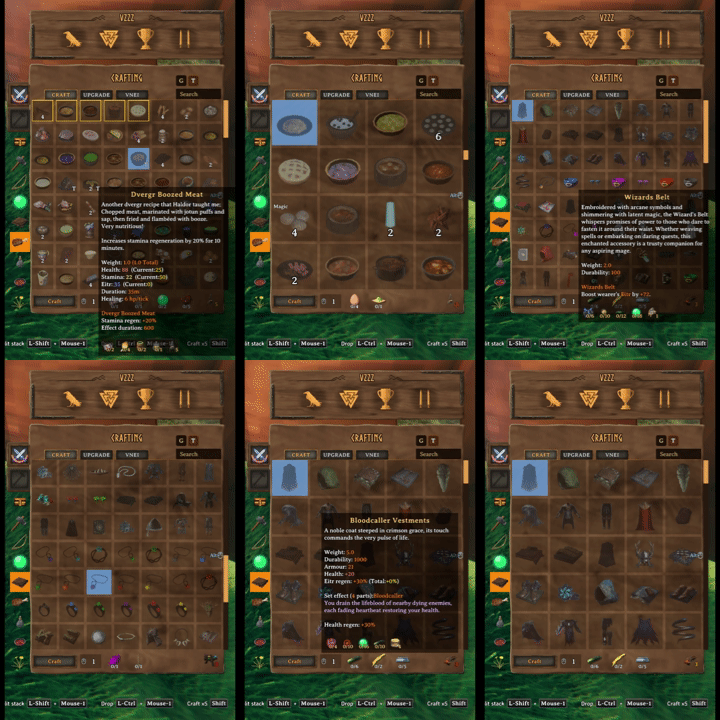
Mark favorite recipes and resize the crafting grid with mouse-wheel zoom.
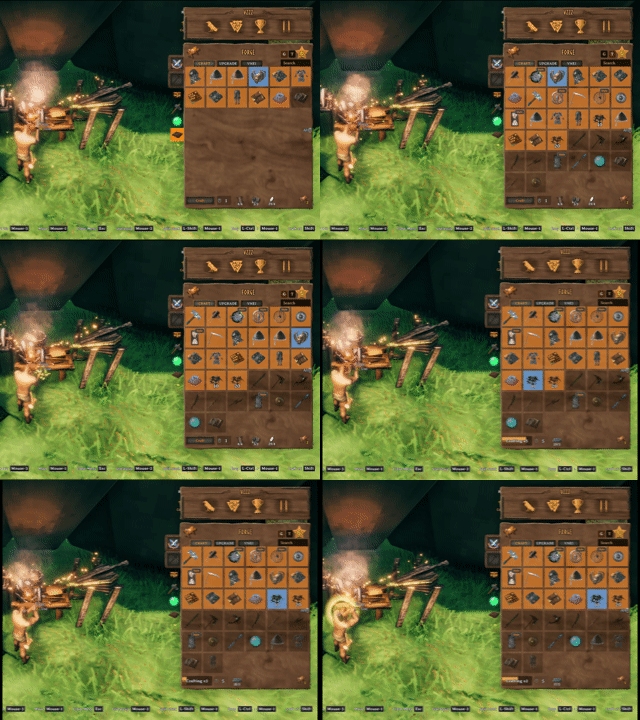
Sort recipes by group and resource tier, then craft multiple items from the same station flow.
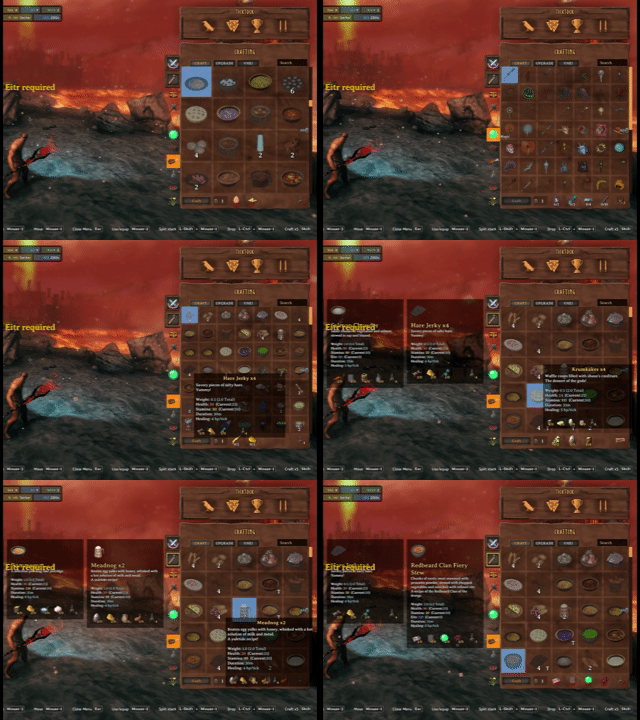
Recipe hover and pinned tooltips stay usable while changing grid size and browsing the crafting station.
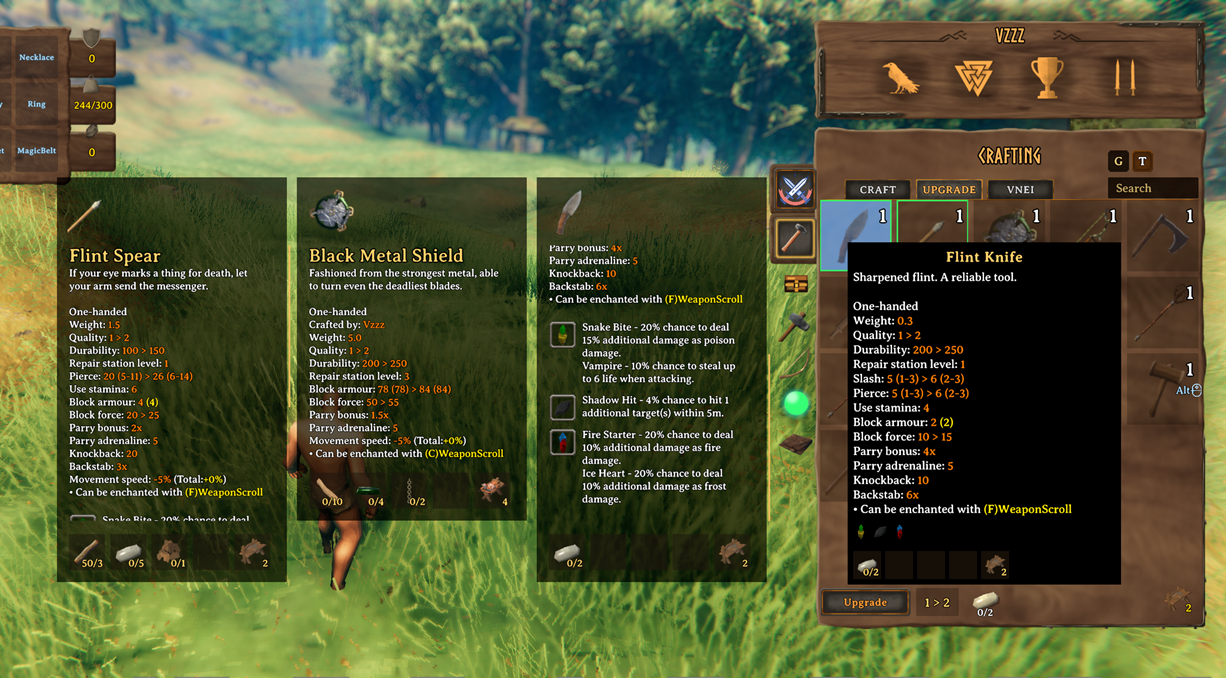
Upgrade views show the stat changes gained from upgrading gear, with upgrade favorites kept separate from crafting favorites.
Scrollable Tooltips And Comparisons
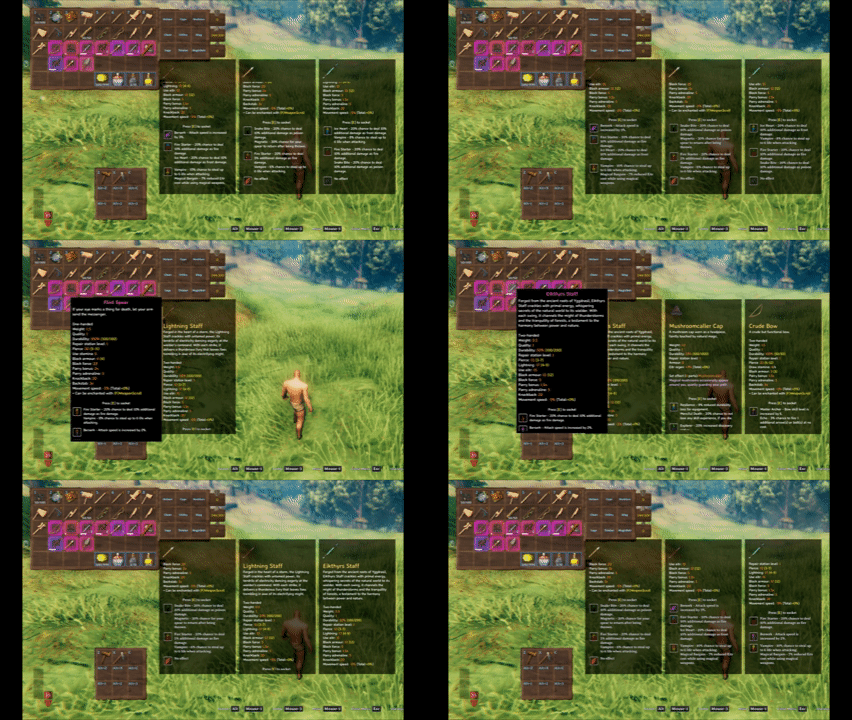
InventorySlots tooltips can expand into scrollable panels and support multiple pinned comparison slots.

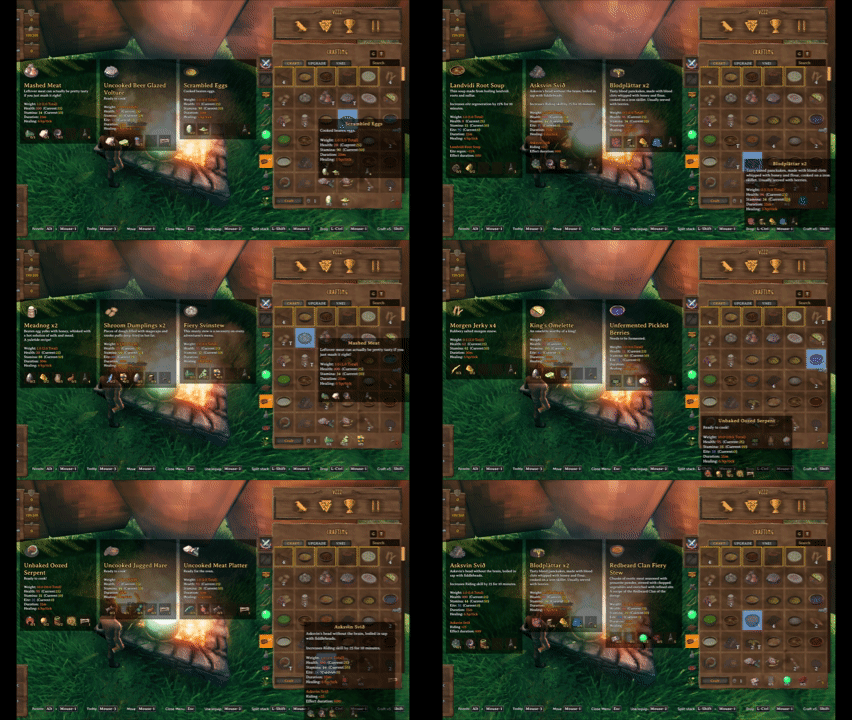
Pin up to three tooltips to compare recipes, meals, potions, and gear without losing your current hover target.
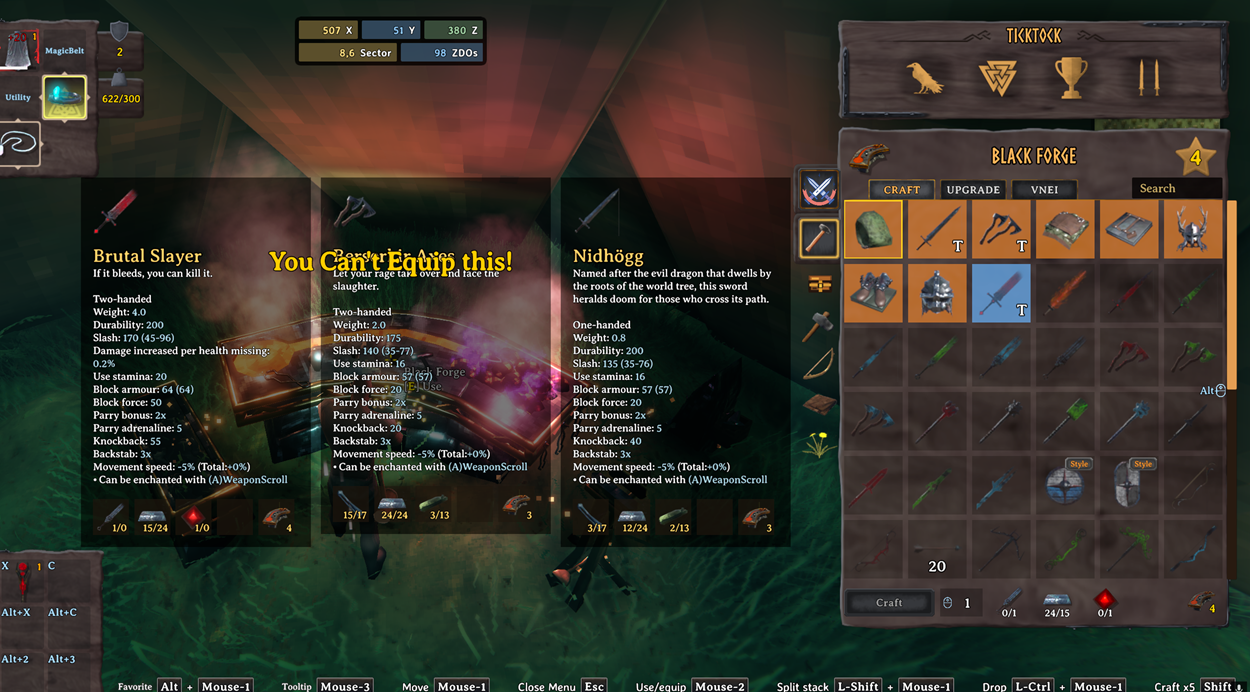
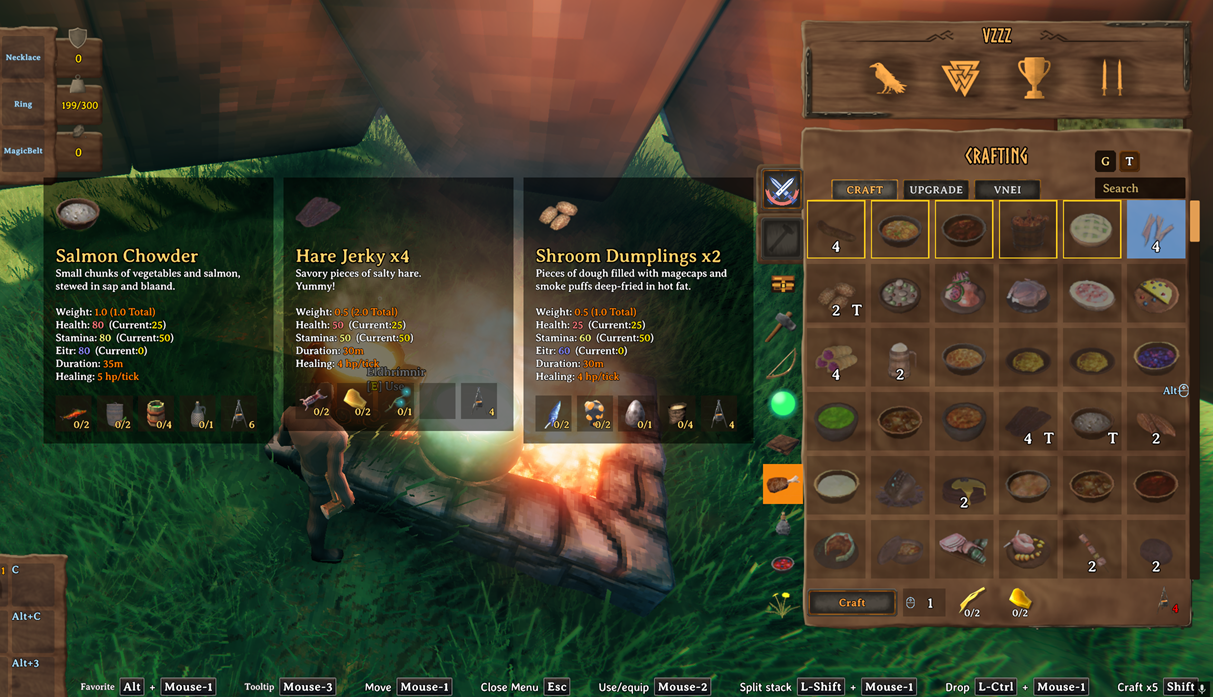
Gear and food comparisons use the same pinned tooltip system.
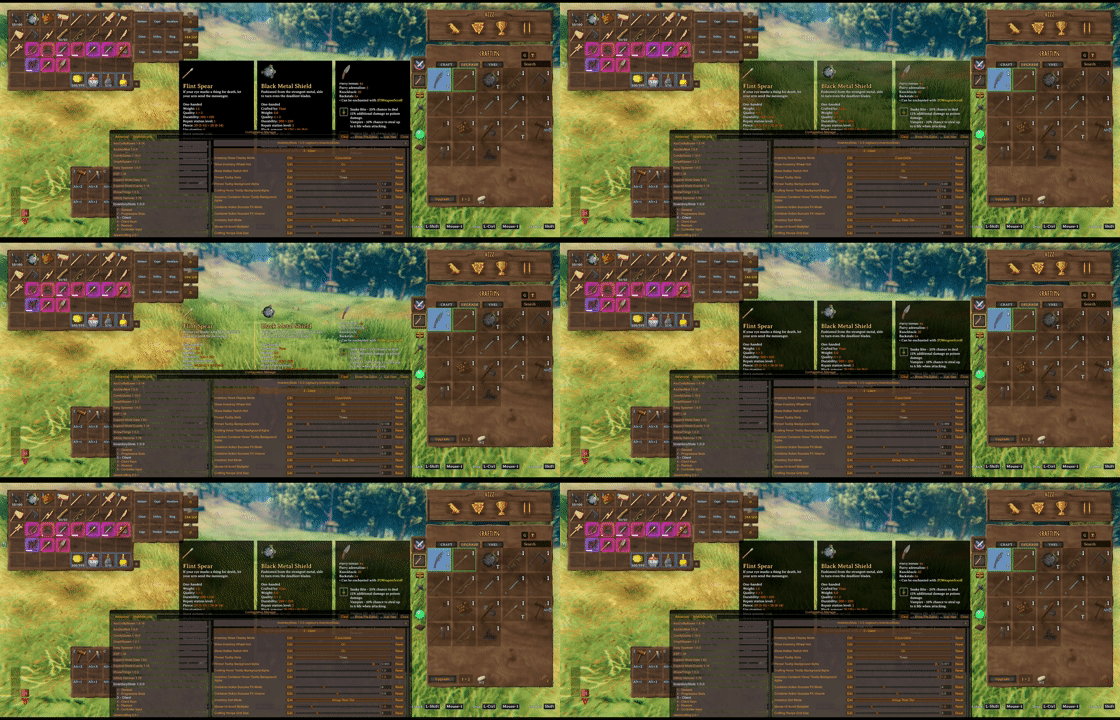
Inventory/container and crafting hover tooltip background opacity are configurable on the client.
Container Tools
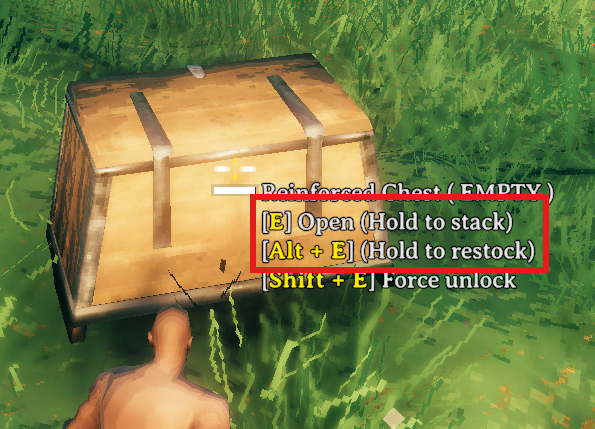
Hovering a container shows hold actions for area quick stack and area restock. Area ranges are centered on the interacted container.

Hold E to quick stack matching non-favorited player items into the hovered container and nearby eligible containers.
Favoriting marks the inventory slot itself, making that slot immune to quick stack while also registering it as a restock target.
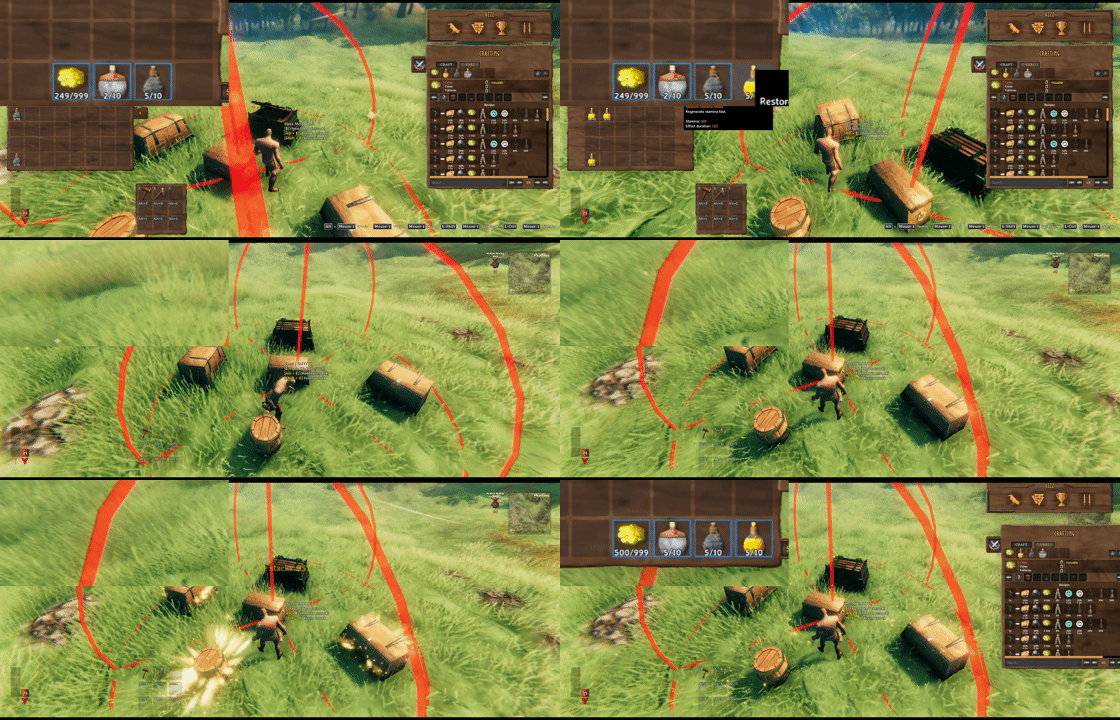
Hold Alt+E by default to restock favorited inventory stacks from the hovered container and nearby eligible containers.
Take stacks pulls only matching stackable items that are not favorited.

Client restock limits can cap favorite restock targets per prefab, such as Stone: 10 or Coins: 500.
Mod Compatibility Examples
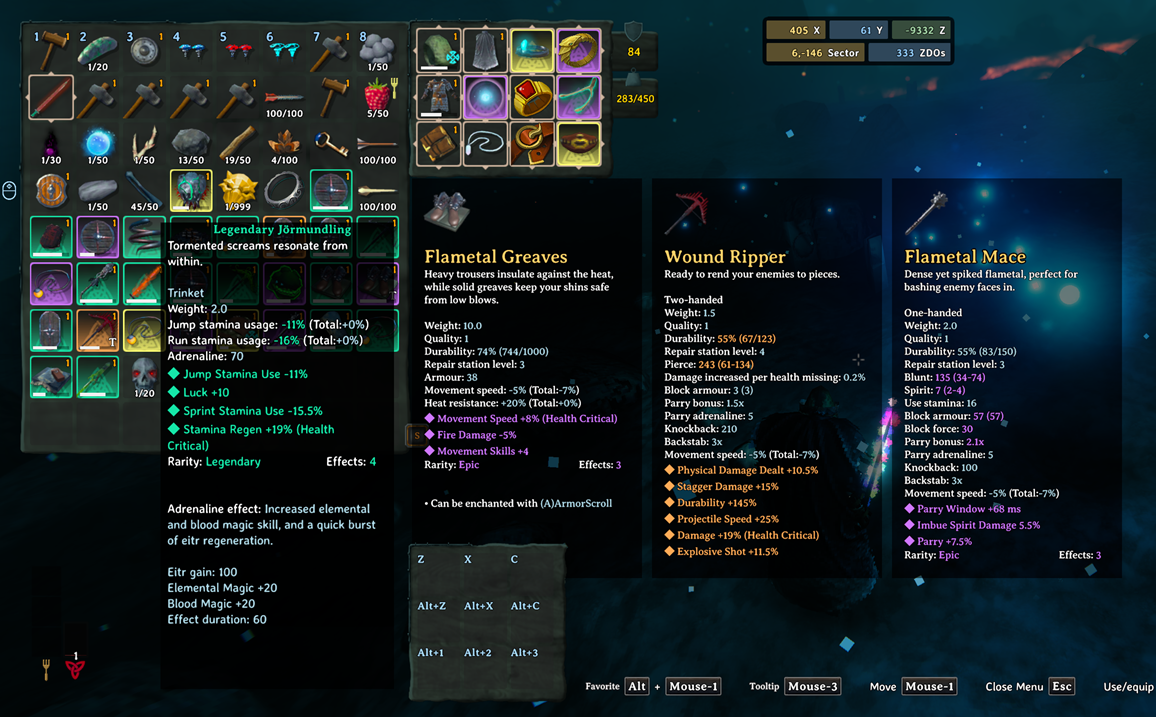
EpicLoot items keep their tooltip data and can use InventorySlots equipment/custom slot routing when configured in InventorySlots.yml.

EpicLoot gear can be compared from upgrade views with InventorySlots pinned tooltips.
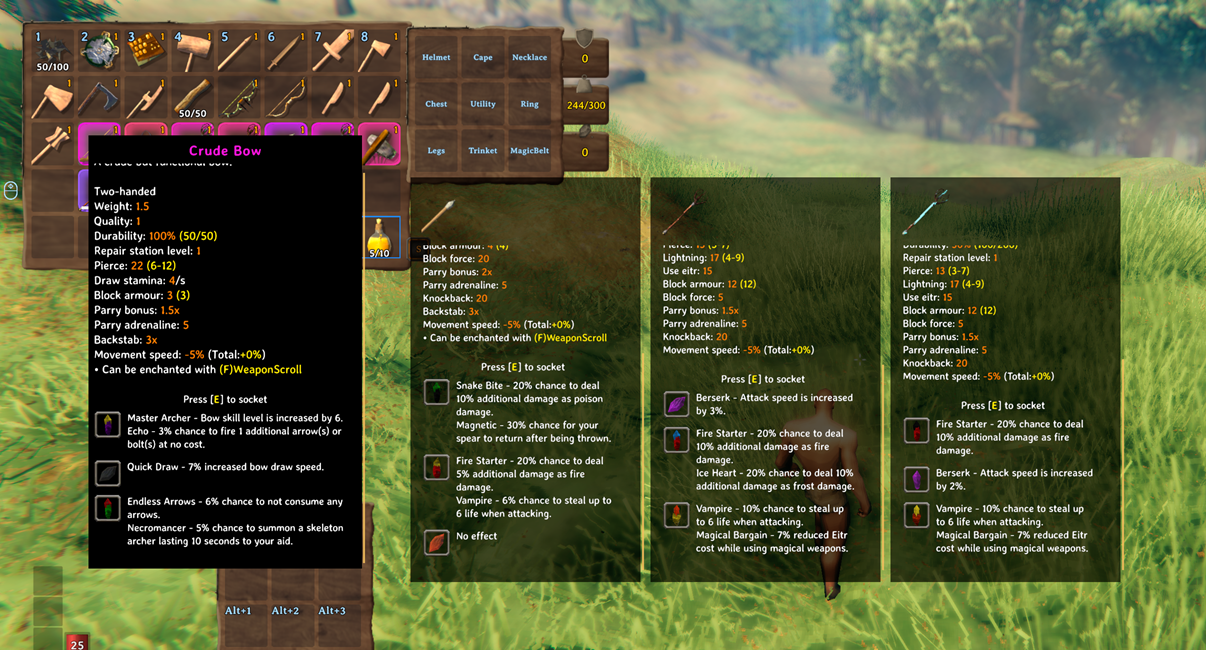
Jewelcrafting sockets and gem tooltip content are supported in InventorySlots tooltip and comparison flows.
Highlights
- Stable progressive inventory rows that unlock over time without reshuffling saved item positions.
- Built-in equipment slots for helmet, chest, legs, cape, utility, and trinket.
- YAML-defined custom equipment slots with server-synced rules.
- Optional Jewelcrafting ring and necklace slot support when Jewelcrafting is installed.
- A fixed quick slot panel and draggable quick slot HUD with client-side hotkeys.
- Separate inventory, crafting, and upgrade favorites that do not interfere with each other.
- Pinned comparison tooltips for inventory, containers, and crafting recipes.
- Scrollable InventorySlots hover tooltips for inventory, containers, quick slot panels, crafting recipes, and compatible external crafting tabs.
- A redesigned crafting recipe browser with icon grid, group filters, search, favorites, tier sorting, and mouse wheel zoom.
- Native container actions for quick stacking, restocking favorite slots, sorting, and safe tombstone take-all behavior.
- Server-synced YAML for group rules, keep-on-death rules, quick slot rules, resource tiers, and custom slots.
Why InventorySlots
InventorySlots is built around slot stability instead. It reserves the maximum layout internally, then exposes only the rows and special slots that should currently be usable. Locked rows are hidden and blocked, while equipment and quick slots are anchored after the reserved regular inventory area.
That design makes the mod better suited for progression, multiplayer, and heavily modded games where inventory state must survive many systems touching it.
Progressive Rows
Progressive rows let the inventory grow as the character advances.
By default, extra rows unlock through item discovery:
- Row 1:
Wishbone - Row 2:
DragonTear - Row 3:
YagluthDrop - Row 4:
QueenDrop - Row 5:
FaderDrop
The server can change the unlock items and maximum extra row count in the synced config. Clients can choose how unlocked rows are displayed:
Fixed: always show all unlocked regular rows.Expandable: remember the visible row count locally and adjust it with the mouse wheel while the inventory is open.
The hotbar row switch key rotates between unlocked regular rows so the hotbar can stay useful even with a taller inventory.
Equipment Slots
InventorySlots adds dedicated equipment slots beside the player inventory:
helmetchestlegscapeutilitytrinket
These slots use real Valheim item data and project equipped state back to the player, so armor, effects, visuals, and equipment state remain consistent after reconnects and inventory audits.
Custom equipment slots can be added in InventorySlots.yml. Each custom slot has a stable id, a display name, and an items list. Entries in items can be exact prefab/internal names or YAML group names.
Slots:
  - id: wishbone
    name: Wishbone
    items:
      - Wishbone

  - id: pickaxe
    name: Pickaxe
    items:
      - pickaxe
      - custom_pickaxes
The six built-in equipment ids are fixed; their names can be changed in YAML. Custom slot order follows the order in the YAML file. If Jewelcrafting is installed, the reserved jewelcrafting.necklace and jewelcrafting.ring ids can be named and ordered from YAML as well.
Quick Slots
Quick slots are fixed special slots shown in a side panel and mirrored in a lightweight HUD.
The server controls:
- quick slot count
- quick slot progression
- which item groups are allowed in quick slots
Clients control:
- quick slot hotkeys
- HUD placement
- local display preferences
By default, quick slots accept items matching these YAML rules:
QuickSlots:
  - Melee
  - Ranged
  - Magic
  - Food
  - Consumable
The default hotkeys are Z, X, C, Alt+Z, Alt+X, Alt+C, Alt+1, Alt+2, and Alt+3.
Controller Input
Controller support is client-side and lives in the BepInEx config section 6 - Controller Input.
InventorySlots stores controller hotkeys as a fixed action enum. In Configuration Manager these entries have a custom editor with Capture, Clear, and Presets, so users do not need to type action names manually.
Available actions include JoyButtonA, JoyButtonB, JoyButtonX, JoyButtonY, JoyLBumper, JoyRBumper, JoyLStick, JoyRStick, JoyDPadUp, JoyDPadDown, JoyDPadLeft, JoyDPadRight, JoyHotbarUse, and JoyAltKeys.
Controller DPad Hotkey Mode defaults to InventoryNavigation, leaving DPad input available for vanilla inventory movement. Change it to Hotkeys to let configured DPad hotkeys fire, or HotkeysWhileHoldingModifier to require the configured Controller DPad Modifier Button.
Favorites
InventorySlots has separate favorite systems for inventory slots, crafting recipes, and upgrade items.
Inventory favorites are player-local inventory positions protected from accidental movement.
Hold the favorite modifier key, LeftAlt by default, and left-click an inventory cell to toggle a favorite marker. Favorited slots are protected from:
- player inventory sorting
- quick stack
- area quick stack
- take all safety movement
- restock slot selection
Restock uses favorite slots as intentional targets: if a favorite slot contains a stackable item, InventorySlots can refill that stack from containers without using favorites as generic storage.
Crafting tab favorites apply to recipes. Upgrade tab favorites are independent from crafting favorites and apply to the specific upgrade item instance, not every item with the same prefab. Upgrade favorites use a green marker in the upgrade grid.
The favorite group icon can clear crafting or upgrade favorites for the current crafting tab with Clear Crafting Favorites Key, Mouse-3 by default.
Tooltips
InventorySlots uses scrollable custom hover tooltips for inventory, containers, quick slot panels, crafting recipes, upgrade recipes, and compatible external crafting tabs. Pinned comparison tooltips use the same scrollable body behavior.
Inventory/container hover tooltip opacity is client-side via Inventory Container Hover Tooltip Background Alpha, default 1. Crafting hover tooltip opacity is client-side via Crafting Hover Tooltip Background Alpha, default 0.8.
Container Tools
InventorySlots adds focused container actions without turning every container interaction into an area action.
When a container is open:
Place stacksstacks matching non-favorited player items into that container only.Take stacksfills matching non-favorited partial player stacks from that container only.- Sort buttons sort the current player inventory or current container.
When hovering a container:
- Hold
Eto quick stack into the hovered container and nearby eligible player-built containers. - Hold
Alt+Eby default to take stacks from the hovered container and nearby eligible containers, refilling favorite stacks.
Area ranges are server-synced and use the interacted container as the range center. Setting a range to 0 disables the nearby-container part of that action. Container access checks respect Valheim container access, ward access, tombstones, ships, in-use containers, and ownership constraints.
Clients can set Container Action Success FX Mode from 0 to 12, default 4: 0 disables FX, 1 spawns a small chest-unlock success effect at the interacted container, and 2-12 spawns FX at each container whose stacks changed, up to that many containers. Container Action Success FX Volume, default 0.7, scales audio on the spawned FX. Opened-container buttons do not spawn this FX.
Clients can also cap hover Alt+E restock targets per prefab in the BepInEx config section 5 - Restock. For example, Restock Target Stack Limits = Stone: 10, Coins: 500 makes favorite Stone stacks refill only up to 10 and favorite Coins stacks refill only up to 500. Prefabs not listed still refill to their normal max stack.
Crafting Browser
The crafting panel is redesigned into a fast icon-grid browser.
Key features:
- recipe icon grid instead of a long vanilla list
- mouse wheel paging
Alt + mouse wheelgrid zoom- recipe favorites
- group filter rail
- search input
- craftable recipe highlighting
- pinned recipe comparison tooltips
- recipe requirement rows under hover tooltips
- sorting by favorite, craftable state, resource tier, group, equipment set, and name
Crafting search indexes user-facing names, English localization text, prefab/internal names, and recipe materials, so English searches can still work while playing in another language.
Crafting station sorting and inventory/container sorting have separate client-side sort modes. The crafting station defaults to TierThenGroup, while inventory and container sort buttons default to GroupThenTier.
TierThenGroup: resource/biome tier first, then group. Equipment sets are clustered within the same tier.GroupThenTier: group first, then resource/biome tier. Equipment sets are not force-clustered.
The crafting station G and T buttons only change the crafting station recipe sort mode.
The resource tier map is defined in YAML and defaults to a biome-style progression from Meadows through Ashlands.
Item Groups
Item groups are the backbone of crafting filters, inventory sorting, quick slot rules, and death keep rules.
The fixed top-level groups are:
MeleeRangedMagicEquipmentFoodConsumableMeadbaseMisc
Built-in subgroups include weapon families, ammo, magic types, armor slots, food roles, trophies, valuables, and other item categories detected from Valheim item data such as item type, skill type, animation state, attack data, food stats, stack size, value, and station input behavior.
YAML can change subgroup order and add custom prefab groups:
Groups:
  Melee:
    - sword
    - ashlandswords
    - axe
    - club

  ashlandswords:
    - SwordNiedhogg
    - THSwordSlayer
Custom groups can then be reused by sorting sections, quick slot rules, keep-on-death rules, and custom slot item lists.
Keep On Death
KeepOnDeath lets the server decide which items stay with the player instead of moving to the tombstone.
Entries can reference:
- top-level groups
- built-in subgroups
- custom YAML groups
- exact prefab/internal item names
Default:
KeepOnDeath:
  - Melee
  - Ranged
  - Magic
  - Equipment
The whole feature can be disabled from the synced config with Enable Death Keep Rules.
YAML Configuration
The server-authoritative YAML file is created here:
BepInEx/config/InventorySlots.yml
It controls:
GroupsKeepOnDeathQuickSlotsresourceMapSlots- optional food precursor/conversion overrides
The host or server is the source of truth. In single player or when running as the configuration authority, YAML changes are hot-reloaded and synced to connected clients.
Invalid YAML or unknown YAML properties are rejected so the last stable configuration can remain active.
The client-local state file is created here:
BepInEx/config/InventorySlots.Client.yml
It stores local inventory favorites, crafting favorites, upgrade favorites, and local row display state.
Default YAML Shape
Slots:
  - id: helmet
    name: Helmet
  - id: chest
    name: Chest
  - id: legs
    name: Legs
  - id: cape
    name: Cape
  - id: utility
    name: Utility
  - id: trinket
    name: Trinket
#  - id: circlet
#    name: Circlet
#    items:
#      - HelmetDverger
#  - id: wishbone
#    name: Wishbone
#    items:
#      - Wishbone
#  - id: demister
#    name: Demister
#    items:
#      - Demister
  - id: jewelcrafting.necklace
    name: Necklace
    items: []
  - id: jewelcrafting.ring
    name: Ring
    items: []
  - id: smoothbrainbackpacks.backpack
    name: Backpack
    items: []
  - id: adventurebackpacks.backpack
    name: Backpack
    items: []
  - id: rustybags.bag
    name: Bag
    items: []
  - id: rustybags.quiver
    name: Quiver
    items: []
  - id: magicsupremacy.belt
    name: MagicBelt
    items: []

Groups:
  Melee:
    - sword
    - axe
    - club
    - knife
    - spear
    - polearm
    - fists
    - shield
    - pickaxe
    - tool
  Ranged:
    - bow
    - arrow
    - crossbow
    - bolt
    - ammo
    - bomb
  Magic:
    - elementalmagic
    - bloodmagic
  Equipment:
    - helmet
    - chest
    - legs
    - cape
    - utility
    - trinket
  Food:
    - balancedfood
    - healthfood
    - staminafood
    - eitrfood
  Consumable: []
  Meadbase: []
  Misc:
    - trophy
    - valuable

KeepOnDeath:
  - Melee
  - Ranged
  - Magic
  - Equipment

QuickSlots:
  - Melee
  - Ranged
  - Magic
  - Food
  - Consumable
The generated file also includes the default resourceMap for biome-tier sorting.
Compatibility
InventorySlots declares BepInEx incompatibilities with mods that also take ownership of equipment slots, quick slots, or inventory slot movement:
Azumatt.AzuExtendedPlayerInventoryshudnal.ExtraSlotsshudnal.ExtraSlotsCustomSlotsrandyknapp.mods.equipmentandquickslotscom.bruce.valheim.comfyquickslotsgoldenrevolver.quick_stack_store
It also includes soft compatibility and adaptive behavior for these modded setups:
- AzuCraftyBoxes: crafting requirement counts and colors can reflect nearby available materials.
- Jewelcrafting: ring/necklace slot support, socket tooltip handling, gem rows, crafting socket UI placement, and visual/stat panel placement support.
- AdventureBackpacks: backpack slot support plus equipped-backpack state synchronization.
- Smoothbrain Backpacks: backpack slot support plus equipped-backpack state synchronization.
- RustyBags: bag and quiver slot support plus equipped bag/quiver state synchronization.
- Magic Supremacy: belt slot support plus equipped-belt state synchronization.
- BetterArchery: quiver/reserved cells are treated conservatively so InventorySlots does not move them as normal inventory cells.
- MultiUserChest: remote-owner container access is respected for container sorting and request-style container actions.
- ServerCharacters: local slot backup/restore is suppressed around server-authoritative character data to avoid stale restores.
- EpicLoot: EpicLoot item tooltip content is preserved where it is part of the item tooltip pipeline, while EpicLoot's large hover tooltip replacement, comparison tooltip, and scrollbar artifacts are suppressed on InventorySlots-owned inventory, container, quick slot panel, and crafting tooltips.
- TooltipExpansion: InventorySlots-owned custom tooltips are kept isolated from TooltipExpansion's vanilla tooltip scrollbar/layout behavior.
- VNEI: crafting and upgrade recipe icons expose item tooltip data so VNEI's recipe hotkey can resolve them, and VNEI crafting-tab hover tooltips use InventorySlots' hover tooltip renderer when EpicLoot would otherwise replace them.
Installation
- Install BepInEx for Valheim.
- Place
InventorySlots.dllinBepInEx/plugins. - Start the game once to generate config files.
- Edit
BepInEx/config/InventorySlots.ymlon the host/server for synced slot and group rules. - Restart or let the YAML hot reload apply when running as the configuration authority.
For multiplayer, all clients should run the same InventorySlots version as the server.
Git
QuickStack, Restock, favorite code from https://github.com/Goldenrevolver/QuickStackStore
CHANGELOG
Version |
Update Notes |
|---|---|
| 1.0.4 | - Restock limit config now accepts localized in-game name of items too. - Fixed checking fermenter and cookingstation input output too often, which was the cause of framedrop while the inventory is opened and ValheimCuisine is installed. - Reinforced compat for other mods. - Minor optimization and refactoring of some codes. |
| 1.0.3 | - Added Trash panel on inventory (serversync on/off) - Quickslot 2,3 row's item would not be moved to inventory on player's login. - Stackable items from Jewelcrafting and EpicLoot can be quickstack, restock too(hover on container and hold e or alt+e, respectively) |
| 1.0.2 | - Fixed quickslot 2,3 row's keep-on-death items moving to inventory on player's death. - More compat patches for Jewelcrafting and EpicLoot. - Added compat for MyLittleUI, CurrencyPocket and RecycleNReclaim. - Fixed errors related to fx_hildrichest volume. - Fixed quickslot hotkey being recognized on chat. |
| 1.0.1 | - Wackysitemrequiresskill's requirement now shows up in crafting station tooltip - Fixed items in row 5~9 getting removed on login - Inventory is now fixed when scrolling over Container - Fixed grouping not working correctly for some modded items - Added compat to Jewelcrafting table - Added compat to Homestead circlet configuring - Added potion, mead group to Consumable group in InventorySlots.yml. Removed balancedfood group |
| 1.0.0 | - Initial Release |
