
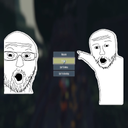
PauseMenuImages
Add your own custom images on both sides of the pause menu! Now with adjustible size and position!
By Moetus
| Last updated | 2 months ago |
| Total downloads | 962 |
| Total rating | 1 |
| Categories | Mods Client-side |
| Dependency string | Moetus-PauseMenuImages-2.1.5 |
| Dependants | 1 other package depends on this package |
This mod requires the following mods to function

bbepis-BepInExPack
Unified BepInEx all-in-one modding pack - plugin framework, detour library
Preferred version: 5.4.2121
Rune580-Risk_Of_Options
A convenient API for adding BepInEx ConfigEntry's to a option menu
Preferred version: 2.8.5README
Pause Menu Images
Adds customizable PNG images to the left and right sides of the pause menu with configurable positioning, sizing, and smooth animations.
Features
- Display custom PNG images on either side of the pause menu
- Smooth slide-up animation when pause menu appears (toggleable)
- Fully customizable position and size via in-game settings
- Images disappear when entering settings or logbook
- Non-intrusive - doesn't block menu buttons
- Works with any screen resolution
Installation
Install with r2modman or Thunderstore Mod Manager.
Configuration
All settings can be adjusted in-game via Risk of Options mod settings menu:
General Settings
- Slide up with Pause - Enable/disable the smooth slide-up animation (default: ON)
Left Image Settings
- Position X - Horizontal position (negative = more left, positive = more right)
- Position Y - Vertical position (negative = more down, positive = more up)
- Width - Image width in pixels (10-2000)
- Height - Image height in pixels (10-2000)
Right Image Settings
- Position X - Horizontal position (negative = more left, positive = more right)
- Position Y - Vertical position (negative = more down, positive = more up)
- Width - Image width in pixels (10-2000)
- Height - Image height in pixels (10-2000)
How to Use Your Own Images
- Create or find two PNG images you want to use (one for left, one for right)
- Recommended base resolution: 800x1080 or similar vertical images
- Navigate to
AppData/Roaming/r2modmanPlus-local/RiskOfRain2/profiles/DesiredProfile/BepInEx/plugins/PauseMenuImages/ - Replace
left_image.pngandright_image.pngwith your own images - Keep the exact filenames:
left_image.pngandright_image.png - Launch the game and adjust position/size in Risk of Options settings to fit your screen perfectly!
Tips
- Transparent backgrounds work great and look professional
- Vertical images (taller than wide) work best
- Use the in-game sliders to fine-tune position and size for your screen resolution
- PNG format is required (use GIMP, Photoshop, or any image editor)
- The animation is subtle - disable it in settings if you prefer instant appearance
- Test different width/height values to make images fit your aesthetic
Notes
- Placeholder images are included as examples
- Images automatically respect your screen's UI scaling
- Click-through is enabled so transparent areas won't block menu interaction
- Images only show on the main pause screen, not in submenus
- Changes to settings take effect the next time you pause
- Requires Risk of Options mod for in-game configuration
Recommended Image Tools
- GIMP - Free, powerful image editor (what the creator uses!)
- Photoshop - Professional option
- Paint.NET - Simple and lightweight
