

StockAlert
Warns on low stock, supports consumer-based auto-adjustment, and highlights useful recipe buildings. Builder icons, worker queues, seasonal alerts.ATS-StockAlert
ATS-StockAlert is a BepInEx mod for Against the Storm that warns you when your stock of a good drops below its in-game global production limit.
What it does
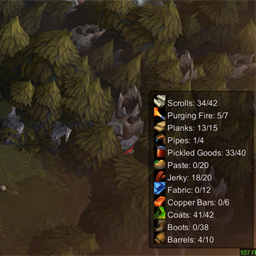
Displays goods that have a production limit set in the Recipes menu, and shows their current/max stock in a compact, movable, hideable HUD anchored to the bottom-right or bottom-left corner.
Use HUD sort in the F8 settings window to choose Newest first (default) or Biggest deficit. Biggest deficit sorts by wanted stock minus current stock, not percentage; ties show the newest shortage first. The choice applies immediately and is saved between sessions.
Stock below production limit that cannot be produced further (after current in-progress productions), are now marked in red.
It can also optionally auto-adjust production limits for all goods you currently have a recipe for, based on the number of people consuming them and an adjustable multiplier.
It can also optionally auto-adjust the Purging Fire production limit in blight posts to the number of existing cysts plus one.
It can also optionally queue a chosen race for a worker slot by Ctrl+clicking a race portrait, so the slot auto-fills the next time it becomes empty and a matching free villager becomes available.
It can also optionally show how much of each insufficient ingredient is currently sitting in non-warehouse buildings in the ingredient selection wheel.
It can also optionally show the embarkation bonus cost range on the top-left and the current cost on the top-right, colored by where it falls in the possible range.
It can also optionally show estimated trade route profit as a percentage compared to selling the raw material inputs at the bottom of the production chain.
It can also optionally use higher-resolution shadow maps, more shadow cascades, and soft shadows to reduce blocky shadows.
It also shows a countdown badge on bottom-left event modifier icons when the modifier has a repeating time-based trigger, such as Friend or Foe.
It also shows alerts when timed orders have 1 minute and 30 seconds remaining, when a Hearth loses an upgrade level, and when a settlement save is loaded so you remember to check the mission objective.
It also changes the base-game top-left builder counter from available to available/needed, where needed is how many additional builders could immediately work on active construction sites. Deactivated construction sites and sites blocked by missing construction materials are not counted.
When assigning a villager to a building from the builders pool, it also preserves the game's normal builder choice formula but deprioritizes builders who are currently carrying goods. The base game scores eligible builders by break status plus distance to the target building, with lower scores picked first. Stock Alert adds a penalty to builders carrying goods and a small tie-breaker bonus for idle non-carrying builders, so a nearby builder hauling materials is less likely to drop their delivery when another suitable free builder is available.
Hovering an assigned worker slot or a race portrait in the worker selection wheel highlights the villager who is assigned or would be assigned with a bright ring at their feet and a vertical yellow column above them.
Holding Shift while the vanilla Alt worker overlay is open filters the overlay to the race currently selected at the cursor.
Clicking Hearth decoration upgrade requirements selects a matching decoration for construction: Park for Comfort, Garden for Aesthetics, and Marble Fountain for Harmony.
A settlement tile grid is shown while placing or moving a building.
When the Grazer/Forest Eater event is active, it can show the Grazer's currently chosen path with an arrow marking the next direction.
Hovering the bottom blightrot icon shows unlocked buildings that you currently have zero of, with building icons, excluding decorations, houses, warehouses, hearths, hydrants, roads, gathering posts, geysers, farm fields, mines, and similar source-only buildings.
It can also show an overlay for finding items by Ctrl+clicking an item's icon. The overlay appears above buildings, events, and resource nodes that contain or provide that item.
It can also optionally show a persistent alert when you have idle builders, and optionally pause with an alert 3 seconds before a season ends so you can check trade routes.
It can also optionally highlight recipe buildings in the world when they have an enabled recipe for goods that are currently under threshold or below that building's local recipe limit:
- red when the building can help, but has no workers assigned
- yellow when the building can help, has at least one worker, but is not fully staffed
- grey when the building has enabled shortage recipes, but none can currently be produced because ingredients are missing
- normal white vanilla icon when the building is unmanned but none of its recipes are currently under threshold
Building shortage indicators also show the matching shortage product icons next to the worker icon, respect per-building local recipe limits, and also mark farms when fields in range need seasonal work. Mines are marked only for the active recipe matching the ore currently under the mine, and water-collecting buildings are marked when their current water type has free tank capacity.
On Hearths with no firekeeper assigned, the free-worker icon turns red when the remaining fire falls below that Hearth's fuel-delivery threshold.
When a good is marked red because it cannot continue production after current in-progress productions, these building indicators can also extend to gathering/source posts that can provide its missing ingredients.
Warehouses with assigned haulers show a small hauler indicator with the current hauler count.
Worker slots show the game's green right-pointing arrow while carrying goods to a warehouse, including glade-event rewards. Other travel keeps the normal boot icon. This is enabled by default; to disable it, set ShowWarehouseDeliveryStatusIcon = false under [HUD] in BepInEx/config/StockAlert.cfg.
Integrated Builder Icon mod made by ~DGH into my mod with some changes:
- the exclamation marker for builders that are idling
- the hammer icon for all other builders
- when builder status icons are enabled, race portraits in the building worker assignment wheel are also marked if that race has an idle builder
Newly triggered shortages go at the top of the list.
Options for HUD anchor, movable, hideable, building indicators, building placement grid, builder status icons, idle builders alert, timed orders alert, queued worker assignments, Grazer direction overlay, high quality shadows, ingredient wheel building stock, embarkation cost ranges, trade route profit, season ending trade routes alert, Purging Fire auto-adjust, and production limit multiplier are available in the F8 settings window.
The timed orders alert is enabled by default and can be disabled in the F8 settings window.
The builder demand counter is enabled by default and is configured only in the BepInEx config file, not the F8 settings window. To disable it, edit BepInEx/config/StockAlert.cfg and set:
[HUD]
ShowBuilderDemandCounter = false
Some other default-on HUD helpers are also configured only in BepInEx/config/StockAlert.cfg, not the F8 settings window. To disable them, set:
[HUD]
ShowWorkerHoverHighlight = false
FilterWorkerOverlayByRace = false
EnableHearthDecorationRequirementShortcuts = false
ShowZeroBuildingBlueprintHover = false
HearthLevelDownAlert = false
MissionObjectiveLoadAlert = false
If a good has no production limit, it is ignored by the mod.
Usage
- Set a global production limit for a good in the Recipes menu.
- When your current stock drops below that limit, the good appears in the Stock Alert HUD.
- Press
F8to open the Stock Alert settings window. - Optional: choose whether the Stock Alert HUD anchors to the bottom-right or bottom-left corner.
- Optional: enable auto-adjust in the
F8window to make the mod set eligible global production limits for you. - Optional: enable Purging Fire auto-adjust in the
F8window to make blight posts keep that limit atexisting cysts + 1. - Optional: enable building shortage indicators in the
F8window to spot where extra staffing would help with current shortages. - Optional: enable builder status icons in the
F8window to distinguish idle free builders from busy free builders and mark matching race portraits in the building worker assignment wheel. - Optional: enable queued worker assignments in the
F8window, then Ctrl+click a race portrait to reserve that race for a worker slot until the next vacancy. - Optional: toggle the Grazer direction overlay in the
F8window to show its chosen path during the Forest Eater event. - Optional: enable high quality shadows in the
F8window to reduce blocky shadows at a possible GPU performance cost. - Optional: enable ingredient wheel building stock in the
F8window to show how much of each insufficient ingredient is currently sitting in non-warehouse buildings. - Optional: enable embarkation cost ranges in the
F8window to show the possible cost range and current cost on embarkation bonuses. - Optional: enable trade route profit in the
F8window to show estimated percentage profit on trade route offers. - Ctrl+click an item's icon to show an overlay over buildings, events, and resource nodes that contain or provide that item.
Auto-adjust option
- off by default
- when enabled, the mod checks how many alive villagers can consume a good and sets that good's global production limit to
consumers x multiplier - the multiplier is editable in the
F8window from1.0to9.0 - values round up to the next whole number
- only goods for recipes available from unlocked blueprints are adjusted
- disabling the option stops further automatic changes, but does not restore previous manual limits
Purging Fire auto-adjust option
- off by default
- when enabled, the mod sets the Purging Fire production limit in blight posts to
existing cysts + 1 - disabling the option stops further automatic changes, but does not restore the previous manual limit
Queued worker assignments
- off by default
- when enabled, Ctrl+clicking a race portrait queues that race for the worker slot, whether or not a free villager of that race is currently available
- the queued race appears to the left of the normal worker slot icon
- clicking the queued icon lets you change or clear the queued race
- queued workers only auto-fill when the slot becomes empty and a matching free villager becomes available
- if multiple slots are waiting for the same race, the oldest queue is filled first
- queues last only for the current session
Builder assignment priority
- enabled by default
- the base game chooses from eligible free builders by scoring break status plus distance to the target building, then picking the lowest score
- Stock Alert keeps that formula, adds a penalty when a candidate builder is currently carrying goods, and gives idle non-carrying builders a small tie-breaker bonus
- this makes carrying builders less likely to be pulled away from deliveries when assigning a villager to a building
- hovering an assigned worker slot highlights that villager in the world with a bright ring at their feet and a vertical yellow column above them
- hovering a race portrait in the worker selection wheel highlights the villager who would currently be assigned
- to disable the carrying-builder assignment priority, edit
BepInEx/config/StockAlert.cfgand set:
[Workers]
AvoidAssigningCarryingBuilders = false
- to disable the hover highlight marker, edit
BepInEx/config/StockAlert.cfgand set:
[HUD]
ShowWorkerHoverHighlight = false
Blightrot zero-building hover
- enabled by default
- hovering the bottom blightrot icon shows unlocked buildings that you currently have zero of, with building icons and each building's live construction costs as material icons with
available/neededamounts - excludes decorations, houses, warehouses, hearths, hydrants, roads, gathering posts, geysers, farm fields, mines, and similar source-only buildings
- to disable it, edit
BepInEx/config/StockAlert.cfgand setShowZeroBuildingBlueprintHover = false; set it back totrueto re-enable it:
[HUD]
ShowZeroBuildingBlueprintHover = false
Ingredient wheel building stock
- off by default
- when enabled, the ingredient wheel shows how much of each insufficient ingredient is currently sitting in non-warehouse buildings
- the extra amount appears in parentheses after the normal
available/neededvalue
Embarkation cost ranges
- off by default
- when enabled, embarkation bonus cost ranges are shown on the top-left of each bonus, with the current cost on the top-right
- the current cost is green for the lowest possible roll, yellow for a middle roll, and red for the highest possible roll
- since the F8 settings window is currently only available while in a mission, players who want to enable it before embarking should launch the game once with this mod version to generate the config option, quit the game, then set
ShowEmbarkationCostRanges = truein the BepInEx config
Trade route profit
- off by default
- when enabled, trade route offers show estimated percentage profit next to the travel time
- profit is calculated as final amber reward minus the estimated production cost of the materials and packs of provisions
- production cost uses the cheapest available recipe chain from unlocked blueprints, following the chain down to raw material inputs
- perk-added recipes, including Better Packaging's Packs of Trade Goods recipe at the Makeshift Post, are included; Worker Mobilization applies to both original and perk-added Makeshift Post recipes
- recipe costs use the live recipe output amounts shown in buildings, including perks and other production bonuses, falling back to trader sell value for raw or unavailable goods
- the trade routes screen has an
Available inputsoption to only use recipe chains that can currently be crafted from available raw ingredients - the available-input check considers all upstream production batches needed when choosing between alternative ingredients
- the F8 Trade Route Profit options include an off-by-default
Ignore disabled recipescheckbox to use only enabled recipes from placed production buildings - the displayed percentage compares total route profit to the trader sell value of the raw inputs used by that recipe path
- hover the profit text to see the calculation breakdown
- trade route reward, packs of provisions, and trader sell value modifiers are included
- travel time is not converted into profit
Item finder overlay
- Ctrl+click an item's icon to toggle an overlay for finding that item
- the overlay appears above buildings, events, and resource nodes that contain or provide the item
- building overlays show a count for how much of that item is there, including goods already in transit to that building
- resource nodes do not show a count
Requirements
- Against the Storm
- BepInEx 5
- ATS API 3.7.0 or newer
Credits
- Builder status icon feature adapted from
BuilderIconsource by~DGH
Build
Update StormPath in StockAlert.csproj to match your game install, then build the project.