Mod Menu
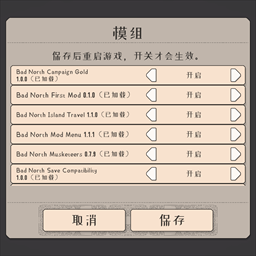
Manage local plugins in-game from the main menu. Changes apply the next time you launch.Mod Menu
Manage local plugins in-game from the main menu. Changes apply the next time you launch.
Press F10 on the main menu or click 模组 to open the menu. Changes take effect at the next launch. The startup patcher is included in this ZIP.
The in-game menu changes DLL filenames to apply its selection. For a profile managed by r2modman or Thunderstore Mod Manager, use the manager for enabling and disabling plugins so it can track the files it installed.
在主菜单按 F10 或点击「模组」打开菜单。变更在重新启动后生效。
Installation
Install through Thunderstore Mod Manager or r2modman and start Bad North with the selected profile. The Bad North BepInEx pack is listed as a dependency.
For a manual install, set up BepInEx 5 x86 first. Copy the files from plugins/ModMenu into BepInEx/plugins/ModMenu inside your game folder. Copy the included startup DLL from patchers into BepInEx/patchers.