

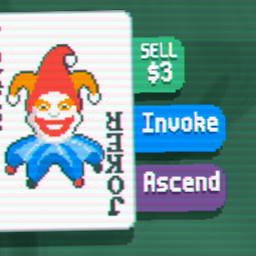
BasicButtons
Adds Use buttons to Jokers, and allows defining custom buttons.Basic Buttons
An API to give your Jokers buttons and modify the default ones.
This code was adapted from SynthB, which in turn adapted it from Spectrallib. The idea is to make it easy to use for people who only have something simple in mind, but at the same time modular enough that people who do have something complex in mind can implement it.
How to use in your mod
To access the API, you can either add Basic Buttons as a dependency for your mod, or you can clone buttons.lua from this repository and load it unmodified. If you pick the latter option, please add Basic Buttons with its current version number to the "provides" list in your mod's metadata. (Example) You may also benefit from adding lsp_defs.lua to your workspace; it's not required for function, but it lets your Lua Language Server provide hints and validation.
(Note for thunderstore users, this is based on Steamodded's dependency logic only, idk whether provides actually works like that with their mod managers. Or exists at all, actually.)
If you just want usable Jokers and nothing complicated:
Give your Joker a use(self, card) field that performs its function. You may also give it a can_use(self, card):boolean field that determines when the use button works; if the field is not defined the Joker will be usable at any time the player is able to use cards at all.
You may also define functions that conditionally hide the use and sell buttons, hide_use_button(self, card):boolean and hide_sell_button(self, card):boolean. Though obviously hiding the use button doesn't do anything on Jokers which never had one defined!
If you want something complicated:
Give your Joker a buttons field, consisting of a table of tables, each with two fields:
local button = {
    get_button_args = function(self, card)
        --Returns a set of arguments, as defined below. This can be dynamic, if you like; it will be reevaluated each time the Joker is highlighted. Returning nil hides the button.
    end,
    hide = function(self, card)
        --If this function exists and returns true, the button will not be rendered.
    end
}
Each button is another table.
Cards can only display 5 buttons in total (including the vanilla sell button); it's already getting cramped by that point! If there are more eligible buttons on a Joker at a time than that, a random selection of 5 will be displayed each time the card is clicked.
That said, it's probably ideal for modders to just... not give their Jokers that many buttons at once. That's so many buttons, y'all.
Button arguments
local args = {
    id = string,                --To identify this button, in case another button wants to override it.
    override = string,          --The id of a button this button will replace; generally "use" or "sell", but you can override any button you like.
    effect = string,            --Name of a `function(e)` in `G.FUNCS` that is run when this button is pressed. In these functions, `e.config.ref_table` refers to the `card` argument below.
    can = string,               --Name of a `function(e)` in `G.FUNCS` that runs every frame the card is selected. Generally used to conditionally modify `e.config`; see the default can_use function in `buttons.lua` for an easy example.
    one_press = boolean,        --This button disables itself when pressed. Used by the vanilla sell button to prevent spam-clicking shenanigans.
    title = string,             --Title of the button, in small text above the main text (e.g. "Sell" on the vanilla sell button).
    title_colour = table,       --The color to render the title in; find colors in `G.C` or use `HEX()`. Defaults to `G.C.WHITE`.
    title_scale = number,       --Size of the text to be rendered. Defaults to 0.4 in this context.
    bg_colour = table,          --Color of the button's background when it can be pressed. Defaults to G.C.ORANGE.
    bg_colour_inactive = table, --Color of the button's background when it can not be pressed. Defaults to G.C.UI.BACKGROUND_INACTIVE.
    handy_insta = string,       --Defines what insta-action Handy performs on this card? ngl i don't actually know what this string refers to, but if you do, you can define it here.
    card = Card,                --The card which this button affects. Defaults to the card to which it is attached.
    text = Text,                --This one is a bit overloaded. See more details below.
}

--Valid types of Text:
local one_string = string   --If it says the same thing all the time, and doesn't need any formatting.

local one_node = {          --If it says the same thing at all times, but needs simple formatting.
    text = string,          --The text to be rendered.
    text_colour = table,    --The color to render the text in; find colors in `G.C` or use `HEX()`. Defaults to `G.C.WHITE`.
    text_scale = number,    --Size of the text to be rendered. Defaults to 0.55 in this context.
}

local several_nodes = { --If it needs to be updated to reflect the gamestate, or if it needs more complex formatting. These nodes will be assembled, in the order given, into a single piece of text. This is used by the vanilla Sell button, to combine the dollar sign with the price.
    string_node,                                        --If this piece of text is simple.
    { text = string, colour = table, scale = number }   --As with individual nodes.
    { ref_table = table, ref_value = string, colour = table, scale = number } --For anything that needs to be kept up-to-date; number of use charges or amount of MP or such a thing. The value of `ref_table[ref_value]` will be rendered here and updated every frame.
}