
You are viewing a potentially older version of this package. View Latest Version
BigWalkRadioMusic
Floating lyrics and 12-channel Dolby Atmos music for Big Walk. Bilingual UI (Chinese/English, switchable in-game with F9 panel), local NetEase Cloud lyrics, playlist loop, and optional host-to-team music sync.版本 v2.2.0(中英双语版)|适用于《Big Walk》(Steam App 1478500,BepInEx IL2CPP)
中文
一、安装
- 把
BigWalkRadioMusic.dll放到游戏目录:steam\steamapps\common\Big Walk\BepInEx\plugins\ - 启动游戏(建议通过 Steam 启动)。
- 进入游戏后按 F9 打开设置面板。
二、默认热键
| 按键 | 功能 |
|---|---|
| F9 | 打开 / 关闭设置面板 |
| F10 | 开 / 关全景声(7.1.4)播放 |
| F11 | 总开关(停止 / 恢复本插件全部播放) |
热键如与其他模组冲突,可在配置文件里改(见第四节)。
三、中英文切换(v2.2.0 新功能)
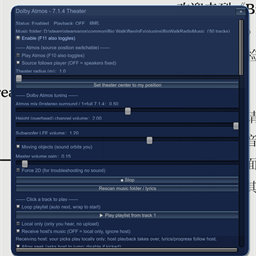
- 面板按钮切换(推荐):按 F9 打开面板,滑到最底部,点「中文 / EN」按钮,界面文字立即在中文和英文之间切换,无需重开游戏。
- 配置文件切换:编辑
plx.bigwalk.radiomusic.cfg:[界面/UI]→English = false→ 中文[界面/UI]→English = true→ English- 重开游戏生效。
- 面板上的切换按钮会把选择写回配置,下次进游戏保持你上次选的语言。
- 参考截图:
ZH.png(中文面板)、EN.png(英文面板)。 - 说明:歌词内容来自网易云音乐的原歌词,属于歌曲本身内容,不在翻译范围内;翻译的是设置界面的标签、按钮、滑块名和状态提示。
四、主要功能
- 悬浮歌词:支持世界 3D 悬浮(走近变大、转头会移出视野)或固定在屏幕下部;可调高度、距离、字号、倾斜、左右各一句、渐变色等。
- 全景声 7.1.4:2 银幕 + 1 中置 + 2 侧环 + 2 后环 + 4 顶置 + 1 超低;音源可跟随玩家或固定在原地。
- 音乐目录:把
mp3 / ogg / wav放进插件目录的BigWalkRadioMusic文件夹,面板里点「重新扫描」。 - 歌词来源:本地
.lrc/.txt同名歌词文件;或连接网易云播放器(用附带的启动网易云歌词连接.cmd以调试端口方式启动)。 - 联机同步:房主点歌可同步给装了本插件的队友(队友不需要有音乐文件);也可勾选「仅本地播放」只自己听。
五、配置文件
路径:
steam\steamapps\common\Big Walk\BepInEx\config\plx.bigwalk.radiomusic.cfg
常用项:[界面] 热键、[界面/UI] English 语言、[播放] 音量/环绕半径/仅本地、[歌词] 悬浮位置样式、[联机] 接收房主设置。
六、反馈
本模组仍在测试中。遇到问题请反馈:QQ 482312587,邮箱 [email protected]。
English
1. Installation
- Put
BigWalkRadioMusic.dllinto the game folder:steam\steamapps\common\Big Walk\BepInEx\plugins\ - Start the game (launching via Steam is recommended).
- Press F9 in game to open the settings panel.
2. Default Hotkeys
| Key | Function |
|---|---|
| F9 | Open / close the settings panel |
| F10 | Toggle Atmos (7.1.4) playback |
| F11 | Master on/off (stop / resume all playback from this mod) |
If a hotkey conflicts with another mod, change it in the config file (see section 4).
3. Chinese / English Switch (new in v2.2.0)
- Panel button (recommended): Press F9, scroll to the bottom, click the "中文 / EN" button. The UI language switches instantly, no game restart needed.
- Config file: Edit
plx.bigwalk.radiomusic.cfg:[界面/UI]→English = false→ Chinese[界面/UI]→English = true→ English- Restart the game to apply.
- The panel button saves your choice to the config, so your language persists next time.
- Reference screenshots:
ZH.png(Chinese panel),EN.png(English panel). - Note: Lyric text comes from NetEase Cloud original lyrics and is not translated — only the settings UI (labels, buttons, slider names, status hints) is bilingual.
4. Main Features
- Floating Lyrics: World 3D floating (grows as you approach, shifts out of view when turning) or fixed at the bottom of the screen; adjustable height, distance, font size, tilt, two-side layout, gradient colors, etc.
- Dolby Atmos 7.1.4: 2 screen + 1 center + 2 surround + 2 rear + 4 height + 1 subwoofer; source can follow the player or stay fixed.
- Music Folder: Put
mp3 / ogg / wavfiles into theBigWalkRadioMusicfolder under the plugin directory, then click "Rescan" in the panel. - Lyric Source: Local
.lrc/.txtfiles with matching names; or connect to the NetEase Cloud player (launch it with the included启动网易云歌词连接.cmdto enable the debug port). - Online Sync: The host's music can sync to teammates who have this mod installed (they need no music files); or enable "Local only" to listen by yourself.
5. Configuration File
Path:
steam\steamapps\common\Big Walk\BepInEx\config\plx.bigwalk.radiomusic.cfg
Common sections: [界面] hotkeys, [界面/UI] English language, [播放] volume / surround radius / local only, [歌词] floating position & style, [联机] host-receive settings.
6. Feedback
This mod is still in testing. For issues, please contact: QQ 482312587, Email [email protected].