
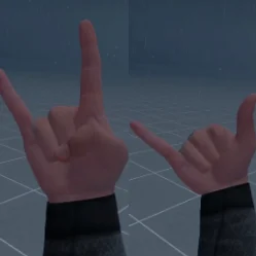
WigglesHandSigns
Hand signs on an empty hand: rock, peace, middle finger and call me. Pick one with a button, make a fist to show it; the rest of the time your hand works as normal. Works on PC and Quest.Wiggles Hand Signs
Make hand signs in BONELAB on PC and Quest: rock (index and pinky up), peace (index and middle up), the middle finger and call me (thumb and pinky out).
Install
- Install MelonLoader (0.6.5 or newer) and BoneLib (3.2.2 or newer).
- Put
Mods/WigglesHandSigns.dlldirectly inBONELAB/Mods(copy the file, not the folder).
Use
- With an empty hand, tap the thumbstick (press it in) on that hand to choose the next sign: normal > rock > peace > middle finger > call me > normal.
- Make a fist (squeeze grip and trigger) to show the chosen sign. Open your hand and it works as normal again. Change this in the menu under Show When: Fist (default), Grip Only or Always.
- Hold the thumbstick in for half a second to clear that hand's sign.
- Grabbing something always shows your normal hand; the sign comes back when you let go.
- BoneMenu > Hand Signs:
- Button: Stick Click (default), Upper Button (B / Y) or Lower Button (A / X), if the stick click is in the way.
- Left Hand / Right Hand: pick a sign straight from the menu.
- Clear Both, and Enabled to switch the mod off.
How it works
The mod sets the game's own finger curl values (the ones your controller normally drives), so the regular hand animation forms the sign. Nothing about your hands' physics or grabbing changes.
Changelog
- 1.1.0 The sign only shows while you make a fist; the rest of the time your hand works as normal.
- 1.0.1 Fixed the game crashing while loading: no more patching of the game's controller code.
- 1.0.0 First release.