

EnableItemBasedAppearanceColors
Enables an ununsed game system that changes character's clothing color based on currently equipped bodywear and headgear.Enable Item-based Appearance Colors
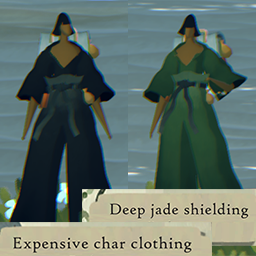
This mod enables an ununsed game system that changes the character's clothing colors based on your currently equipped bodywear and headgear, IF that item has tintColor set on its item data in the game. Bodywear and Headgear with tintColor data can be viewed on the Data Spreadsheet.
Generally, if the item name indicates a color (eg. "Deep char clothing", "Jade clothing", "Umber-coloured top hat") it will also have a tintColor in the game - however, this is not always the case, and the mentioned colors don't always match the description, eg. the "Train worker's official garb" has a tintColor of Jade while the description describes it as cobalt + cinnabar.
This mod only enables a built-in and disabled system; it does not add additional tintColors to unassigned items or resolve description mismatches described above.
Known issue #1: if you have a Bodywear item with tintColor currently equipped and click-drag another Bodywear item with a tintColor into the slot to replace what you're wearing, your character's clothes will revert to their base color scheme, rather than showing the newly equipped item's tint color. To avoid this issue, never swap Bodywear items directly; instead, unequip the old item leaving the slot empty, then equip the new item.
Known issue #2: If you equip a Headgear item with a tintColor and do not have a Bodywear item with a tint equipped, the character's clothing will tint black. To avoid this issue, wear a Bodywear item with tintColor while wearing Headgear with tintColor. (In the future, I might try to fix this bug, but no promises.)
Clothes-coloring spells will always take precedence over equipped item colors.
For OFFLINE use only.
Compatibility
This mod should generally be compatible with all other mods.
Installation / Uninstallation
Requires BepInEx 5.4.x - I recommend installing both BepInEx and this mod via the Thunderstore app or R2ModMan (supports Linux & is ad-free). Both apps also allow easy uninstallation.
Otherwise, install BepInEx then manually install this mod by unzipping & copying the DLL file to the game data folder\BepInEx\plugins folder. To uninstall, delete the DLL.
This mod can be uninstalled at any time without damaging your save files.