ReenableOldCombat
Disables the current sequenced combat system and re-enables the old combat mechanics; does NOT bring back missing enemies.Re-enable Old Combat
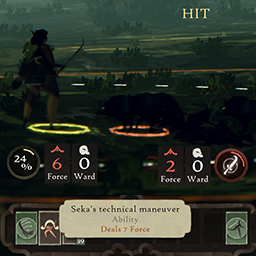
This mod disables the new "sequenced" combat and re-enables the old combat style. This mod does NOT bring back the missing Maisu/Kettem/Wolves combat events. (Wolves shown in the icon were spawned via the Debug mode mod.)
Combat knots should theoretically work, however, as a new player who never experienced old combat, I can't actually tell if they're working or not? They're selectable in the UI and appear to do damage but idk if they had special effects that aren't there anymore or if anything else is missing.
In my testing, the old combat will enter a "stuck" mode occasionally where the game is frozen and inputs no longer work. To solve, open the Debug menu with Right Alt and click "Unstuck Me" - your character will still be in combat mode and run back to the enemies, but combat should then proceed and buttons become clickable again.
Compatibility
This mod should generally be compatible with all other mods unless they interact with the combat systems.
Installation / Uninstallation
Requires BepInEx 5.4.x - I recommend installing both BepInEx and this mod via the Thunderstore app or R2ModMan (supports Linux). Both apps also allow easy uninstallation.
Otherwise, install BepInEx then manually install this mod by unzipping & copying the DLL file to the game data folder\BepInEx\plugins folder. To uninstall, delete the DLL.
This mod can be uninstalled at any time without damaging your save files.