ControllerSupport
Full gamepad support for Burglin' Gnomes. Navigate every menu, shop, and HUD element with a controller — no keyboard or mouse required.
Features
- Complete controller navigation — Every screen is navigable with the D-pad and left stick: main menu, settings, shop, papyrus, task list, death/downed overlays, and more.
- Full gameplay bindings — Move, look, jump, crouch, sprint, interact, push, attack, drop, ragdoll, and use items, all mapped to sensible default gamepad controls.
- Shop and catalog support — Browse and purchase items from the shop and catalog using left-stick navigation with proper focus handling and visual indicators.
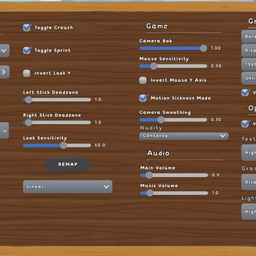
- In-game settings — Adjust deadzones, response curves, sensitivity, and gameplay toggles directly from the game's options menu. No config file editing required.
- Adjustable deadzones — Separate deadzone values for left stick, right stick, and left trigger. Eliminate stick drift or tighten responsiveness to your liking.
- Response curve options — Choose between Linear, Exponential, Aggressive, and Smooth response curves for each stick independently. Fine-tune the feel of your aim and movement.
- Sensitivity control — Separate look and movement sensitivity sliders.
- Toggle or hold — Optionally switch crouch and sprint to toggle-on/toggle-off instead of hold.
- Invert look Y — Standard inverted-Y option for players who prefer it.
- Co-op compatible — Works in multiplayer sessions. Push-to-talk and all social features remain accessible.
- Native bug fixes — Includes fixes for a few game-side issues, including stamina draining while sprint is held but the player is not moving, the cursor staying hidden on dead/tied task overlays, and cleanup when the local player is revived or untied.
Known Limitations
- Equipment inventory dragging — Moving equipment items between inventory slots requires a mouse. All other inventory interactions (browsing, selecting, using items) work with controller. This may be addressed in a future update if a clean implementation is found.
Requirements
Installation
- Install BepInEx via r2modman or Thunderstore Mod Manager.
- Install this mod via r2modman or Thunderstore Mod Manager.
- Launch the game — the mod loads automatically.
Default Controls
| Action |
Button |
| Move |
Left Stick |
| Look |
Right Stick |
| Jump |
A (South) |
| Crouch |
B (East) |
| Interact |
X (West) |
| Push to Talk |
Y (North) |
| Ragdoll |
Left Bumper |
| Drop |
Right Bumper |
| Push |
Left Trigger |
| Attack |
Right Trigger |
| Inventory |
Select |
| Pause |
Start |
| Items 1–4 |
D-Pad Up / Right / Down / Left |
| Sprint |
Left Stick Click |
| Navigate UI |
D-Pad or Left Stick |
All bindings can be remapped from the in-game settings menu.
Support
If you run into any issues, have questions, or want to suggest improvements, feel free to reach out on Discord: @teeteearrr