Player Markers
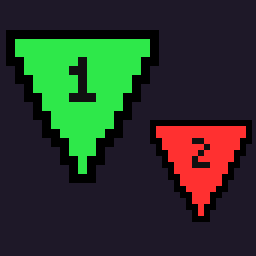
Accessibility: a green marker with your player number over your character and red markers over other players. Works with Online Crawl, Crawl: Further and CrawlCustomBosses.Player Markers
An accessibility mod for Crawl. It puts a green marker over your own character and a red marker over every other player, so it's easier to see who is where on a busy screen.
Each marker is a downward triangle with the player number (1–4) inside, so you can tell players apart by number as well as by colour.
Every player is already visible in Crawl, so this mod gives no gameplay advantage. A marker only shows while that character is actually drawn on screen. If a character is hidden (for example a ghost inside a prop), its marker is hidden too.
Works with
- Online Crawl. Install this mod on every player's computer. Each player then sees their own character green and everyone else red.
- A player who joins without the mod still sees the markers, but in the host's colours: green over the host's players and red over everyone else.
- Your own marker follows Online Crawl's client-side prediction, so it doesn't lag behind your character.
- Everyone should run the same version of this mod.
- Crawl: Further and CrawlCustomBosses: no conflicts.
- Offline / couch play. Players using this computer's controllers get green markers. Bots and other players get red markers. For several people on one screen, set
ColorMode = Heroso the hero gets the green marker.
None of these mods are required.
Controls
- F8 turns the markers on and off. You can change the key in the config.
Config
The config file is BepInEx/config/ibeck.crawl.playerarrows.cfg. It is created the first time you launch the game. You can also edit it in your mod manager's Config editor.
| Setting | Default | What it does |
|---|---|---|
| Enabled | true | Show the markers |
| ToggleKey | F8 | Key that turns the markers on and off |
| ShowOwnArrow | true | Show the green marker over your own character |
| ShowBots | true | Show red markers over bot-controlled player slots |
| ColorMode | Mine | Mine = this computer's players are green. Hero = the hero is green (offline only) |
| MyColor | #2EE84A | Colour of your marker |
| OpponentColor | #FF3030 | Colour of the other players' markers |
| OutlineColor | #000000 | Colour of the marker outline |
| NumberColor | #101010 | Colour of the player number |
| ShowPlayerNumbers | true | Show the player number inside each marker |
| Size | 0.04 | Marker height as a fraction of the screen height |
| Gap | 0.25 | Space above the character's head |
| Bob | 0.15 | How far the marker bobs up and down (0 = still) |
If red and green are hard to tell apart for you, change MyColor and OpponentColor. For example, #3399FF (blue) and #FFB000 (amber) work well for most kinds of colour blindness. Each player can choose their own colours, because each computer draws its own.