

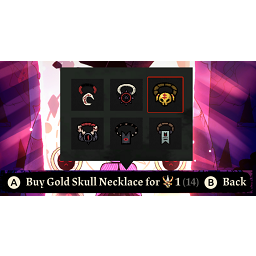
Mystic Assistant
Adds a God Tear store that (mostly) offers the same rewards as the roulette wheel. No more RNG, all agency, all the time.The Mystic Assistant
This is a mod for Cult of the Lamb to buy specific rewards from the shop that unlocks when you beat the base game. If you've played the post-game in Relics of the Old Faith, you'll be familiar with this:
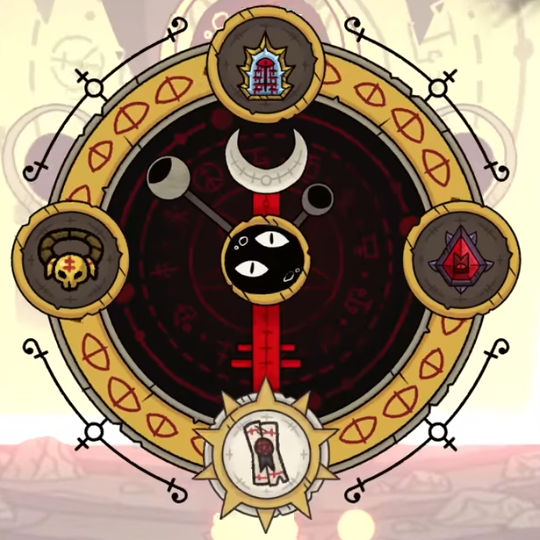
This was a wonderful addition to the game, but 3 of the 4 options on the wheel have limited stock by design. The only one that doesn't is the necklace option. Once all the other options are exhausted, the wheel offers refined stone, refined lumber, meat, and a random necklace from it's pool. Having all the stone, lumber, and meat that I needed, I found myself save scumming until the necklace I wanted was offered and was what I won. This was tedious and time-consuming, especially when I really only wanted a specific necklace.
So I wrote this mod!
Lore or something
Seeing the continual frustration of the lamb with receiving unwanted items from its boss, one of the assistants of the Mystic Shopkeeper covertly offers the lamb a deal. If the lamb brings the God Tear to it instead of its boss, it can provide the lamb with a specific necklace. Unsure of what the assistant gets out of the deal, but not wanting to turn down a good opportunity, the lamb accepts.
How to install the mod
-
Install BepInEx for Cult of the Lamb. There's a couple ways to go about this, but either way, make sure you get BepInEx version 5.4, not version 6.
- You can follow this guide that is specific to Cult of the Lamb.
or
- You can find their GitHub page here, and their installation guide here.
-
In the game's root folder (\steamapps\common\Cult of the Lamb), go to the BepInEx folder.
-
If the "plugin" folder does not exist, launch the game so that BepInEx can create the stuff it needs to work in its folder.
-
Drop the "MysticAssistant.dll" into the plugins folder.
-
Enjoy the game with the mod installed!
How to build the project
There are some items that the project needs to build that are excluded from the repo by design. They aren't mine to distribute, but if you own the game, you can get everything you need.
- Download the code, stick it wherever you want.
- If you haven't already, set up BepInEx for your Cult of the Lamb installation. You'll need some files from it to be able to build this project.
- Check out this guide, specifically starting at section 4, Importing useful dependencies.
- Specifically, you need BepInEx.dll and 0Harmony.dll from the BepInEx installation, and the Assembly-CSharp.dll, UnityEngine.dll, and UnityEngine.CoreModule from the Cult of the Lamb installation.
- In addition to what is mentioned in the guide, you'll need the UnityEngine.TextMeshPro.dll from the Cult of the Lamb installation.
- I followed the guide's steps as described, so the .csproj file is looking for a libs folder in the root directory of the project. You can, of course, adjust that to your liking.
- Once all the references are fixed, you should be able to build it! Good luck!