
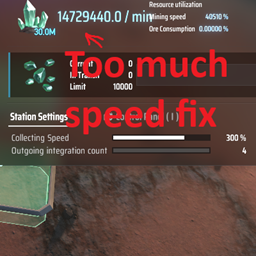
MiningSpeedMod
This mod set max mining speed to fix overflow issue.MiningSpeedMod
Dyson Sphere Program: MiningSpeedMod
This mod set max mining speed to fix overflow issue.
Repository
https://github.com/GoToNightmare/DSP_MiningSpeedMod
Installation(ModManager)
- Click on install with ModManager and follow the steps.
- Start the game as usual, config file would be created. Restart game.
- Edit "Dyson Sphere Program\BepInEx\config\MiningSpeedMod.cfg" parameters
Installation(Manual)
- Download the mod from repo
- Extract and Copy .dll file to "Steam\steamapps\common\Dyson Sphere Program\BepInEx\plugins". If BepInEx doesn't exist, download and install from here
- Start the game as usual, config file would be created. Restart game.
- Edit "Dyson Sphere Program\BepInEx\config\MiningSpeedMod.cfg" parameters
Troubleshooting
- Feel free to add a bug report by clicking here.
Updates
V0.0.2
- Icon fix
V0.0.1
- Initial