


DSP Belt Reverse Direction
BETA RELEASE! Reverse the direction of a converyer belt.Belt Reverse Direction for Dyson Sphere Program
<font color='red'>BETA RELEASE - This mod is still in development, and is entering the testing phase. If you want reliability, please come back later. If you want to experiment, please backup your saves. Testing feedback is appreciated. If you encounter issues, please leave detailed feedback on how to reproduce the problem on GitHub here. You can also contact me at GreyHak#2995 on the DSP Modding Discord #tech-support channel.</font>
Belt Reverse Direction is a mod for the Unity game Dyson Sphere Program developed by Youthcat Studio and published by Gamera Game. The game is available on here.
To reverse the direction of a conveyor belt, click on any segment of the conveyor belt, and click the reverse button.
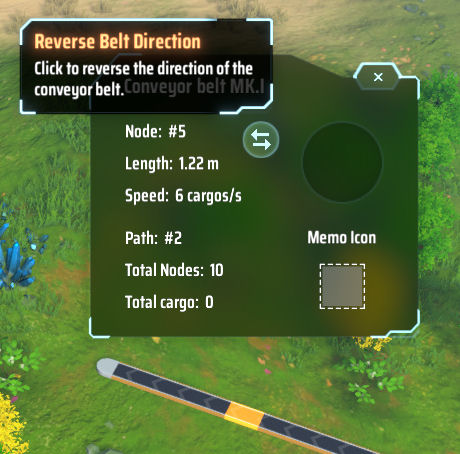 If you like this mod, please click the thumbs up at the top of the page (next to the Total rating). That would be a nice thank you for me, and help other people to find a mod you enjoy.
If you have issues with this mod, please report them on GitHub. I try to respond within 12 hours. You can also contact me at GreyHak#2995 on the DSP Modding Discord #tech-support channel..
Config File
The configuration file is called greyhak.dysonsphereprogram.beltreversedirection.cfg. It is generated the first time you run the game with this mod installed. On Windows 10 it is located at %PROGRAMFILES(X86)%\Steam\steamapps\common\Dyson Sphere Program\BepInEx\config\greyhak.dysonsphereprogram.beltreversedirection.cfg.
Installation
This mod uses the BepInEx mod plugin framework. So BepInEx must be installed to use this mod. Find details for installing BepInEx in their user guide. This mod was tested with BepInEx x64 5.4.5.0 and Dyson Sphere Program 0.6.16.5827 on Windows 10.
To manually install this mod, add the DSPBeltReverseDirection.dll to your %PROGRAMFILES(X86)%\Steam\steamapps\common\Dyson Sphere Program\BepInEx\plugins\ folder.
This mod can also be installed using ebkr's r2modman dsp mod manager by clicking "Install with Mod Manager" on the DSP Modding site.
Open Source
The source code for this mod is available for download, review and forking on GitHub here under the BSD 3 clause license.
Change Log
v0.1.0-beta
- Initial release.