You are viewing a potentially older version of this package. View Latest Version
For other languages of this README, please refer to
BACKUP YOUR SAVE FILE FIRST
It's currently UNRESTORABLE after using this mod.
And BACKUP YOUR CONFIG FILE if you are already using this mod.
This mod allows you add new planets to your existing saved games (and modify original planets or birth point if you know what you are doing).
The first time you install this mod and lauch the game, a config file will be generated in your save file directory (see below), then you can edit the config file to add new planets (or modify original planets).
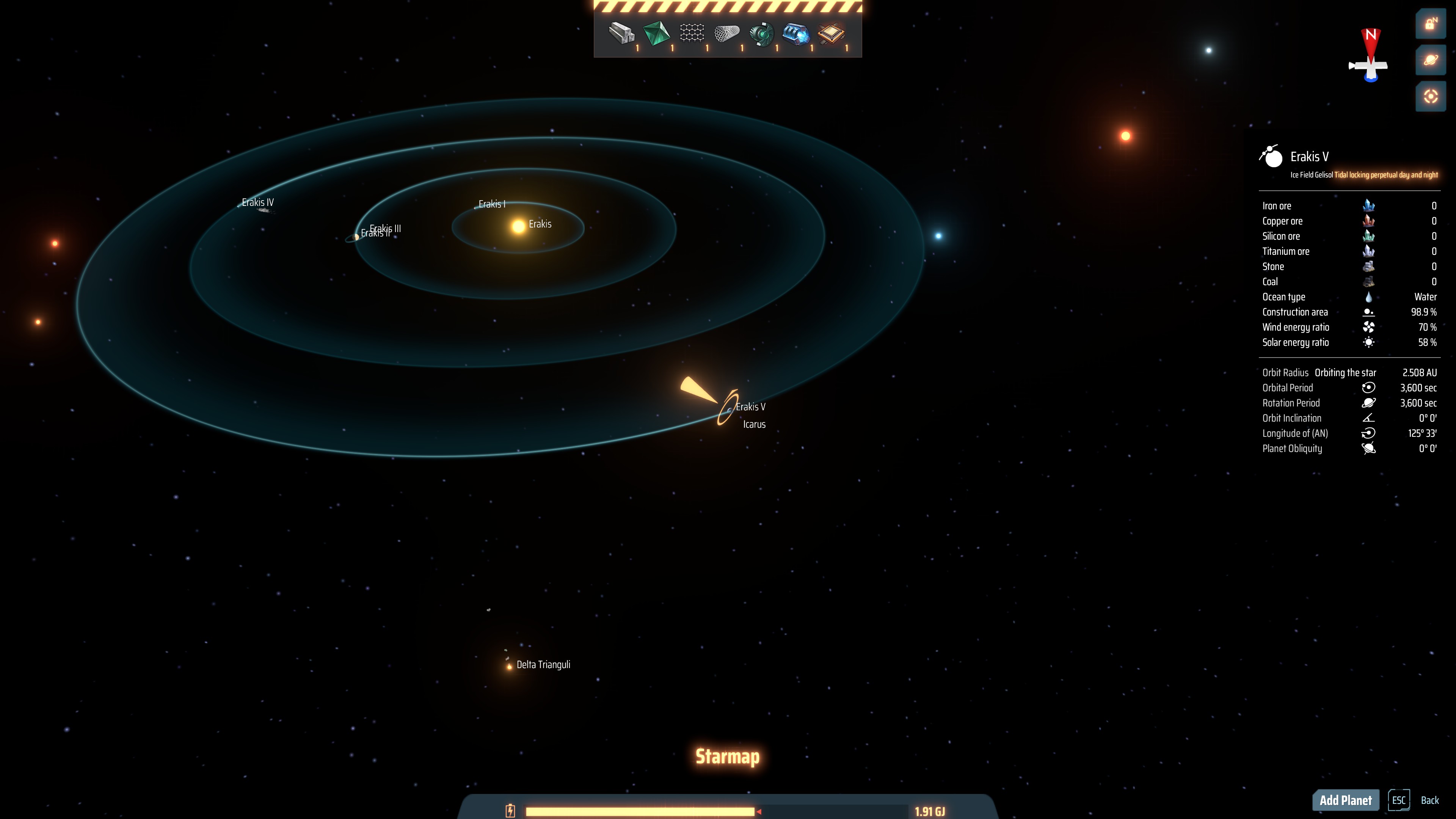
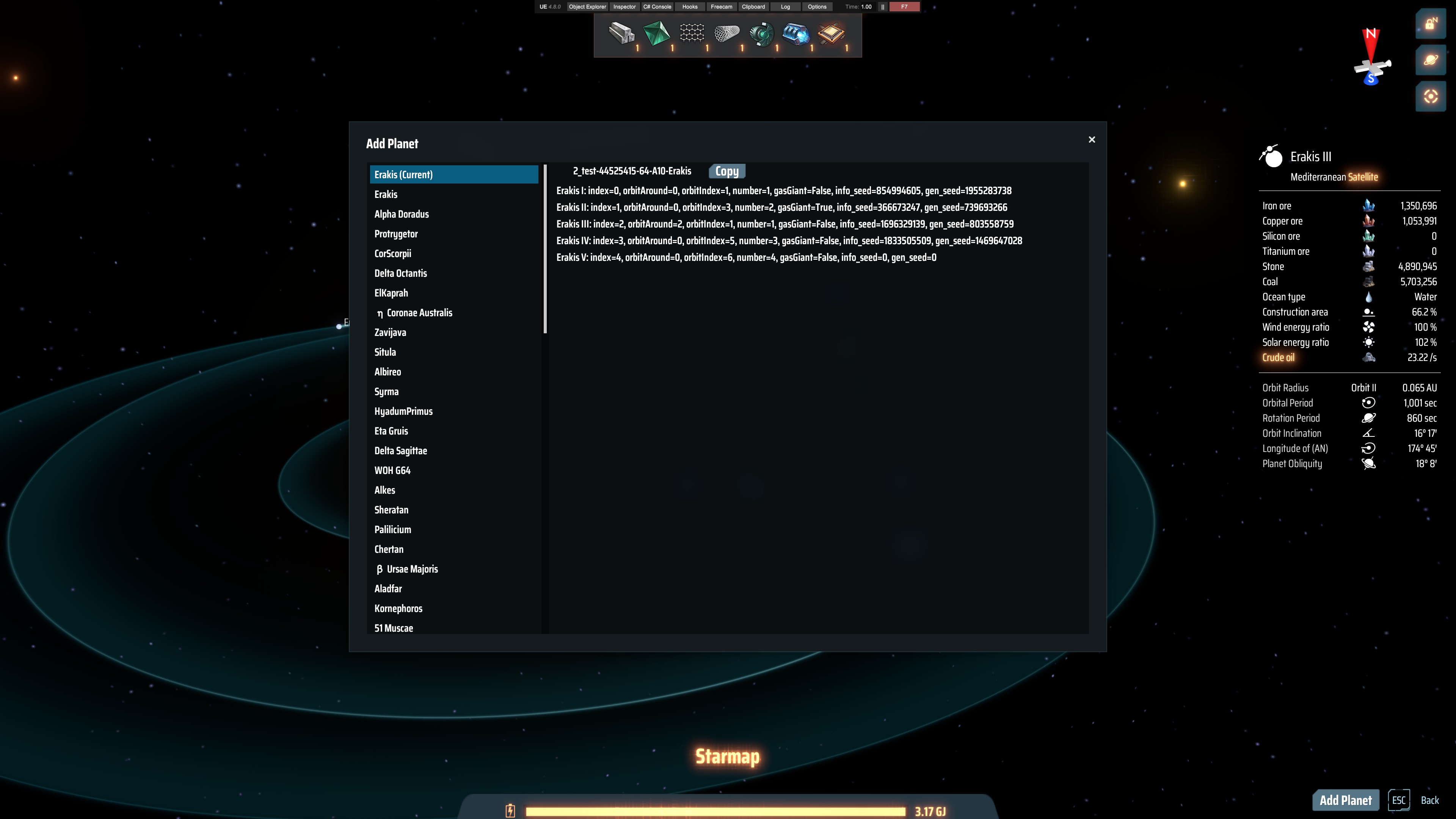
To add or modify planets, you will need some information about original planets in your game, I made a small tool to make it easier to get those information, you can press V to open the star map and click the 'Add Planet' button on the bottom-right corner to open the tool.
In the tool, stars are listed in the left panel, click on it to view info about planets in that star system, include planet's index, orbitIndex, orbitAround, number etc. The current star system is on the top of all.
You can click 'Copy' button on the right to copy the uniqueStarId to your clipboard.
A 'unqiueStarId' is a string composed of an optional save name, cluster string and star name, which can basically uniquely identify a star.
Read 'Config file' section below on how to add planets in the config file.
After finishing editing the config file, exit game, BACKUP YOUR SAVE FILE, then re-launch the game, load the save file you just add planets to.
Then you should be able to see new planets (and modified planets) in your game.
Note that auto-saves have the same name as your last loaded game (though it's not displayed in the menu), so it's fine to use auto-saves.
The config file lies in your game's save file directory, in a sub-directory named 'modData/IndexOutOfRange.DSPAddPlanet', file name 'config.xml'.
For example C:\Users\administrator\Documents\Dyson Sphere Program\Save\modData\IndexOutOfRange.DSPAddPlanet\config.xml
New planets will be added in the same order as they are written in the config file.
For old txt format please to Old README
Since version 0.1.0, the config file has changed to an xml file. It's basic structure is displayed below. Old .txt file can still be read but without new features.
Since version 0.2.0 the config file splitted into two parts: <Global> and <GameNameSpecific>
Generally, <Global> planets' UniqueStarId does not have a 'GameName', these configurations have lower priority but will be applied to any saved game or new game which has the same cluster string and star name, while planets in <GameNameSpecific> must have a UniqueStarId with a proper GameName, these configurations have higher priority than <Gloal> planets, but will only be applied to named existing saved games.
Note that if you create a new game and does save it manually, it's GameName and it's auto saves' GameName will be empty, and configurations in <Global> will be applied to it.
<Config>
    <Global>
        <Planets>
            <Planet>
                <UniqueStarId>
                    <!-- No GameName in <Global> configurations -->
                    <ClusterString>The cluster string</ClusterString>
                    <Star>The star name</Star>
                </UniqueStarId>
                <!-- Other parameters are same with those in <GameNameSpecific> -->
            </Planet>
        </Planets>
    </Global>
    <GameNameSpecific>
        <Planets>
            <Planet>
                <UniqueStarId>
                    <GameName>The game name of your save file</GameName>
                    <ClusterString>The cluster string</ClusterString>
                    <Star>The star name</Star>
                </UniqueStarId>
                <IsBirthPoint>false</IsBirthPoint>
                <Index>4</Index>
                <OrbitAround>0</OrbitAround>
                <OrbitIndex>2</OrbitIndex>
                <Number>3</Number>
                <GasGiant>false</GasGiant>
                <InfoSeed>0</InfoSeed>
                <GenSeed>0</GenSeed>
                <ForcePlanetRadius>false</ForcePlanetRadius>
                <Radius>200</Radius>
                <OrbitalPeriod>3600</OrbitalPeriod>
                <RotationPeriod>3600</RotationPeriod>
                <IsTidalLocked>true</IsTidalLocked>
                <OrbitInclination>0</OrbitInclination>
                <Obliquity>0</Obliquity>
                <DontGenerateVein>true</DontGenerateVein>
                <ThemeId>0</ThemeId>
                <OrbitLongitude>0</OrbitLongitude>
                <VeinCustom>
                    <Iron>
                        <VeinGroupCount>
                            <Type>Accurate</Type>
                            <AccurateValue>10</AccurateValue>
                        </VeinGroupCount>
                        <VeinSpotCount>
                            <Type>Random</Type>
                            <RandomBaseValue>100000</RandomBaseValue>
                            <RandomCoef>1</RandomCoef>
                            <RandomMulOffset>0</RandomMulOffset>
                            <RandomAddOffset>5</RandomAddOffset>
                        </VeinSpotCount>
                        <VeinAmount>
                            <Type>Default</Type>
                        </VeinAmount>
                    </Iron>
                </VeinCustom>
                <ReplaceAllVeinsTo>Copper</ReplaceAllVeinsTo>
            </Planet>
        </Planets>
    </GameNameSpecific>
</Config>
<Config>
    <GameNameSpecific>
        <Planets>
            <Planet>
                <UniqueStarId>
                    (required)
                    a unique id of the target star composed of your save name, cluster string and star name,
                    for example, if '2_test' is your save name, '44525415-64-A10' is your cluster name,
                    'Erakis' is the name of the star you want to add new planets to,
                    then your uniqueStarId will be '2_test-44525415-64-A10-Erakis'
                </UniqueStarId>
                <IsBirthPoint>
                    (required/optional)
                    default value if false.
                    Whether this planet is the birth planet in this galaxy.
                    If you are modifying the theme of original birth planet then at least one planet in your configurations must have this option set to true, this is because the birth info of the original birth planet will be wiped out after theme modification.
                </IsBirthPoint>
                <Index>
                    (required)
                    if you want to add new planet then this is the index of your new planet,
                    it must be larger than the index of the last original planet in your target system,
                    and must not be duplicated with other old/new planets,
                    for example if your target system originally has 4 planets, you want to add 1 new planet,
                    then this new planet's index should be 4 (start from 0)
                    if you want to modify original planets then this is the index of the original planet you want to make modifications to,
                    in the case of modifying the birth planet, you must first know the index of your birth planet, which means you need to use the same seed to create a new game which has no planet configuration
                    and peek the birth planet's index
                </Index>
                <OrbitAround>
                    (required)
                    which planet you want your new planet to orbit around,
                    set to the 'Number' of target planet to orbit around target planet, set to 0 to orbit around the star
                </OrbitAround>
                <OrbitIndex>
                    (required)
                    which orbit this new planet will use, ranges from 1 to 16 (according to 'StarGen.orbitRadius')
                </OrbitIndex>
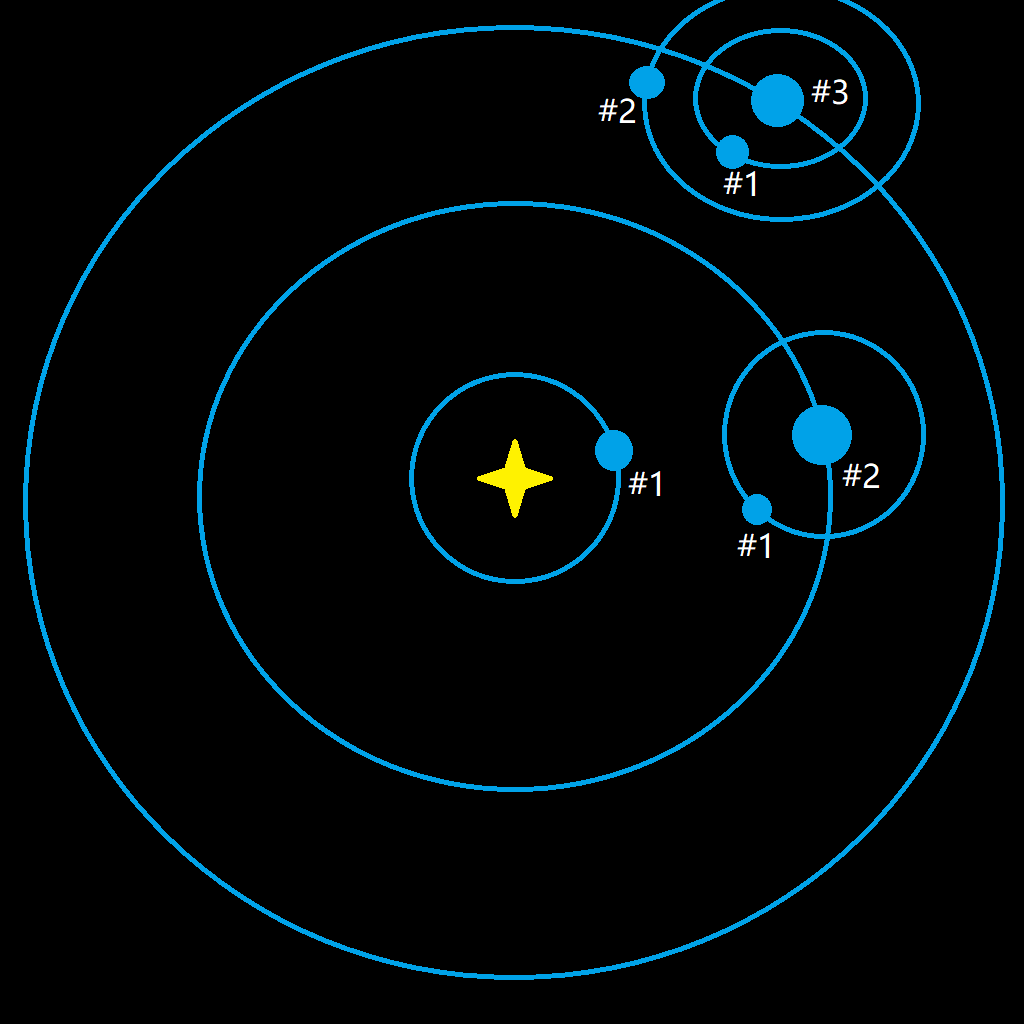
                <Number>
                    (required)
                    the number of your new planet in the system, see image below on how to set this value
                </Number>
                <GasGiant>
                    (optional)
                    default value is false.
                    wether your new planet a gas giant, true or false, set this value to true will make 'Radius' useless
                </GasGiant>
                <InfoSeed>
                    (optional)
                    default value is 0.
                    one of two seeds to generate a planet
                </InfoSeed>
                <GenSeed>
                    (optional)
                    default value is 0.
                    one of two seeds to generate a planet
                </GenSeed>
                <ForcePlanetRadius>
                    (optional)
                    default value is false.
                    if you want to test planet radius larger than 600 (or smaller than 50), you need to set this option to true
                </ForcePlanetRadius>
                <Radius>
                    (optional)
                    default value is 200.
                    as it's named, the radius of your new planet, the default radius is a normal size, the max radius is 600,
                    value 200, 400 and 600 are tested, 800 caused crashes
                </Radius>
                <OrbitalPeriod>
                    (optional)
                    default value is 3600.
                    orbital revolution period, in seconds
                </OrbitalPeriod>
                <RotationPeriod>
                    (optional)
                    default value is 3600.
                    self rotation period, in seconds
                </RotationPeriod>
                <IsTidalLocked>
                    (optional)
                    default value is true.
                    set this option to true to display a 'tidal locked' text in planet description,
                    I think this option does not make real difference,
                    if you let 'orbitalPeriod' equals to 'rotationPeriod', then you should get a tidal locked planet
                </IsTidalLocked>
                <OrbitInclination>
                    (optional)
                    default value is 0.
                    planet's orbital inclination
                </OrbitInclination>
                <Obliquity>
                    (optional)
                    default value is 0.
                    planet's obliquity
                </Obliquity>
                <DontGenerateVein>
                    (optional)
                    default value is true.
                    if you want veins to generated on your new planet, set this option to false
                </DontGenerateVein>
                <ThemeId>
                    (optional)
                    no default value.
                    theme ID of your new planet, see the table below for available themes,
                    a theme generated by original planet generator will be used if you leave this option unspecified,
                    the theme specified here must match the 'gasGiant' option above,
                    for example, if you set '<GasGiant>true</GasGiant>' then you should choose a 'Gas Giant' or 'Ice Giant' theme
                </ThemeId>
                <OrbitLongitude>
                    (optional)
                    no default value.
                    planet's longitude of (AN), format 'DEGREE,MINUTE', e.g. '30,33'
                </OrbitLongitude>
                <VeinCustom>
                    (optional)
                    no default value.
                    change the type, size and amount of veins.
                    insert a new node here with the vein type you want to change as the tag name.
                    see table below for all available vein types.
                    this parameter can be used to add types of viens which can not be generated in normal vein generation process.
                    <Iron>
                        for each type of vein you can specify three aspects of it's generation process:
                            VeinGroupCount: how many groups of veins will be generated
                            VeinSpotCount: how many vein spots will be generated in a group
                            VeinAmount: the amount of mineral in a vein spot
                        in each aspect you can specify how numbers be generated by specifying some parameters:
                            the first parameter is 'Type', if you specified an aspect, then you must also specify it's 'Type' parameter
                            there are three types: 'Accurate', 'Random' or 'Default'.
                                if you set 'Type' to 'Accurate', then you also need to set 'AccurateValue',
                                if you set 'Type' to 'Random', then you can leave other parameters unspecified and default values will be used,
                                    or you can manually set 'RandomBaseValue', 'RandomCoef', 'RandomMulOffset' or 'RandomAddOffset' to values you want,
                                    see below for how random values been calculated.
                                if you set 'Type' to 'Default', then nothing will be modified.
                        <VeinGroupCount>
                            <Type>Accurate</Type>
                            <AccurateValue>10</AccurateValue>
                        </VeinGroupCount>
                        <VeinSpotCount>
                            <Type>Random</Type>
                            <RandomBaseValue>100000</RandomBaseValue>
                            <RandomCoef>1</RandomCoef>
                            <RandomMulOffset>0</RandomMulOffset>
                            <RandomAddOffset>5</RandomAddOffset>
                        </VeinSpotCount>
                        <VeinAmount>
                            <Type>Default</Type>
                        </VeinAmount>
                    </Iron>
                </VeinCustom>
                <ReplaceAllVeinsTo>
                    (optional)
                    no default value.
                    change all veins to the type you specified.
                    this step takes after 'VeinCustom'.
                    see below for all available vein types.
                </ReplaceAllVeinsTo>
            </Planet>
        </Planets>
    </GameNameSpecific>
</Config>
| ID | name | planet type | temperature | gas items | gas speeds | wind | ion height | water height | water item | culling radius | ice flag |
|---|---|---|---|---|---|---|---|---|---|---|---|
| 1 | Mediterranean | Ocean | 0 | 1 | 60 | 0 | Water | 0 | 0 | ||
| 2 | Gas Giant | Gas | 2 | Hydrogen, Deuterium | 0.96, 0.04 | 0 | 0 | 0 | 0 | 0 | |
| 3 | Gas Giant | Gas | 1 | Hydrogen, Deuterium | 0.96, 0.04 | 0 | 0 | 0 | 0 | 0 | |
| 4 | Ice Giant | Gas | -1 | Fire ice, Hydrogen | 0.7, 0.3 | 0 | 0 | 0 | 0 | 0 | |
| 5 | Ice Giant | Gas | -2 | Fire ice, Hydrogen | 0.7, 0.3 | 0 | 0 | 0 | 0 | 0 | |
| 6 | Arid Desert | Desert | 2 | 1.5 | 70 | 0 | 0 | 0 | |||
| 7 | Ashen Gelisol | Desert | -1 | 0.4 | 50 | 0 | 0 | 0 | |||
| 8 | Oceanic Jungle | Ocean | 0 | 1 | 60 | 0 | Water | 0 | 0 | ||
| 9 | Lava | Vocano | 5 | 0.7 | 60 | -2.5 | 0 | 0 | |||
| 10 | Ice Field Gelisol | Ice | -5 | 0.7 | 55 | 0 | Water | 0 | 0 | ||
| 11 | Barren Desert | Desert | -2 | 0 | 0 | 0 | 0 | 0 | |||
| 12 | Gobi | Desert | 1 | 0.8 | 60 | 0 | 0 | 0 | |||
| 13 | Volcanic Ash | Vocano | 4 | 0.8 | 70 | 0 | Sulfuric acid | 0 | 0 | ||
| 14 | Red Stone | Ocean | 0 | 1 | 60 | 0 | Water | 0 | 0 | ||
| 15 | Prairie | Ocean | 0 | 1.1 | 60 | 0 | Water | 0 | 0 | ||
| 16 | Waterworld | Ocean | 0 | 1.1 | 60 | 0 | Water | -10 | 0 | ||
| 17 | Rocky Salt Lake | Desert | 1 | 1.1 | 60 | 0 | 0 | 0 | |||
| 18 | Sakura Ocean | Ocean | 0 | 1 | 60 | 0 | Water | 0 | 0 | ||
| 19 | Hurricane Stone Forest | Desert | 1 | 1.6 | 70 | 0 | 0 | 0 | |||
| 20 | Scarlet Ice Lake | Desert | -2 | 0.7 | 55 | 0 | -5 | 1 | |||
| 21 | Gas Giant | Gas | 1 | Hydrogen, Deuterium | 0.84, 0.16 | 0 | 0 | 0 | 0 | 0 | |
| 22 | Savanna | Ocean | 0 | 1.1 | 60 | -0.7 | Water | 0 | 0 | ||
| 23 | Crystal Desert | Desert | 0.08 | 1.5 | 55 | 0 | 0 | 0 | |||
| 24 | Frozen Tundra | Ice | -4 | 1.3 | 55 | 0 | 0 | 0 | |||
| 25 | Pandora Swamp | Ocean | 0 | 1 | 60 | -2 | 0 | 0 |
| Vein type | Name for human read |
|---|---|
| Iron | Iron |
| Copper | Copper |
| Silicium | Silicium |
| Titanium | Titanium |
| Stone | Stone |
| Coal | Coal |
| Oil | Oil |
| Fireice | Fireice |
| Diamond | Kimberlite |
| Fractal | Fractal Silicon |
| Crysrub | Organic Crystal |
| Grat | Optical Grating Crystal |
| Bamboo | Spiniform Stalagmite Crystal |
| Mag | Unipolar Magnet |
A = RandomBaseValue * RandomCoef
B = A * RandomMulOffset
C1 = |A - B|
C2 = A + B
D = randomly pick in range [C1, C2]
E1 = |D - RandomAddOffset|
E2 = D + RandomAddOffset
F = randomly pick in range [E1, E2]
F is final result
Careful about the name of your save file when you save your game because new planets are bound to your save file by using the uniqueStarId (composed of your save name, cluster string and star name)
Build target: game version 0.9.26.13034, BepInEx version: 5.4.19 (should work under 5.4.17)
Build target: game version 0.9.26.12900, BepInEx version: 5.4.19 (should work under 5.4.17)
Build target: game version 0.9.25.12201, BepInEx version: 5.4.19 (should work under 5.4.17)
Compatibility with game version 0.9.26.13034
Change the structure of config file
Change the format of UniqueStarId (should only have internal effects)
Add the ability to modify original planets
Add the ability to change birth points
Change config format from pure text to xml
Add parameters to customize vein generation
Change parameter 'gasGiant' and 'GasGiant' to optional, default false
Fix problem that pumps will bury the water when you place them in water
Add 'orbitLongitude' parameter
Fix some errors about Foundation on planets with 250 radius
Fix trash not being affected by gravity on some planets
Every time you load your save file, the game will use the seed in the save file to re-generate the galaxy, and if this mod has been turned on, it will generate new planets according to the config file, which means that all new planets created by this mod will not be saved in any place except in the config file.
If you turn off this mod, new planets will disappear, but you may have some buildings on new planets or some transport lanes related to new planets, they will point to some nonexistent things, which will cause errors.
It seem that the max valid radius of a planet is limited by an unsigned short value, maybe 655.35 is the largest radius.
Thanks to the author of GalacticScale for how to properly deal with the GetModPlane method.
Thanks to the author of ILSpy for creating such a powerful tool.
Thanks to the author of BepInEx and Harmony for creating the modding platforms we rely on.