For other languages of this README, please refer to
中文说明
DSP Transport Stat
Press Ctrl+F to open/close transport stations window.
Great thanks to authors of LSTM and Unity Explorer.
Features
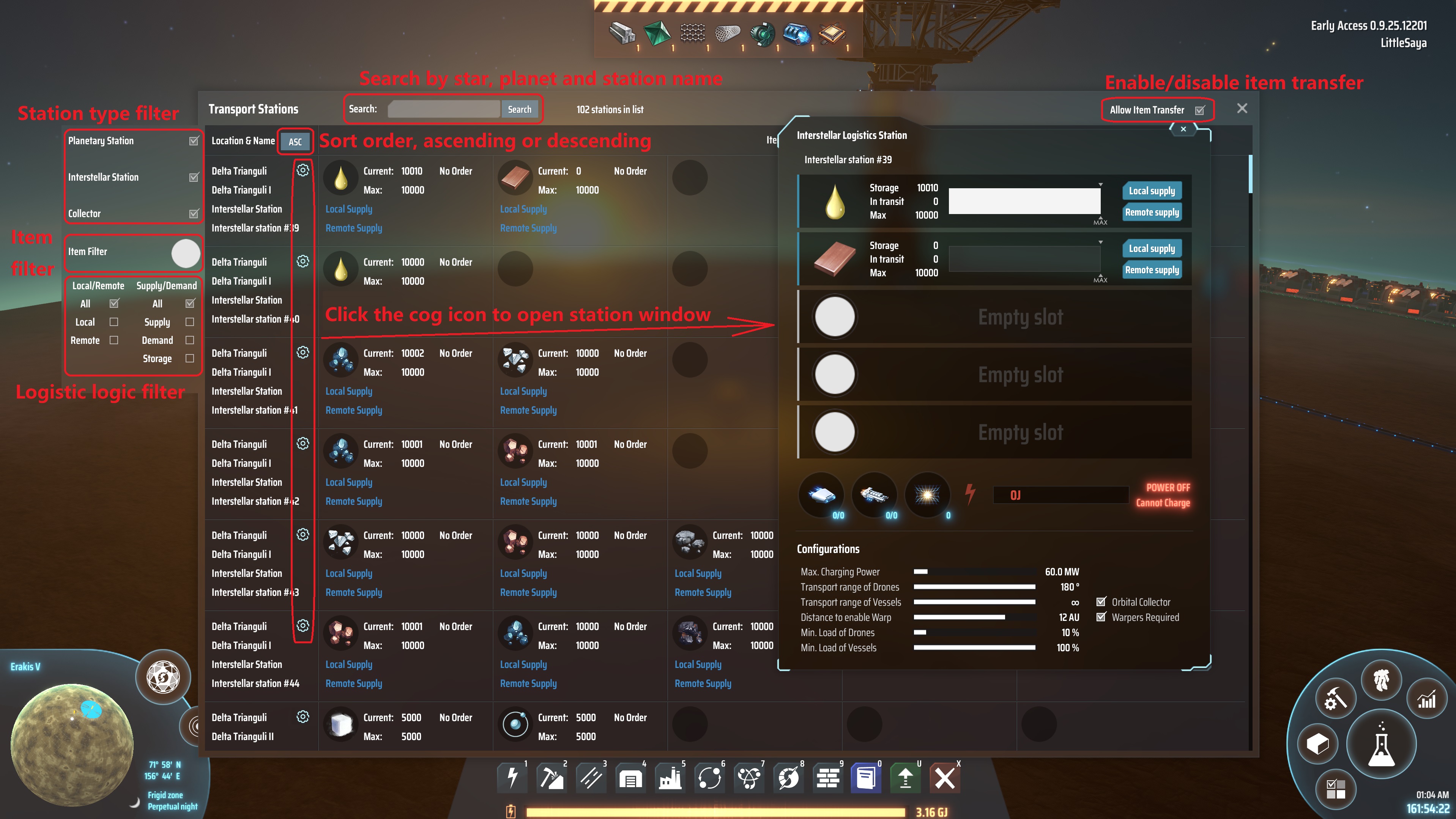
- Listing all transport stations in every corner of your galaxy. Showing the location, state and storage of stations.
- Open the Station Window remotely and directly in a list without the need to stand near the station or land on the station's planet.
- Filtering though station type, location, name and items.
- Sorting by station location and name, ascending or descending.

Compatibility
0.0.8 ~ 0.0.13
Game Version: Early Access 0.9.25.12201, BepInEx: 5.4.19
0.0.1 ~ 0.0.7
Game Version: Early Access 0.9.25.12077, BepInEx: 5.4.19
Known Issues
- Causing null pointer exception when used with LSTM.
Todo List
Ideas are welcome :-)
Change log
0.0.12 -> 0.0.13
0.0.11 -> 0.0.12
- Fix NPE after quiting the game without closing the station list window
0.0.10 -> 0.0.11
0.0.9 -> 0.0.10
- Fix NullPointerException when transfering items between player inventory and station
- Fix NullPointerException when opening the Transport Stations Window after removing existing stations
0.0.8 -> 0.0.9
- Fix null pointer exception after close station window
0.0.7 -> 0.0.8
- Fix error when picking up items in player inventory after closing the station window opened from station list.
0.0.6 -> 0.0.7
0.0.5 -> 0.0.6
-
Add a button to open the station window.
-
Add station count in title bar.
-
Add color to item's usage logic text, which is similiar to those in the station window.
-
Fix english translations broken.
-
Fix some mistakes in station type filtering logic.

0.0.4 -> 0.0.5
- Add chinese translations.
0.0.3 -> 0.0.4
- Querying and sorting
- Column head
0.0.1 -> 0.0.3
- Change shortcut key from Ctrl+T to Ctrl+F to avoid conflict with LSTM's shortcut key.