


DSPTranslationPlugin
Dyson sphere translation plugin! Translations download form crowdin https://crowdin.com/translate/dyson-sphere-program/14#Dyson sphere translation plugin!
Licence: Project is under CC Attribution 4.0
Features
- Adds possibility to add custom languages (text only)
- Adds (currently hidden) French language
- Adds the possibility to change Font in game (WORK IN PROGRESS)
- Use custom logo for custom translation
Roadmap
- Refactor code and add documentation
- Add support for adjusting content size of in game UI to fit new text
Installation via Mod manager
- Press Install with Mod Manager at https://dsp.thunderstore.io/package/Muchaszewski/DSPTranslationPlugin/
- Add translations to
{Mods Directory}\Muchaszewski-DSPTranslationPlugin\Translation\{LanguageName}\translation_DysonSphereProgram.json. You can find translations at Crowdin - Select new translation in Menu of the Game
- Enjoy (Note: Restart is not required for full effect ;) )
Installation Manual
-
Download and unpack BepInEx into game root directory
-
Download mod files
-
Extract zip file
-
Paste DLLs under
Dyson Sphere Program\BepInEx\plugins\DSPTranslationPlugin -
Add translations to
Dyson Sphere Program\BepInEx\plugins\DSPTranslationPlugin\Translation\{LanguageName}\translation_DysonSphereProgram.json. You can find translations at Crowdin -
Select new translation in Menu of the Game
-
Enjoy (Note: Restart is not required for full effect ;) )
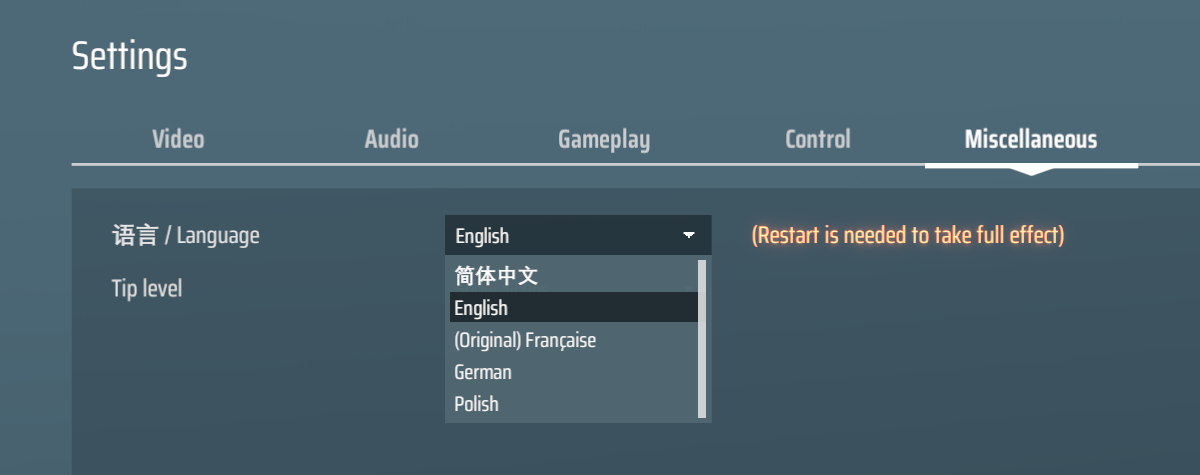
How to add new translations
- Create folder under
Dyson Sphere Program\BepInEx\plugins\DSPTranslationPlugin\Translationwith the name of your translation eg:Polish
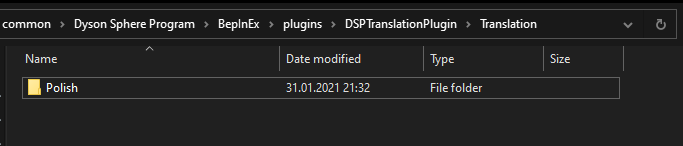
- Run game once - New file settings and translations files will be created.
- Translate
Translation file structure:
{ #CROWDIN
  "点击鼠标建造": "Click to build",
  "无法在此建造": "Cannot build here",
  "{NAME}: "{TRANSLATION}",
  (...)
}
{ #LEGACY
  "TranslationTable": [
    {
      "IsValid": true,                          # Does translation exists in the game
      "Name": "点击鼠标建造",                    # Name used by the game for translation (READ ONLY)
      "Original": "Click to build",             # Translation in English
      "Translation": "Kliknij, aby zbudować"    # Your translation here
    },
    (...)
    ]
}
Settings file structure:
{
  "Version": "0.1.0.0",                             # Plugin version
  "GameVersion": "0.6.15.5678",                     # Game version
  "OriginalLanguage": "ENUS",                       # Language in which empty new translation files will be generated, possible values: "ENUS", "FRFR", "ZHCN"
  "LanguageDisplayName": "Polish",                  # Language display name in the game
  "ImportFromLegacy": false,                        # Generate Legacy json format (defualt is Crowdin format)
  "CreateAndUpdateFromPlainTextDumpUnsafe": true    # Should create and import dump file (more below)
}
Custom images:
Currently in the game there are 2 images that can be changed, they look like a path - UI/Textures/dsp-logo-en. You can use a valid path from resources or valid URL.
URL needs to be a direct png file. Eg:
   Internet URI -- "ImageLogo0": "https://wiki.factorio.com/images/thumb/Factorio-logo.png/461px-Factorio-logo.png",
   Local file URI -- "ImageLogo0": "file://C:/Users/Muchaszewski/Documents/Icon.png"
Specific images description:
ImageLogo0andImageLogo1needs to have aspect ratio that corresponds to 800x300 pixels, otherwise they will be stretched
Dump file:
Simpler file structure where only Translation value is provided.
Each new translation is separated by 5 dashes ----- this can speed up the translation process.
Can cause error if ever game decide to change IDs or will add new ones, with JSON format there should be no such issue.
IMPORTANT! Disable dump file import when sending for production!
Kliknij, aby zbudować
-----
Nie można tutaj budować
-----
Brak przedmiotu
-----
(...)
Special Thanks to
BepInEx - for mod support
Modified hard fork of SimpleJSON - for simple json parser