
StackSizeEditor
Stack-Size Editor via Ingame-UI. Open with K by default. Also works with modded Items. Comes with a Sort all Storages functionality.Stack-Size Editor
Features
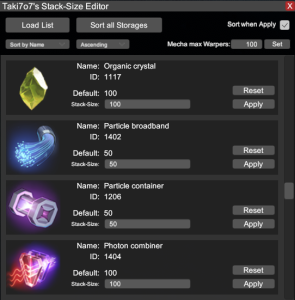
This mod lets you Edit Stack-Sizes via an Easy to Use ingame UI, opened with K by default. Also, it works for modded Items. It offers a function to sort ALL Storages, including the Player Inventory.
Also lets you set max Warp Cells for the Mecha.
In the Mod-Config you can set a custom HotKey for opening the console. (Stack-Sizes are not saved in that config!)
Information
You cannot edit the Stack-Sizes manually via the config, only via the Ingame Mod-UI!
Stack-Sizes are saved in Binary format in /BepInEx/config/StackSizeEditor/StackSizeEditor.7o7 if you need to delete it or something.
Installation
With Mod Manager
Simply open the mod manager (if you don't have it install it here), select StackSizeEditor by Taki7o7, then Download.
If prompted to download with dependencies, select Yes.
Then just click Start modded, and the game will run with the mod installed.
Manually
Install BepInEx here
Then drag StackSizeEditor.dll into steamapps/common/Dyson Sphere Program/BepInEx/plugins.
Feedback / Bug Reports
Feel free to contact me via Discord (Taki7o7#1753) for any feedback, bug-reports or suggestions.
Changelog
v1.0.1
- Added setting to change Mechas max Warp Cells in Mecha Window
- Sorting will also sort Fuel Chamber now
v1.0.0
- Initial release