

You are viewing a potentially older version of this package. View Latest Version
PythonCheats
Python scripting example with cheats to Edit Mecha, Add Items, View Galaxy#Python Cheat Mod for DSP
Python Cheat Mod is example mod for the Python Console for DSP mod.
- What it does
Python Cheat Mod is example mod for the Python Console for DSP mod

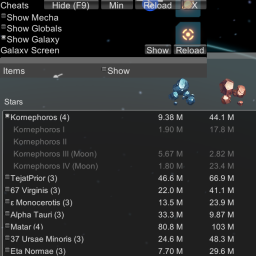
Currently it lets you any item to your Mecha Inventory, edit basic Mecha stats and view galaxy resources
- How it works
The mod is loaded by the Python engine in the Console mod and shows a simple UI.
- Directory Structure Overview
\BepInEx\
    The root folder managed by BepInEx.  Shared by BepInEx and plugins.

\BepInEx\Console\Mods\
    This folder is the location for python based mods

\BepInEx\Console\Mods\cheats
  This folder is the location for this mod
- Installation
Prerequisites:
  1. Download BepInEx 5 LTS version

     BepInEx_x64_5.4.5.0.zip was tested.
       https://github.com/BepInEx/BepInEx/releases/download/v5.4.5/BepInEx_x64_5.4.5.0.zip

     The current versions can be downloaded from here:
      https://github.com/BepInEx/BepInEx/releases

     More help on BepInEx
      https://github.com/BepInEx/BepInEx/wiki/Installation

  2. Unpack BepInEx to game folder so winhttp.dll is in same folder as DSPGAME.exe

  3. Test game still loads before adding console

  4. Download the current version of Python Console for DSP (Unity-Console)

  5. Unpack to game folder.  BepInEx folder is already present so extract
     to same folder as DSPGAME.exe

  6. Test game still loads before adding console

Installation:
  1. Unpack to game folder.  BepInEx folder is already present so extract
     to same folder as DSPGAME.exe
- Usage
The mod will appear in the upper right corner of the screen by default.

1. Load a game.

2. Look for Cheat menu on the right.

3. Click on "Show" to right of Items

4. Click on E to open Mecha inventory.

5. Select +1 next to item in menu and see it appear in Mecha Inventory

6. Click Show Galaxy > View to show all resources in current galaxy or galaxy in new game
- TODO
I'm sure there can be a lot done to improve some basic scripting libraries.
- Contact
The code is offered as-is for demonstration purposes.

The author apologizes for not having time to maintain the code but hopes that it is still useful to other users.

The official homepage:
  https://github.com/TheHologram/unity-console
  https://github.com/TheHologram/DSP_Mods