DSP Touhma Plugins
How to Install :
First Install Bepinex in your game
folder : https://bepinex.github.io/bepinex_docs/master/articles/user_guide/installation/index.html?tabs=tabid-win
Then Download the latest DLL of the mod : https://github.com/Touhma/DSP_Plugins/releases
And add it in depinex plugins folder in your game : %gamefolder%\Dyson Sphere Program\BepInEx\plugins
Launch the game and you should be all set !
How to use the QOL mod ?
Go into the build option to lay foundation, determine the zone with + or - , it will create an invisible square around
the center of the foundation area. Then press the jump key ( probably space bar for you ) and enjoy !
Dismantling :
Everything is available from the dismantle tool ingame :
- Use the tool normally for vanilla usage
- Use the LeftControl key to enter in Sphere mode, use the reformPlusKey or reformMinusKey ( + & - on NUMPAD by default ) to increase or decrease the size of the sphere
- The sphere start either from the ground or from the first building touched
- Use the LeftShift key to enter in General mode, it allow you to select all the conveyor belt of a specific node
- Use the LeftShift key to enter in General - Sphere mode, it allow you to select all the specific Building in a specific Area. ex : all conveyors in a specific sphere. use the reformPlusKey or reformMinusKey ( + & - on NUMPAD by default ) to increase or decrease the size of the sphere
Quick Key map :
- LeftControl : Sphere mode
- reformPlusKey or reformMinusKey ( + & - on NUMPAD by default ) : increase or decrease the size of the sphere
- LeftShift key : General mode
- LeftShift key + Left Control key to enter in General - Sphere mode
Config Available :
Edit the file here : %gamefolder%\Dyson Sphere Program\BepInEx\config\touhma.dsp.plugins.qol-features.cfg
Limitations :
-
The height is limited by the radius of the invisible sphere for now. you will still have to remove some stuff manually but it should be only on extreme height situation.
- If you don't have space in inventory you loose what's deleted, be carefull !
How to use galactic-scale ?
Map Size :
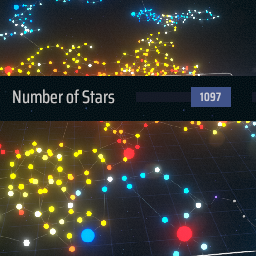
You can slide the number of system up to 1024 ( by default ) instead of 64. Be carefull if your pc is slow ^^ ---> everything past 64 is experimental ! Test it at your own risk :)
Config Available :
Edit the file here : %gamefolder%\Dyson Sphere Program\BepInEx\config\touhma.dsp.plugins.galactic-scale.cfg
Limitations :
Although you can put more than 1024 stars in the config file the slider will get stuck on a number between 1024 & 1300 depending on the seed you are using.