
You are viewing a potentially older version of this package. View Latest Version
First Install Bepinex in your game folder : https://bepinex.github.io/bepinex_docs/master/articles/user_guide/installation/index.html?tabs=tabid-win
Then Download the latest DLL of the mod : https://github.com/alekslt/DSPPlugins_ALT/releases
And add it to a new subfolder in bepinex plugins folder under the steam game folder : %steamapps\common%\Dyson Sphere Program\BepInEx\plugins\DSPPlugins_ALT
Launch the game and you should be all set !
After launching one time there will be a config file you can edit in %steamapps\common%\Dyson Sphere Program\BepInEx\net.toppe.bepinex.dsp.veinexhaustion.cfg
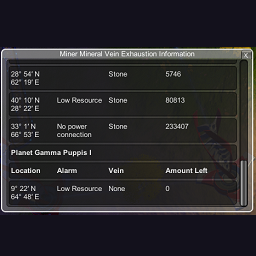
The plugin will periodically check the miners for an alarm (Low Power, Low Production Yield), and/or if they remaining mineral they can mine is low or none.
If a miner is detected with this condition a first time notification window will pop up, but afterwards only available through the toggle button [M] on lower right, or by pressing the hot key.
If you have cleared out all faulty miners by default this will allow a popup notification to occur again.