

You are viewing a potentially older version of this package. View Latest Version

BetterStats
Add more information to the production stats panelBetterStats
This mod improves the production stats panel to add the count of producer/consumer and the maximum theoretical production/consumption (i.e.: the maximum you can produce if you have no power issue or input/output bottleneck), taking into account mining productivity multipliers.
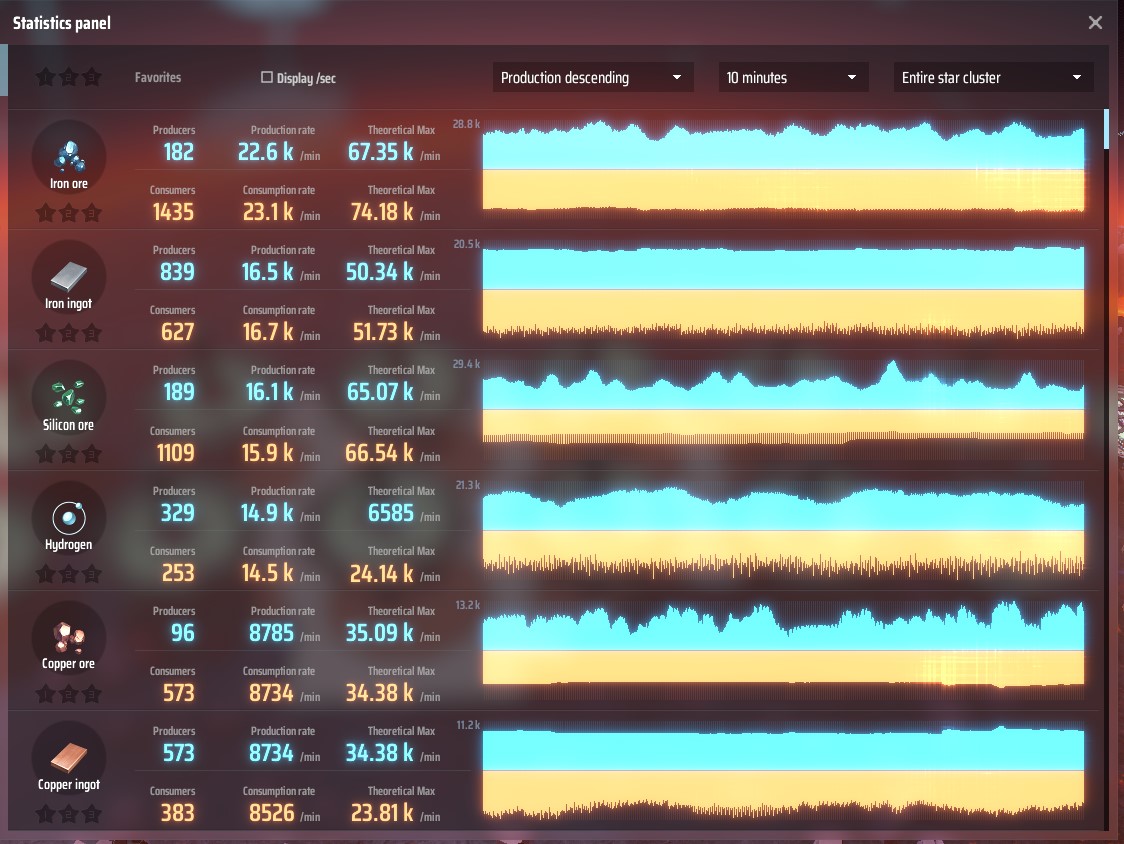
Configuration
After a first launch you will find the configuration file BepInEx\config\com.brokenmass.plugin.DSP.BetterStats.cfg.
You can customise the production ratios that govern text highlighting (red for lack of production ; yellow when max consumption is way above max production)
Changelog
v1.3.0
- FEAT: Highlights in red items where production is insufficient (Thanks ThomasBlt)
- FIX: fix error if the game 'language' uses
.as decimal separator instead of,(thanks ThomasBlt)
v1.2.1
- FIX: Fix compatibility with game version 0.7.18.7275 (thanks burdoto / wmtorode / ThomasBlt)
v1.2.0
- FEAT: allow to filter stats by item name
- FEAT: Count critical photon production (thanks zhangxp1998)
v1.1.2
- FIX: Fix fractionators incorrectly reporting production as consumption
- FIX: Limit miners production to max output possible (30item/s max belt speed) (thanks zhangxp1998)
v1.1.1
- FEAT: Include production of Orbital Collector stations
v1.1.0
- FEAT: Improved UI
- FEAT: Allows to display stats per seconds instead of per minute (thanks wingless)
- FEAT: Shows number of producer and consumers
v1.0.0
- Initial Release
To build this mod
Inspired by https://docs.bepinex.dev/master/articles/dev_guide/plugin_tutorial/1_setup.html
Setup visual studio
- Install Visual Studio (not visual studio code)
- In Visual Studio, create a new blank project and there choose "add more tools" and add .Net developpement support
- Install .Net Framework 3.5 (be careful to choose "Framework")
project setup
- In Visual Studio, choose import and then select "BetterStats.csproj"
- In the right tree, right click references and then select "add references" and add the requered references (most of them located in C:\Program Files (x86)\Steam\steamapps\common\Dyson Sphere Program\DSPGAME_Data\Managed ; others are from BepinEx)
- You will find the last DLL "Assembly-CSharp.refstub.dll" in https://discord.com/channels/806549677209944084/806556447885623336/809241758323572766
Icon made by Freepik from www.flaticon.com