MultiBuild
This mods gives you the ability to build multiple copies of a building, with optional space between the copies.
It also allow you to create / restore/ export/ import blueprints, allowing you to copy and paste whole parts of your base
Please carefully read the FAQ section.
Visit the amazing website created by Diacred https://www.dysonsphereblueprints.com to view and share blueprints!
This mod is NOT COMPATIBLE with AdvancedBuildDestruct and Copyinserters, but that shouldn't be a problem as this mod provides the same functionalities (multibuild, copy of inserters, etc).
The mod will not initialise if any of the incompatible mods are loaded. please remove them from your modman profile or from your plugins (if you are installing mods manually)
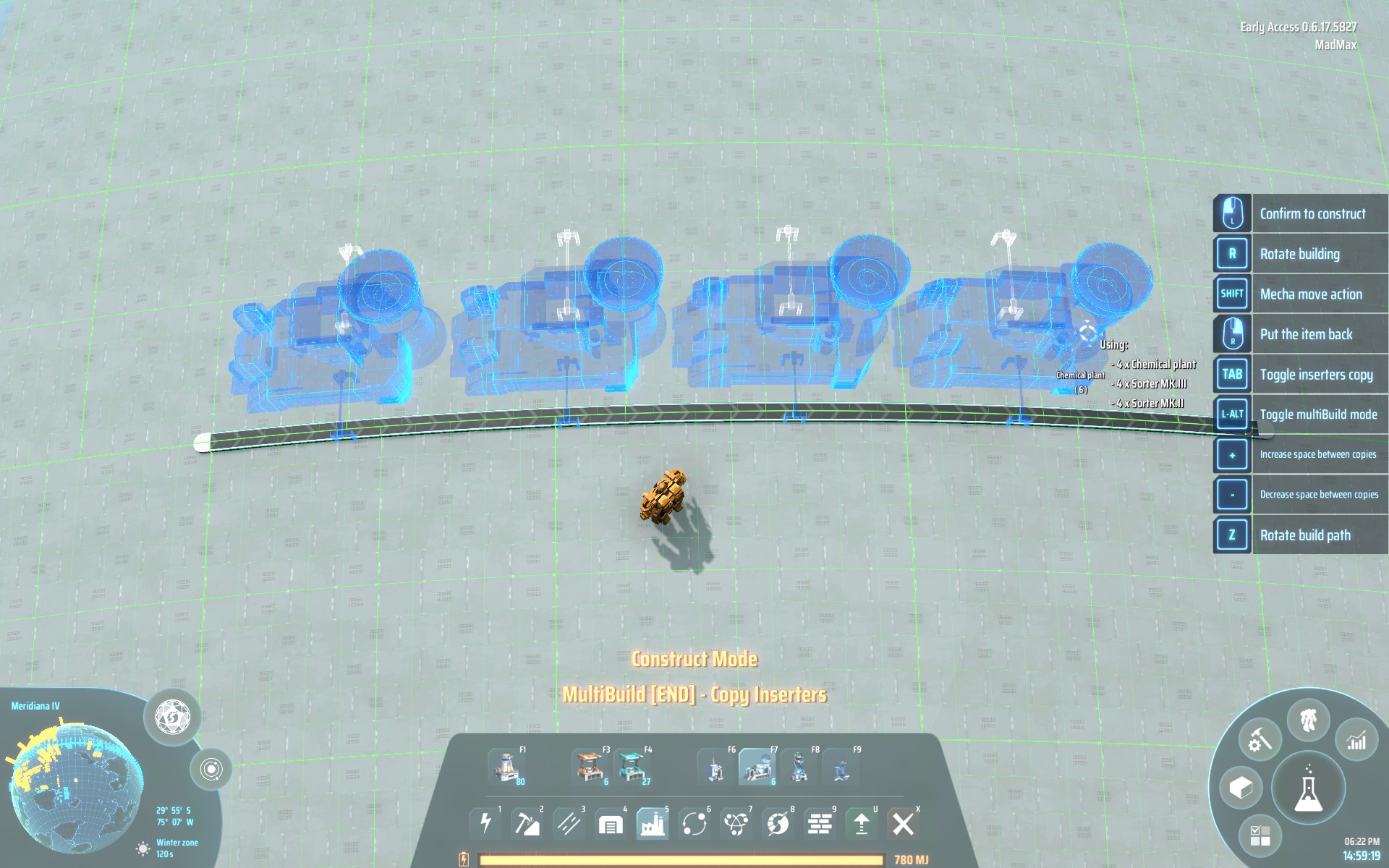
In this screenshot you can see MultiBuild in multibuild mode and BuildCounter;
Release channels
This mod is released on 2 separate "channels":
-
MultiBuild: The stable version of this mod. Only when functionalities have reached a target level of stability they are promoted to this channel. This mean that this version is updated less often than the other. Consider this the SLOW CHANNEL and choose this version if you prefer stability over functionalities.
-
MultiBuildBeta: The 'bleeding' edge version of the mod, aligned to the most recent version of the code. While still being highly reliable, when using this versions you might experience some 'weirdness', graphic glitches and, very rarely, an error message. Consider this the FAST CHANNEL and and choose this version if you want the latest functionalities and/or if you want to contribute to the development of this mod.
The two channels are not compatible with each other and none of the 2 will load if they are both loaded at the same time.
Disclaimer
This mod does not alter any entity or save anything to disk.
This mean the mod SHOULD be very safe to use and not break your savegame, not even after an update.
If it stops working following a game update, you can just disable it and your game will just work, obviously without the extended capabilities provided by the mod.
Usage
MultiBuild Mode
Select a building from the building bar or copy an exisiting building, then press LEFT ALT keyboard button to enter multibuild mode.
This mode is disabled while holding a blueprint (for now).
Left Mouse Click once to start building and Left Mouse Click one more time when you are happy with the placement of the copies.
- Press
TAB to toggle the pasting of the copied inserters
- Press
+ and - on your keyboard to increase / decrease the spacing between buildings
- Press
CTRL + and CTRL - on your keyboard to increase / decrease the spacing period (number of copied before adding a space)
- Press
0 to reset spacing to 0 and spacing period to 1
- Press
Z to 'rotate' the building path (if you are not buildin on a straight line)
Blueprint Mode
Click the blueprint button in the build dock
- The first button initiate the creation of a new blueprint
left click (and hold if you want) to add entities to the blueprint
- hold
CTRL and left click (and hold if you want) to remove entities from the blueprint
right click to exit blueprint creation mode
- The second button restore the last used blueprint
- The 3rd button exports the current blueprint to your clipboard
- The 4th button import the data from your clipboard into your blueprint
Inserter copy functionality
When shift+click an exisisting building it will be copied with all the connected insters (creating a minimal blueprint , that you can store and reload);
Configuration
itemSpecificSpacing
If this option is set to true, the mod will remember the last spacing used for a specific building. Otherwise the spacing will be the same for all entities.
Type: boolean [true/false]
Default value : true
FAQ
-
What are the limitations of this mod (MultiBuild mode)?
This mod doens't allow to place multiple miners, oil extractors or orbital collectors.
-
What are the limitations of this mod (Blueprint mode)?
This mod is still in development and so has one or more know issue:
- in some conditions, when pasting a blueprint, it's possible to place building nearer than what is possible in vanilla
- splitter / boxes settings are not copied
TODO
- Add ability to build a full 'loop' of a certain type of building. useful to build a lot of solar panels.
Changelog
v2.2.0
- MultiBuild is now MultiThreaded. You should notice an improvments in performance when pasting large blueprints / long lines of buildings
- fix 2 bugs (
NPE and array index outOfBounds) happening when blueprinting unbuilt buildings or buildings with unbuilt inserters
v2.1.4-Beta
- Fix error when hovering a multilevel tank while holding a belt in hand
v2.1.3-Beta
- Fix issue with colliders in multibuild mode where shift+clicking a rotated entity and using multibuild mode was leading to either too spaced or not spaced enough copies (the collider of the copies was not correctly rotated)
- Fix issue that allowed to connect inserter to building without inserter slots (like tesla towers for example), when copying building with attached inserters
v2.1.2-Beta
- Allow to import blueprintV1 ! (thanks
Kremnev8)
- fix edge case bug that could led to belt not correctly connecting to tanks / splitter / logistic towers
- Add checks for incompatible items (modded items) when loading a blueprint
v2.1.1-Beta
- Allow to copy / paste elevated belts (multilevel buildings are still ignored even if they appear as selected)
- Allow to connect blueprinted belts with existing ones (only at belt extremities and direction must, obviously, match)
- Allow belt to belt inserter in blueprint as long as both start and end belt are selected
v2.1.0-Beta
- BREAKING CHANGE: Blueprint data format v2: 80% blueprint size reduction.
- new Spherical coordinates positioning system. AMAZING work by
Kremnev8
- General code cleanup and big performance improvements across the board
- fix bug where building of a blueprints could be placed on water if positioned outside the mecha building range
- fix blueprint menu not closing in sail mode
v2.0.6-Beta
- Fix some buildings (power exchanger / ejectors / lab / rayreceivers) 'recipe' not being correctly copied in blueprint mode
- Add ability to configure spacing period in multibuild using
CTRL + and CTRL -
- Add ability to toggle pasting of inserters in single and multibuild mode (not in blueprint mode) using
TAB
v2.0.5-Beta
- Fix unresponsive blueprint UI
v2.0.4-Beta
- Fix an issue in blueprint mode where some buildings (tanks / fractionators / powerExchangers) were not correctly connecting to belts if the connected belt was built before the building itself
- Blueprint panel shows correct info about last stored blueprint
- Add ability to prepend blueprint strings with custom text to allow to quick identification of a stored blueprint. A
: must terminate the custom string Example Blueprint name:<actual blueprint string>. The custom text, if present, will be shown in the panel info if an imported blueprint is stored.
- Change visual notification when importing/exporting from blocking popup to less intrusive realtime popup notification
v2.0.3-Beta
- Fix an edge case issue where buildings where not copied with the correct yaw (happen if you copy an area containing belts that was created by a rotated blueprint, and the first element you select is a belt :S)
- Fix blueprint data not correctly resetting when leaviing build mode
v2.0.2-Beta
- Logistic station settings and slot filters are now correctly copied and pasted (not when
shift + clicking to avoid mistakes)
- Fix an issue where some buildings 'recipe' was not being copied (ejectors for example)
- Fix splitters not using the correct 'model' when copied or blueprinted
- Fix issue where connected inserters not being copied when
shift + clicking while not in build mode
v2.0.1-Beta
- Fix error where splitter cannot be pasted (
Too Close error)
v2.0.0-Beta
v1.1.2
- Fix incompatibility issue with CopyInserters where inserters were not being copied when in multibuild mode
v1.1.1
- Fix a bug where the build preview disappears and the game reports "building out of range", if, when in multibuild mode, only a single copy of the building is placed.
v1.1.0
- Store spacing indipendently per item so that you can place your power poles with a different spacing than your assembler without having to constantly tap
+ and -. You can opt out of this functionality and revert to the hold behavious by setting the itemSpecificSpacing config to false.
- Add ability to use key
0 to reset spacing
v1.0.2
- Fixes incorrect (slightly large) spacing of accumulators
v1.0.1
- Fixes an null pointer error in some cases when the spacing was set to a value higher than the amount of spaces between start and end
- Add ability to use keypad + and - to increase / decrease spacing
- Fix spacing of power poles
v1.0.0
Special Thanks
Thanks to Kremnev8 for the amazing work on the UI !
Thanks to Nordblum, Fury_Fairy, iskabot , Ixosis, NZ_Wanderer, Kodu, Wingless for the closed beta testing.