

MultiBuildBeta
This mods gives you the ability to blueprint and build multiple copies of a building, with optional space between the copies, including the insertersMultiBuild
This mods gives you the ability to build multiple copies of a building, with optional space between the copies. It also allow you to create / restore/ export/ import blueprints, allowing you to copy and paste whole parts of your base
This mod is NOT COMPATIBLE with AdvancedBuildDestruct and Copyinserters, but that shouldn't be a problem as this mod provides the same functionalities (multibuild, copy of inserters, etc).
The mod will not initialise if any of the incompatible mods are loaded. please remove them from your modman profile or from your plugins (if you are installing mods manually)
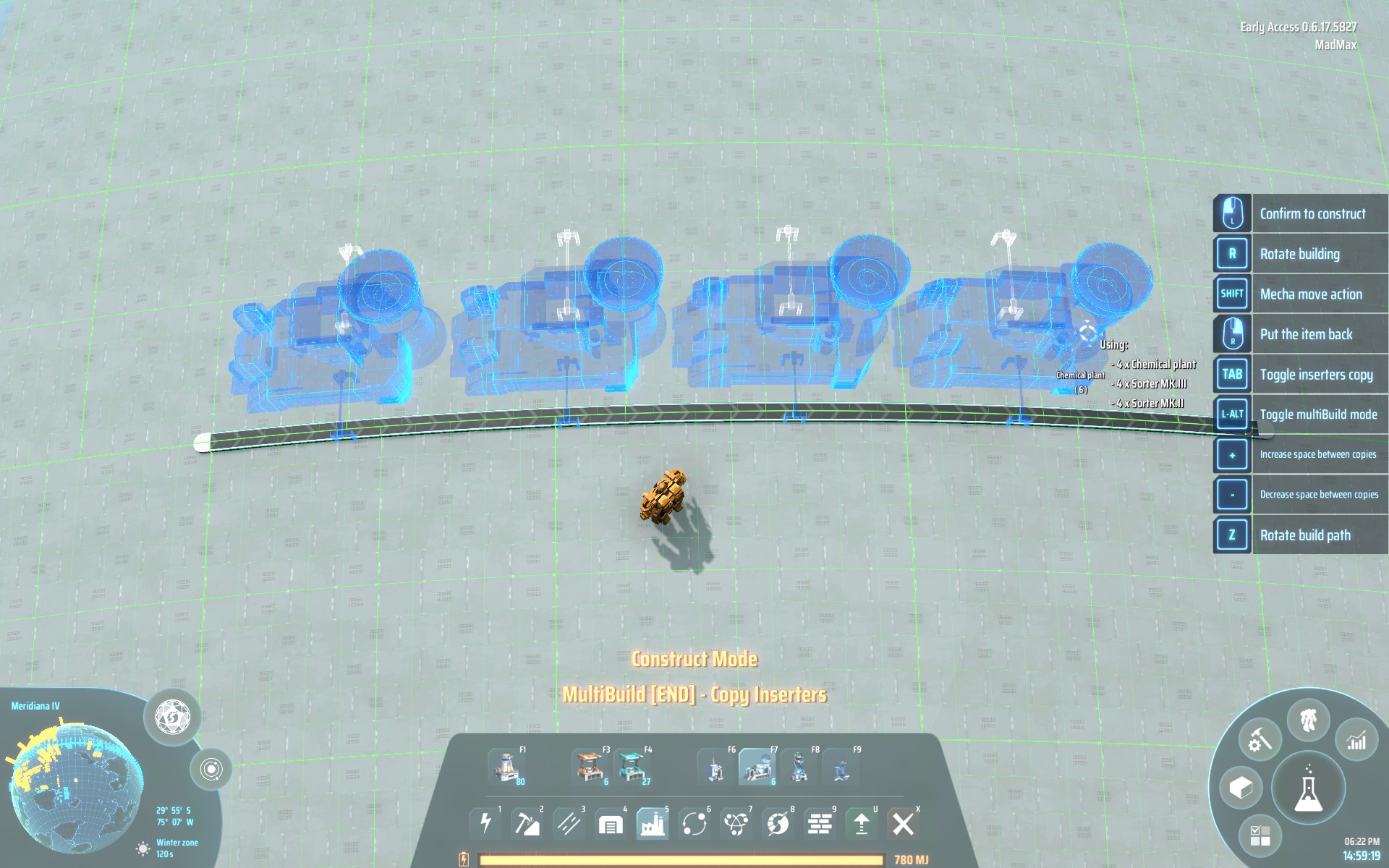
In this screenshot you can see MultiBuild in multibuild mode and BuildCounter;
Beta Notice
This version is under development and cannot , yet, be considered fully stable. It should not affect in any destructive manner your savegame, but you might experience some 'weirdness' and graphic glitches when using this mod.
Please carefully read the limitation of the current beta version of this mod.
Disclaimer
This mod does not alter any entity or save anything to disk.
This mean the mod SHOULD be very safe to use and not break your savegame, not even after an update.
If it stops working following a game update, you can just disable it and your game will just work, obviously without the extended capabilities provided by the mod.
Usage
MultiBuild Mode
Select a building from the building bar or copy an exisiting building, then press LEFT ALT keyboard button to enter multibuild mode.
This mode is disabled while holding a blueprint (for now).
Left Mouse Click once to start building and Left Mouse Click one more time when you are happy with the placement of the copies.
Press + and - on your keyboard to increase / decrease the spacing between buildings
Press 0 to reset spacing to 0
Press Z to 'rotate' the building path (if you are not buildin on a straight line)
Blueprint Mode
Click the blueprint button in the build dock
-
The first button initiate the creation of a new blueprint
left click (and hold)to add entities to the blueprinthold controlandleft click (and hold)to remove entities from the blueprintright clickto exit blueprint creation mode
-
The second button restore the last used blueprint
-
The 3rd button exports the current blueprint to your clipboard
-
The 4th button import the data from your clipboard into your blueprint
Inserter copy functionality
When shift+click an exisisting building it will be copied with all the connected insters (creating a minimal blueprint , that you can store and reload);
Configuration
itemSpecificSpacing
If this option is set to true, the mod will remember the last spacing used for a specific building. Otherwise the spacing will be the same for all entities.
Type: boolean [true/false]Default value : true
FAQ
-
What are the limitations of this mod (MultiBuild mode)?
This mod doens't allow to place multiple miners, oil extractors or orbital collectors. -
What are the limitations of this mod (Blueprint mode)?
This mod is still in development and so has one or more know issue:- positionin of entities around the poles is a bit finicky
- in some conditions, when pasting a blueprint, it's possible to place building nearer than what is possible in vanilla
- splitter / boxes settings are not copied
TODO
- Add ability to build a full 'loop' of a certain type of building. useful to build a lot of solar panels.
- Allow to build outside build range (acting as a sort of)
Changelog
v2.0.5-Beta
- Fix unresponsive blueprint UI
v2.0.4-Beta
- Fix an issue in blueprint mode where some buildings (tanks / fractionators / powerExchangers) were not correctly connecting to belts if the connected belt was built before the building itself
- Blueprint panel shows correct info about last stored blueprint
- Add ability to prepend blueprint strings with custom text to allow to quick identification of a stored blueprint. A
:must terminate the custom string ExampleBlueprint name:<actual blueprint string>. The custom text, if present, will be shown in the panel info if an imported blueprint is stored. - Change visual notification when importing/exporting from blocking popup to less intrusive realtime popup notification
v2.0.3-Beta
- Fix an edge case issue where buildings where not copied with the correct yaw (happen if you copy an area containing belts that was created by a rotated blueprint, and the first element you select is a belt :S)
- Fix blueprint data not correctly resetting when leaviing build mode
v2.0.2-Beta
- Logistic station settings and slot filters are now correctly copied and pasted (not when
shift + clickingto avoid mistakes) - Fix an issue where some buildings 'recipe' was not being copied (ejectors for example)
- Fix splitters not using the correct 'model' when copied or blueprinted
- Fix issue where connected inserters not being copied when
shift + clickingwhile not in build mode
v2.0.1-Beta
- Fix error where splitter cannot be pasted (
Too Closeerror)
v2.0.0-Beta
- Blueprints !!!
v1.1.2
- Fix incompatibility issue with CopyInserters where inserters were not being copied when in multibuild mode
v1.1.1
- Fix a bug where the build preview disappears and the game reports "building out of range", if, when in multibuild mode, only a single copy of the building is placed.
v1.1.0
- Store spacing indipendently per item so that you can place your power poles with a different spacing than your assembler without having to constantly tap
+and-. You can opt out of this functionality and revert to the hold behavious by setting theitemSpecificSpacingconfig tofalse. - Add ability to use key
0to reset spacing
v1.0.2
- Fixes incorrect (slightly large) spacing of accumulators
v1.0.1
- Fixes an null pointer error in some cases when the spacing was set to a value higher than the amount of spaces between start and end
- Add ability to use keypad + and - to increase / decrease spacing
- Fix spacing of power poles
v1.0.0
- Initial Release
Special Thanks
Thanks to Kremnev8 for the amazing work on the UI !
Thanks to Nordblum, Fury_Fairy, iskabot , Ixosis, NZ_Wanderer, Kodu, Wingless for the closed beta testing.