


PowerMeter
Keeps power generation, demand, capacity, load and charge/discharge for your current planet, current star system and every star system on screen at all times.PowerMeter
A Dyson Sphere Program mod that keeps the power situation of your current planet, your current star system, and every star system on screen at all times.
You no longer have to reopen the statistics window every time you want to check power. While you are building, the headroom you have left and the energy moving through your Energy Exchangers are simply there to read.
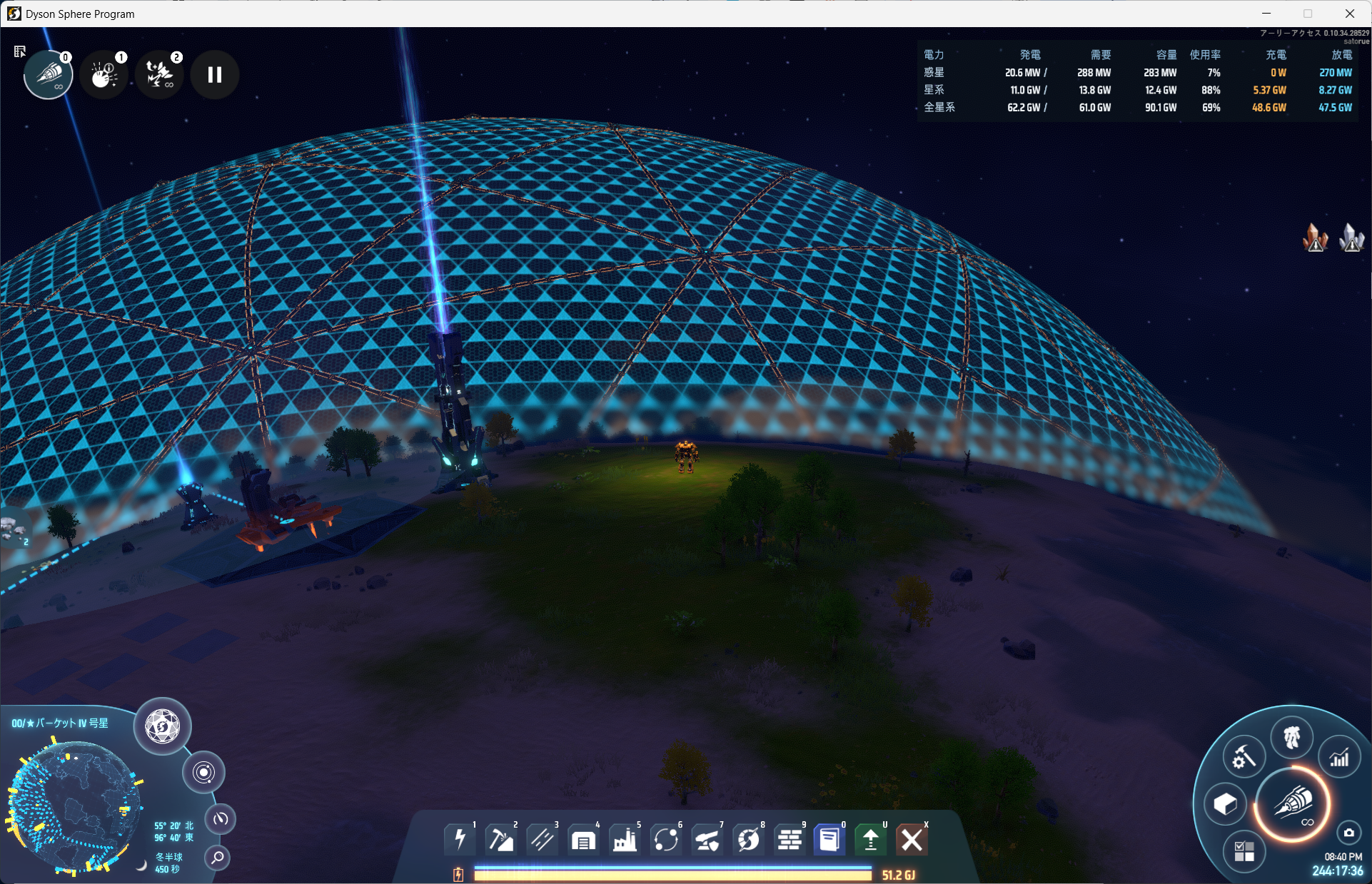
In the screenshot above, the planet the mecha is standing on only generates 20.6 MW against a demand of 288 MW — the rest arrives as 270 MW of discharge from an Energy Exchanger. At the same time the star system as a whole is at 88% load, so its generation headroom is running thin.
The widget is drawn with uGUI underneath the game's own HUD, so it follows the game's font and UI scale, and hides itself in the main menu.
Columns
| Column | What it is | In-game statistics panel |
|---|---|---|
| Gen | Power actually being generated | (sum of the lower circles) |
| Demand | Power the consumers are asking for | Consumption Demand |
| Cap | Maximum generation capability | Generation Capacity |
| Load | Gen / Cap. How much generation headroom is left | (PowerMeter's own) |
| Suff | Served / Demand. Below 100% only when power is short | Sufficiency |
| Charge | Power going into accumulators and Energy Exchangers | Charging Power |
| Discharge | Power coming out of them | Discharging Power |
| Stored | Energy sitting in accumulators | Accumulated |
Gen, Demand, Cap, Load, Charge and Discharge are shown by default. Suff and Stored can be added in the config.
Load turns a warning colour at 90% and above, Suff below 95%.
A note on the numbers
The last digit can differ from the in-game panel (for example 35.9 GW against 35.8 GW). This is not a difference in the data — the game's StringBuilderUtility.WriteKMGPower truncates, while PowerMeter rounds to 3 significant digits.
Requirements
| Dyson Sphere Program | Unity 2022.3 line (verified on Early Access 0.10.34) |
| BepInEx | 5.4.17 |
| Mod manager | r2modman |
Installing
PowerMeter is not on Thunderstore, but r2modman can manage it like any other mod through a local import — it appears in the mod list alongside everything else and can be toggled on and off.
Option A: let r2modman manage it
Build the package:
dotnet build -c Release -t:Package
This produces artifacts\endo5501-PowerMeter-<version>.zip. Load it from Settings → Install local mod in r2modman. The zip carries a Thunderstore V1 manifest.json, so the name, author, version and the BepInEx dependency are all picked up automatically.
Do not combine this with option B. The same plugin sitting in both
plugins\PowerMeter\and the folder r2modman unpacks means one GUID registered twice, and BepInEx will refuse to load one of them. When you switch to r2modman, deleteplugins\PowerMeter\and setDeployToProfiletofalseinDirectory.Build.props.
Option B: copy straight into the profile
Building copies the DLLs into the profile's plugins folder by default. During development this is the quicker loop — edit, build, relaunch.
dotnet build -c Release
Lands in:
%AppData%\r2modmanPlus-local\DysonSphereProgram\profiles\Default\BepInEx\plugins\PowerMeter\
  PowerMeter.Plugin.dll
  PowerMeter.Core.dll
The automatic copy is controlled by DeployToProfile in Directory.Build.props. To suppress it for a single build, pass /p:DeployToProfile=false.
Either way, launch the game from r2modman afterwards. The config file is created on the first run.
Using it
Alt + P toggles the widget. The key is configurable.
Configuration
The config file is written to the path below, and is also reachable through r2modman's Config editor.
%AppData%\r2modmanPlus-local\DysonSphereProgram\profiles\Default\BepInEx\config\com.endo5501.dsp.PowerMeter.cfg
Position, font size and which columns are shown all take effect without restarting the game.
General
| Key | Default | |
|---|---|---|
Enabled |
true |
Turns the mod on and off |
ToggleHotkey |
P + LeftAlt |
Visibility toggle |
UpdateIntervalSeconds |
0.5 |
How often the values are recomputed. 0.1–5.0 |
Language |
Auto |
Label language. Auto follows the game's setting. Japanese / English |
Layout
| Key | Default | |
|---|---|---|
Corner |
TopRight |
TopLeft / TopRight / BottomLeft / BottomRight |
OffsetX / OffsetY |
16 |
Offset from that corner |
FontSize |
14 |
Font size. The whole widget scales with it |
BackgroundOpacity |
0.55 |
Background panel opacity. 0 for no background |
Columns
| Key | Default | |
|---|---|---|
ShowCapacity |
true |
The Cap column |
ShowUtilization |
true |
The Load column |
ShowSatisfaction |
false |
The Suff column |
ChargeColumn |
Split |
Split (charge and discharge separately) / Net (one signed column) / Off |
ShowAccumulated |
false |
The Stored column |
UtilizationWarningPercent |
90 |
Load warns at this value and above |
SatisfactionWarningPercent |
95 |
Suff warns below this value |
Diagnostics
| Key | Default | |
|---|---|---|
DiagnosticLogging |
false |
Writes the aggregated results, and the unrounded W / J values, to the BepInEx log |
DiagnosticLogIntervalSeconds |
5 |
How often |
If a displayed value looks wrong, set DiagnosticLogging to true and the raw numbers appear in BepInEx\LogOutput.log, ready to compare against the in-game statistics panel.
Development
Layout
The logic that depends on neither the game nor Unity lives in PowerMeter.Core, and that is the part covered by unit tests. GamePowerSampler is the only file that touches game types.
PowerMeter.sln
Directory.Build.props            Game / BepInEx paths, deployment switch
packaging/
  manifest.json                  Thunderstore V1. Carries author, so no filename convention needed
  icon.png                       256x256
src/
  PowerMeter.Core/               netstandard2.0. No game or Unity references
    PowerScope.cs                Aggregation scope (Planet / Star / Global)
    NetworkSample.cs             Raw values of one power network
    PowerSnapshot.cs             Aggregated result
    PowerAggregator.cs           Per-scope sums and ratios
    PowerFormatter.cs            W / J / % formatting
  PowerMeter.Plugin/             net472. BepInEx glue
    PowerMeterPlugin.cs          Entry point
    PowerMeterConfig.cs          Config binding
    GamePowerSampler.cs          Game state -> NetworkSample, the boundary
    UI/PowerMeterWidget.cs       The uGUI widget
    UI/WidgetLabels.cs           English / Japanese labels
tests/
  PowerMeter.Core.Tests/         net7.0 / xUnit
What you need
- .NET SDK 7 or newer
- The game, and an r2modman profile with BepInEx 5.4.17 installed
Game DLLs and BepInEx are referenced straight from the local install, so no NuGet feed configuration is needed — the only packages are the net472 reference assemblies and the test dependencies.
If your paths differ from the defaults, override them with environment variables:
DSP_GAME_DIR      The game folder
DSP_BEPINEX_DIR   The BepInEx folder (inside the profile)
Tests
dotnet test
Packaging
dotnet build -c Release -t:Package
Collects manifest.json, icon.png, both READMEs, LICENSE and the two DLLs into artifacts\endo5501-PowerMeter-<version>.zip. It is a Thunderstore package as-is, so the same zip works for publishing there.
PowerMeterVersion in Directory.Build.props is the single source of truth for the version. Packaging fails if version_number in packaging/manifest.json has drifted from it, and it fails outside the Release configuration.
The screenshot is deliberately left out of the zip. Neither Thunderstore nor r2modman resolves relative image paths in a README, so the READMEs link to it by absolute URL on GitHub instead and the image still renders on the package page.
Where the power values come from
Every PowerNetwork in GameMain.data.factories[i].powerSystem.netPool[] is summed directly. Those values persist across ticks, so reading them from UI code is safe. Converting to watts is a multiplication by GameMain.tickPerSecI.
The following are not used, and the reasons are worth keeping:
FactoryProductionStat.powerGenRegisterand the other registers — cleared after each tick's aggregation, so reading them from the UI catches zeroes or partial valuesAstroPowerStatPlan.CalculateAstroPowerBaseInfo()— depends on internal state such asstatFactoryIndicesand cannot be used standalone without theOnInitlifecyclePowerNetwork.energyAccumulated— close in name, but it belongs to the building tooltip. The statistics window's Accumulated isenergyStored
Every column was checked against the in-game statistics panel on a live save. The behaviour of planets receiving from and charging into an Energy Exchanger is pinned by regression tests.
License
MIT. See LICENSE.