
RemoteStorage
跨星球远程开箱 + 全星系掉落物汇总:建筑/原材料/混合/空箱分类,另有建筑掉落、材料掉落页;点图标远程开箱或一键捡走地面掉落。Remote storage boxes on any planet plus a ground-drop warehouse, in one panel.远程储物箱 · RemoteStorage
不用回星球,也能打开任意星球的储物箱;顺手把全星系地上的掉落物收进背包。
本模组有两块功能,共用一个 F9 面板:
- 远程储物箱:扫描全星系的储物箱,点某个格子,就用游戏自己的储物箱窗口 打开那个箱子。取物品、放物品、拆分、排序、过滤、输入限制……全部是游戏原版逻辑, 模组没有自己实现任何储物箱界面。
- 掉落物页:把全星系地面上的掉落物按物品种类汇总成图标格, 点一下就把该种类的全部地面掉落拿走;按建筑 / 材料分成两页。
需要 BepInEx 5(Thunderstore 上安装
xiaoye97-BepInEx即可)。
使用方法
- 进游戏后按 F9 打开面板(可在配置里改键)。
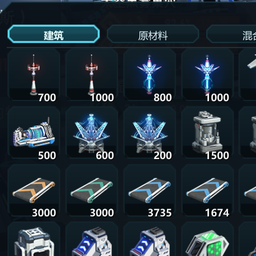
- 面板是一个 12 列 × 8 行的图标方格,和游戏的物品栏 / 建筑栏排版一致; 内容超过 96 格时可以滚动。
- 顶部标签:
- 建筑 / 原材料 / 混合:储物箱分类;有空箱子时会多一个 空箱;
- 建筑掉落 / 材料掉落:地面掉落物,按物品属于建筑页还是物品页分页,排在最后。 打开时默认选中箱子最多的分类;一个箱子都没有时,自动落到有掉落物的那一页。
- 在储物箱标签页点击方格 → 游戏原生的储物箱窗口打开那个箱子, 就像你站在它面前点开它一样;面板会自动收起,避免挡住原生窗口。
- 在掉落物标签页点击方格 → 拿走该物品在全星系地面上的全部掉落; 标签行右侧的 全部拿取 会把当前页的所有掉落一次收走。
- 再按 F9,或点右上角 × / 按 Esc,关闭面板。
储物箱页
- 分类规则:箱内只有一种物品时,建筑类物品进「建筑」,其它物品进「原材料」; 两种及以上物品的箱子进「混合」;空格子进「空箱」。
- 数量:只有单一物品的箱子会在图标右下角显示数量;10000 以内显示原数字,
超过后缩写为
1W/1.2W/10W(英文为K/M)。混合箱和空箱不显示数量。 - 排序:每个分类里都按游戏“物品 / 建筑”选择器的格位顺序(
ItemProto.GridIndex, 也就是截图里的物品顺序)排列;混合箱按数量最多的那种物品排序。 - 图标规则:单物品 → 该物品图标;多种物品 → 最多 4 个图标拼合;空箱 → 储物箱建筑图标。
- 顶部空白区域可以拖动面板;面板位置会自动记住。
- 游戏暂停、打开全屏界面(如物品选择器)时,面板会自动隐藏。
掉落物页
- 统计的是全星系地面上的掉落物:击杀黑雾掉落、背包满时游戏扔到地上的物品、 丢在太空里的垃圾……同种物品不分星球 / 星系,全部合并成一格。
- 数量没有上限,显示方式与储物箱页一致(
1W/1.2W/1亿)。 - 排序同样按
ItemProto.GridIndex;也可以在配置里改成按数量从多到少排序。 - 打开面板时每 0.4 秒刷新一次,战斗后数字会自己变化。
- 鼠标悬停会显示物品名、类型和精确数量。
- 拿取:先把物品放进背包,再删除地面原件;背包/宝盒装不下的余量会按游戏原版行为 掉在脚下,不会丢失,也不会复制。拿取结果会在面板底部短暂提示。
- 沙土(物品 1099)会进沙土池,不占背包格。
原生窗口
- 打开后就是游戏原本的储物箱窗口:格子分堆显示、取放、右键拆分、Shift/Ctrl 多选、 排序、过滤、自动化输入限制等都与原版一致。
- 窗口绑定的是目标星球的储物箱数据,所以可以直接从远处箱子取物、往里面放物。
- 打开期间不会被游戏“观察目标变化”逻辑抢走或关闭;请用窗口关闭按钮或 E 关闭。
- 箱子被拆除或数据失效时,原生窗口会按游戏原本的逻辑自动关闭。
模组不会自己搬运/复制物品,所有储物操作都由游戏代码完成。
配置
配置文件:BepInEx\config\com.yourname.remotestorage.cfg
| 配置项 | 默认值 | 说明 |
|---|---|---|
General.Hotkey |
F9 |
打开/关闭面板的快捷键 |
General.Language |
auto |
auto / zh / en |
General.RefreshSeconds |
2 |
储物箱自动重新扫描间隔(秒),0 = 只手动刷新 |
General.ShowEmptyBoxes |
true |
是否显示空箱子 |
Drops.RefreshSeconds |
0.4 |
掉落物重新统计间隔(秒) |
Drops.SortByCount |
false |
true = 掉落物按数量从多到少排序 |
Drops.KeepEnemyDrops |
false |
兜底开关:黑雾掉落物不再自动消失(仍留在地上等你拿) |
Window.X / Window.Y |
-1 |
面板位置,-1 表示自动居中 |
日志
模组不生成额外的诊断文件。打开失败、拿取失败等异常只写 BepInEx 标准日志:
BepInEx\LogOutput.log
说明与限制
- 储物箱部分只列出带物品格的实体储物箱(储物箱、配送器等);物流塔/储液罐库存不在本版本范围内。
- 掉落物部分只统计
TrashSystem里的地面掉落物;传送带、储物箱、物流塔库存不算。 - 支持其它星球、其它星系:游戏卸载星球时只卸载显示,数据仍然留在内存里。
- 打开原生窗口时会按原版流程同时打开玩家背包窗口,方便直接拖放。
- 背包容量仍是游戏原版限制;拿取只是把“地上的”换成“背包里的”,不会突破堆叠上限。
- 面板是 IMGUI 绘制的图标方格;物品界面完全是游戏原版。
- 纯客户端模组,不改存档结构,不写入游戏目录。多人(Nebula)未测试。
English
Open any planet's storage box from anywhere, and sweep up every ground drop in the galaxy.
Two features share one F9 panel:
- Remote storage: scan every storage box in the save; clicking a cell binds and opens the
game's native
UIStorageWindowfor that box. Taking, putting, splitting, sorting, filters and automation limits are all the vanilla storage logic. - Drop tabs: every ground drop in the galaxy, aggregated per item type. Click a cell to take all of that item's ground drops; Building drops and Material drops are separate tabs.
Press F9 to open the picker: a 12 × 8 icon grid (scrolls past 96 cells) with
Buildings / Materials / Mixed tabs (plus Empty when empty boxes exist), followed by the
Building drops and Material drops tabs. Single-item boxes show their total in the
lower-right corner, abbreviated to 1W / 1.2W / 10W above 9,999 (K / M in English);
mixed and empty boxes show no number. Each tab is sorted by the item's position in the game's own
item/building picker (ItemProto.GridIndex), i.e. the order in the screenshots.
Click a storage cell to open that box in the native storage window; the picker closes so the window is visible. Click a drop cell to take every ground stack of that item; Take all on the right collects the whole current drop tab. If your bag is full, the overflow is dropped at your feet by the vanilla logic — nothing is lost or duplicated. Drops refresh every 0.4 s while the panel is open; soil pile goes to the sand pool.
Requires BepInEx 5 (xiaoye97-BepInEx on Thunderstore).
Config: BepInEx\config\com.yourname.remotestorage.cfg.