

DysonOrbitModifier
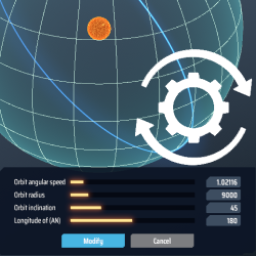
Change the parameters of the existing swarm/sphere orbits. 修改已创建的戴森云/戴森球轨道参数。DysonOrbitModifier

This mod let you view and change parameters of a existing orbit without deleting it.
You can also edit parameter in configuration to make bigger dyson sphere. (unsafe)
Save the game before editing orbits in case of potential crush.
Usage
Select the Dyson swarm/layer number and the Add button will switch to Modify button.
Click it to open the modify panel, you can change the radius, angle, rotation speed (layer only) of that orbit.
Enter -1 in the rotation speed input field to restore the default rotation speed for that radius.
Deselect the orbit number to make the Modify button switchs back to the Add button.
Configuration
modify panel setting
- minRadiusMultiplier : Multiplier of default minimum radius
- maxRadiusMultiplier : Multiplier of default maximum radius
- maxAngularSpeed : Maximum rotation speed
option
- EditNonemptySphere : Allow to modify a layer which is not empty
Warning : Changing the radius of a constructed layer orbit might damage the save file.
使用方法
点选戴森云/球轨道号码,新增按钮会切换为修改按钮。
按下后会打开修改面板,可修改该轨道的半径、角度、旋转速度(限戴森球层)。
在旋转速度的栏位输入-1可以回到该半径的预设旋转速度。
取消选取轨道号码使修改按钮切换回新增按钮。
设置
修改面板设置
- minRadiusMultiplier : 最小轨道半径的倍率
- maxRadiusMultiplier : 最大轨道半径的倍率
- maxAngularSpeed : 最大旋转速度
选项
- EditNonemptySphere : 允许修改非空壳层轨道
警告 : 修改已建有节点的戴森球层的半径可能会损坏存档
Changelog
v1.0.0
Initial Release
Acknowledgements
All trademarks, copyright, and resources related to Dyson Sphere Project itself, remain the property of Gamera Game and Youthcat Studio as applicable according to the license agreement distributed with Dyson Sphere Program.