

DysonOrbitModifier
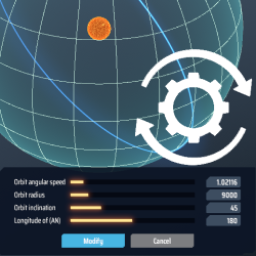
Change the parameters of the created swarm/sphere orbits. 修改已创建的戴森云/戴森球轨道参数。DysonOrbitModifier

syncPosition = true

syncPosition = false
This mod let you view and change parameters of a created orbit without deleting it.
You can also edit parameter in configuration to make a bigger dyson sphere.
Don't use this mod if you want to upload to Milky Way.
Save the game before editing orbits in case of potential crush.
Usage
Select the Dyson swarm/layer number and the Add button will switch to Modify button.
Click it to open the modify panel, you can change the radius, angle, rotation speed (layer only) of that orbit.
Enter -1 in the rotation speed input field to restore the default rotation speed for that radius.
Deselect the orbit number to make the Modify button switchs back to the Add button.
Configuration
Run the game one time to generate .cfg file. Restart the game to make the changes take effect.
-
modify panel settingminRadiusMultiplier: Multiplier of default minimum radius (Default :1.0)maxRadiusMultiplier: Multiplier of default maximum radius (Default :1.0)maxAngularSpeed: Maximum rotation speed (Default :10.0)
-
optionsyncPosition: Move objects to the same grid position when the layer orientation is changed. (Default :true)
When this option is disabled, the graticule frames may be deformed due to changes in the grid.syncAltitude: Move objects to the same altitude when the layer radius is changed. (Default :true)
Disable this option can cause some abnormal graphic effects.correctOnChange: Remove exceeding Structure Point/Cell Point right after entities are moved. (Default :true)
When changing into a smaller radius, the existing SP/CP in each component may exceed their limits.
Disable it will let SP/CP stay at the original value until editor panel is closed.hierarchicalRotation: (experimental feature) Let outer layer rotation affects inside layers. (Default :false)
修改戴森球轨道
查看/修改现有轨道的参数,例如修改無法被删除的第一轨道。
也可以调整设置的倍率来建造比原本限制更大的戴森球,但可能有风险。
此MOD会修改游戏数据,可能会无法上传银河系,使用前请先存档以防游戏错误。
使用方法
点选戴森云/球轨道号码,新增按钮会切换为修改按钮。
按下后会打开修改面板,可修改该轨道的半径、角度、旋转速度(限戴森球层)。
在旋转速度的栏位输入-1可以回到该半径的预设旋转速度。
取消选取轨道号码使修改按钮切换回新增按钮。
设置
.cfg文件需要先运行过游戏一次才会出现,修改后要重启游戏才会生效。
管理器安装: 左边选项Config editor -> 找到starfi5h.plugin.DysonOrbitModifier -> Edit Config
手动安装: 更改BepInEx\config\com.starfi5h.plugin.DysonOrbitModifier.cfg文件
-
修改面板设置minRadiusMultiplier: 最小轨道半径的倍率 (Default :1.0)maxRadiusMultiplier: 最大轨道半径的倍率 (Default :1.0)maxAngularSpeed: 最大旋转速度 (Default :10.0)
-
选项syncPosition: 当旋轉角度改变时,将壳上的物体移至同样网格座标的位置。(Default :true)
禁用此选项时,經緯線框架可能會因為所在網格變化而變形。syncAltitude: 当半径改变时,将壳上的物体移至同样高度的位置。(Default :true)
禁用此选项可能会导致一些不正常的图形效果。correctOnChange: 移动物体后,立即移除超出的结构点数/细胞点数。(Default :true)
将半径调小时,每个组件中已有的结构点数(SP)/细胞点数(CP)可能超过它们的上限。
禁用此选项将让SP/CP保持在改变之前的数值,直到离开编辑面板。hierarchicalRotation: (实验性功能)让外层的旋转传递至内层。(Default :false)
Changelog
V1.3.0
- Add syncPosition and syncAltitude configuration options.
- Implement hierarchical rotation function.
V1.2.0
- Bugfix : CP request will calculate correctly when changing the radius now.
V1.1.0
- Implement structure moving function.
v1.0.0
- Initial Release. Game Version 0.7.18
Acknowledgements
All trademarks, copyright, and resources related to Dyson Sphere Project itself, remain the property of Gamera Game and Youthcat Studio as applicable according to the license agreement distributed with Dyson Sphere Program.
Icon from https://freeicons.io/logos/cog-configuration-gear-settings-icon-38149