SecondMelee
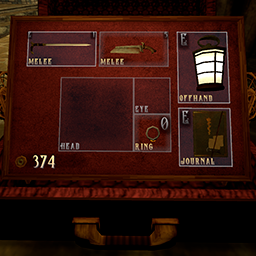
Carry two melee weapons in Gloomwood's melee equipment area.SecondMelee
Carry two melee weapons in Gloomwood's melee equipment area.
Features
- Splits the existing melee equipment area into two native equipment cells.
- Uses the game's existing numbered weapon shortcuts; no extra hotkey system or configuration file.
Requirements
- Windows x64, Gloomwood v0.1.308.19, Unity 2021.3.40. Other game versions are unverified.
- BepInEx 5 x64 for Unity Mono. Build checks use 5.4.23.5 and 5.4.23.6.
- Thunderstore dependency: BepInExPack 5.4.2305.
Installation
Back up your entire Saves folder, or your custom save location, before using the mod. The mod does not create backups automatically.
Mod manager
Install SecondMelee and its BepInExPack dependency in a Gloomwood profile, then launch through that profile. The package layout follows Thunderstore's BepInEx rules; a complete manager installation has not been tested.
Manual
- Close Gloomwood.
- Install BepInEx 5 x64 in the game directory, beside
Gloomwood.exe, if it is not already installed. - Extract the manual archive into that directory. The mod file should be
BepInEx/plugins/SecondMelee/SecondMelee.dll. - If upgrading from Dual Melee, remove or disable old
DualMelee.dllcopies fromBepInEx/pluginsand its subfolders. Keep one version of the mod installed. - Start the game and load your save.
BepInEx and game assemblies are not bundled in this download.
Safe removal
- With the mod enabled, move the item from the second melee cell into ordinary luggage storage.
- Save every slot you intend to use without the mod.
- Close the game, then remove
SecondMelee.dlland any oldDualMelee.dllcopies.
Load older saves with an occupied second cell only while the mod is enabled. Without the mod, the game may relocate or drop that item, particularly with full luggage. Restoring a backup restores only the progress contained in that backup.
Development
Original mod code and development scripts are in the separate source archive. Building requires your own game and BepInEx files; they are not redistributed.
This is an unofficial mod, not affiliated with the game developers. Mod code and documentation were generated with AI from a human-provided design and bug reports.