
CoinBeams
Loot beams for coins, plus a rarity light and boosted sparkles on every valuable - blue for Rare, purple for Epic - so you can read a room's loot at a glance. Client-side visuals.CoinBeams
Loot beams for Grain Rot's coins - inspired by the classic Borderlands / Diablo loot beam.
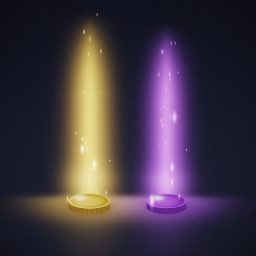
Every gold coin and artifact coin gets a soft, see-through pillar of light rising from it:
- Gold beams on gold coins, purple beams on artifact coins
- Smooth taper - wide soft glow at the coin, narrowing to a bright core that fades out with height
- Beams always point straight up, no matter how a coin lands, tumbles, or flies
- Subtle rising sparkles drift up along each beam (the game's own loot glitter, retinted)
- Works on dispensed coins, enemy drops, chest and locker spawns, and dungeon loot piles
Spot your loot across a dark room without hunting pixel by pixel.
Brighter valuables
Coins get beams - but the carryable valuables (furniture, plants, pictures) only ever had the game's own sparse sparkle, so telling a Rare from an Epic meant flying into the sparkle and inspecting the item.
Two things fix that, and neither one bolts geometry onto your loot:
The game's own sparkles, turned up. Grain Rot scatters its rarity sparkle across each item's actual mesh surface, so it already sits correctly on a hanging picture. This mod amplifies that same effect rather than replacing it - 2.2x bigger sparkles, a faster twinkle, and two extra sparkle systems per item for density.
A rarity light on each valuable - blue for Rare, purple for Epic, white for Common. A light has no shape and no up-vector, so it reads the same on a floor prop, a tumbling item, or a picture on the wall. It never casts shadows, and the number of lights is capped per level.
By default everything valuable is marked, commons included. Set OUTLINE_MIN_QUALITY = 1 for Rare and Epic only, or 2 for Epic alone.
Install
Use a mod manager (r2modman / Thunderstore app) - it handles everything.
Manual install (UE4SS): copy mod/CoinBeams into your UE4SS Mods folder as Mods/CoinBeams, then add CoinBeams : 1 to Mods/mods.txt.
Multiplayer
Purely client-side visuals. Only players with the mod see the beams; it changes nothing about gameplay, loot, or networking. Safe to use whether or not the host has it.
Tweaking
All knobs live at the top of Scripts/main.lua in the CFG table:
| Setting | What it does |
|---|---|
LAYER_COUNT |
Beam smoothness (more concentric layers = smoother, costs more draws) |
BASE_W / TIP_W |
Beam width at the bottom / top (cm) |
BASE_H / TIP_H |
Beam height profile (cm) - TIP_H is the overall height |
BOOST_LO / BOOST_HI |
Glow intensity of the outer haze / hot core |
COLOR_RARE / COLOR_EPIC |
Beam colors (linear RGB) for gold / artifact coins |
FX_SCALE, FX_SPEED, FX_LIFT |
Sparkle size, drift speed, and height |
FX_LAYERS |
Glitter systems per coin (2 = twice the sparkles, desynced) |
SPARKLE_SIZE_MULT |
How much bigger the game's item sparkles get (2.2) |
SPARKLE_COPIES |
Extra sparkle systems per valuable (2) |
SPARKLE_SPEED |
Twinkle rate of the item sparkles |
ITEM_LIGHT |
Master switch for the rarity light |
ITEM_LIGHT_RADIUS / ITEM_LIGHT_INTENSITY |
Light falloff (cm) and brightness |
MAX_ITEM_LIGHTS |
Ceiling on lights per level |
OUTLINE_MIN_QUALITY |
Lowest rarity that gets marked - 0 Common, 1 Rare, 2 Epic |
OUTLINE_RARE / OUTLINE_EPIC / OUTLINE_COMMON |
Rarity colors (linear RGB) |
ITEM_BEAMS |
Optional upright beam on valuables (off - misaligns on wall items) |
Performance note
Each beam is a stack of translucent layers. On very large coin hoards this adds overdraw - if your framerate dips around big piles, lower LAYER_COUNT (27 still looks great).
Credits
Made by Mentalize.