TimbnZombieCustomizer
Restyle your zombies in the game's own customization window. Click the portrait in a zombie's inspect window to pick its hairstyle, hair color and clothes color.Timbn.GraveyardKeeperTwo.ZombieCustomizer
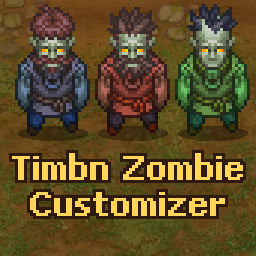
Timbn Zombie Customizer lets you restyle your zombies in the same customization window you use for your own character.
How to use
Inspect a zombie and click its portrait at the top of the window. The customization window opens with your zombie in the preview. It works on zombies that are standing, working, or lying on the ground.
What you can change
Hairstyle
Ten heads, the same ones the game gives new zombies. Most are hairstyles with or without a beard, one is bald with a beard, and one is a hood.
Hair color
Five colors for the hair and beard: auburn, light brown, ash gray, blue black and red. The hood has no hair, so this does nothing on it.
Clothes color
Ten tints for the clothes, plus none. By default they are red, orange, yellow, green, teal, blue, purple, pink, gray and dark, and you can change any of them in the config. Zombies only have one outfit in the game, so this tints it rather than swapping it, and the hands take the tint too. Each zombie keeps the color you gave it, so changing a color in the config later only changes what the window offers.
Rows that have nothing to choose from for a zombie, like Beard and Clothes, are greyed out.
Good to know
- The look is saved with your game.
- Zombies at a mine or a garden wear their work hat while working and keep their beard and hair color under it.
- Zombies in armor keep their hairstyle and hair color.
- A zombie you are carrying or one lying on the ground shows its hairstyle and hair color but not its clothes color. The color comes back when it stands up.
- If you uninstall the mod, hairstyles and hair colors stay but clothes colors go away.
- Your own character's look is never changed.
Requirements
- Timbn Core 1.3.0 or newer
Configuration
BepInEx/config/Timbn.GraveyardKeeperTwo.ZombieCustomizer.cfg
Colors are written as RRGGBBAA hex. With Configuration Manager installed you can pick them with a color picker in game, and the next time you open the window it uses the new colors.
| Section | Entry | Default |
|---|---|---|
| General | Enabled | true |
| Clothes Colors | ClothesColor1 | FF8C8CFF (red) |
| Clothes Colors | ClothesColor2 | FFBF73FF (orange) |
| Clothes Colors | ClothesColor3 | FFFF8CFF (yellow) |
| Clothes Colors | ClothesColor4 | 99FF99FF (green) |
| Clothes Colors | ClothesColor5 | 8CFFFFFF (teal) |
| Clothes Colors | ClothesColor6 | 99B2FFFF (blue) |
| Clothes Colors | ClothesColor7 | CC99FFFF (purple) |
| Clothes Colors | ClothesColor8 | FFA6D9FF (pink) |
| Clothes Colors | ClothesColor9 | B2B2B2FF (gray) |
| Clothes Colors | ClothesColor10 | 737380FF (dark) |