

CombatPanel
Standalone GTFO combat panel: player damage, friendly-fire loss, projectile accuracy and weakspot rate.CombatPanel 1.8.1
Standalone GTFO BepInEx IL2CPP combat statistics. Only dependency: BepInEx-BepInExPack_GTFO-3.2.3.
HUD
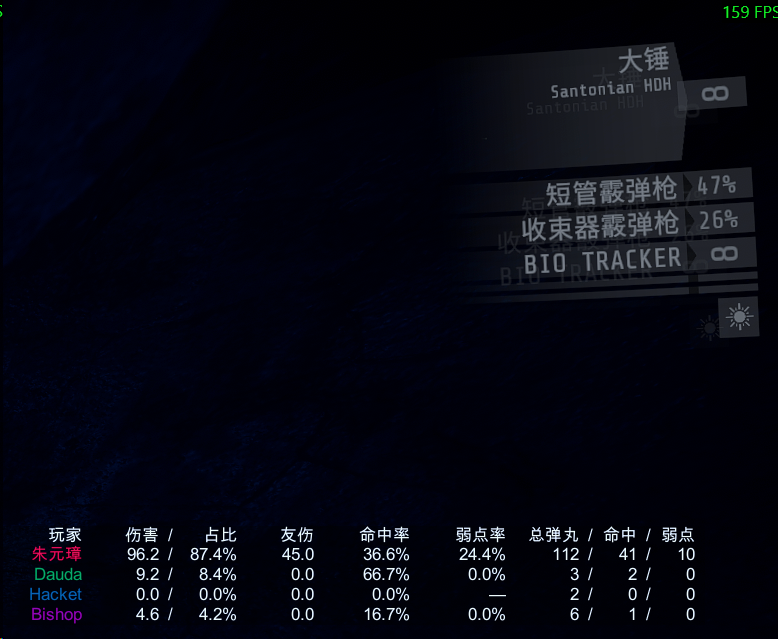
Native-looking table during an expedition, all columns shown by default, F8 to toggle:
Player | Damage Share | Friendly fire | Accuracy | Weakspot rate | Pellets total hit weak
Values inside a merged column sit side by side, one space apart and with no slash between them: Damage/Share reads 1,234.6 32.1%, Pellets read 120 45 12 in total / hit / weakspot order.
Share is player enemy damage divided by the expedition's observed team enemy damage, excluding friendly fire. With zero team damage or unavailable non-host team totals, the share part shows —.
Player names use their in-game color and are limited to six text elements. All other text is white; all fields are right-aligned.
Merged columns align field by field
Both the header and the values of a merged column are split into separate fields, each with its own slot, and each field is right-aligned inside its slot. The numbers of a merged column therefore line up vertically from row to row instead of the whole group being pushed around by the longest value. No slash is drawn between the fields: they are held apart by a gap that is a fraction of the glyph size (and shrinks further with the density), which is what keeps 伤害 占比 and 总弹丸 命中 弱点 narrow. The pellet header qualifies "total" only, which is two characters narrower, and a row with no data shows a single — right-aligned in the last slot.
Placement: window pixels, zero parallax
The table is drawn with IMGUI in window pixels. IMGUI is composited after every camera and every canvas, and is positioned only against the window, so the table inherits no view motion, no HUD motion and no HUD parallax: nothing in the game can move it, and only a configuration change relocates it. It is also clamped to the window, so no column can be cut off by a screen edge or a parent canvas.
Earlier versions could not have both properties. 1.2.0 converted a screen rectangle through a camera that does not render the HUD canvas (the table was displaced and skewed); 1.3.0 used a canvas of the mod's own that produced no pixels at all; 1.4.0 placed the table inside the game's HUD hierarchy, which renders but sways with the player and clipped its right-hand columns. No reference mod for this game creates its own canvas — they all live in the HUD hierarchy and therefore all inherit that sway.
- Glyph size is a reference size at 1080p scaled by the window height and the density, so the table looks the same at any resolution.
- Chinese text uses a system font (
Microsoft YaHei UI→Microsoft YaHei→SimHei→SimSun), because IMGUI's built-in font has no CJK glyphs. - A column is as wide as its widest cell, measured with the very font atlas IMGUI draws with, never below a per-column floor. Headers and values share one cell box, so their right edges line up by construction; cells cannot overlap.
- Drawing happens on the repaint pass only and input is never touched, so the table cannot swallow a click.
Language
General/Language accepts zh (default) and en, plus spellings such as zh-CN, cn and English; anything unrecognized falls back to Chinese. Column headers, result headings and statistic labels all follow it.
Density
General/Density accepts compact (default), normal and spacious. Each level scales row height, cell padding and column gap, and acts as a glyph-size factor:
| Value | Row height | Cell padding | Gap | Font |
|---|---|---|---|---|
compact (default) |
x0.80 | x0.88 | x0.50 | x0.90 |
normal |
x1.00 | x1.00 | x1.00 | x1.00 |
spacious |
x1.30 | x1.12 | x1.25 | x1.10 |
Which fields are shown
The [Columns] section toggles each data column: ShowDamage, ShowFriendlyFire, ShowAccuracy, ShowWeakspot, ShowProjectiles. The player name is the row label and is always drawn. A hidden column contributes neither width nor header, so the table immediately becomes narrower.
Position and size
The table hangs under the native flashlight icon in the right-hand gear column. The icon's screen rectangle is measured through the HUD's own camera, sampled every 0.25 s until it holds still for a second (the HUD animates while a level loads, and a single sample on the first frame lands hundreds of pixels away - that is exactly what earlier versions got wrong), and then frozen: the table is placed against it and never sampled again, so it follows the icon at any resolution without inheriting any motion. It is re-sampled only on a hot reload or a resolution change, and it is clamped to the window so every column is always visible.
[Layout] AnchorToFlashlight = false falls back to PositionX/PositionY, a fraction of the window where a negative value measures from the right/bottom edge. OffsetX/OffsetY is a pixel nudge on the final position, FontSize is the glyph size at 1080p, and [Results] OffsetX/OffsetY moves the result table. All of it is hot reloadable, so position and size can be tuned without leaving the game.
Config hot reload
The plugin watches its own config file. Edit and save BepInEx/config/HawChow.GTFOCombatPanel.cfg while playing and it applies about 0.3 seconds later: language, density, column toggles, font size and position all recompute without restarting the game. Each reload logs:
[HOTRELOAD] config reloaded; language=...; density=...; columns=...; the table is rebuilt and repositioned from the new settings.
BepInEx 6 does not watch config files itself, so the plugin uses a FileSystemWatcher and performs the reload and every Unity object touch on the main thread. Windows' FileSystemWatcher occasionally misses an event; saving the file again applies it.
Statistics
Actual gun/shotgun Fire and pellet ray casts are tracked for the local player and host-controlled bots. Penetration contacts count once per pellet. Accuracy is hits/fired pellets; weakspot rate is weakspot hits/hit pellets, matching Hikaria. Friendly fire does not improve enemy hit rate.
Remote-human host statistics are vanilla-network estimates, marked ~; the original damage packets have no unique pellet ID. Non-host clients only show their own observable data. Damage is actual health lost; source-less explosions are not attributed. Per-weapon damage for unmodded remote players may be misattributed during quick weapon switches.
Results
The success and the failure screen both get a table of the mod's own, drawn on top of the page in window pixels, so the vanilla report cards are never rewritten or repositioned:
Player/TOTAL followed by one line per weapon, every row carrying damage/share, friendly fire, hit rate, weakspot rate and the pellet triple. Each player therefore shows the combined TOTAL row plus one row per weapon. The table is scaled down and clamped if it would outgrow the window.
New expeditions reset counters; completion, failure and checkpoint retries retain them.
Verified: local Interop build at 0 warnings / 0 errors, 200 regression assertions, a BepInEx-only isolated startup reporting 19 patch receipts with no plugin or interop error, and a live config hot-reload check. Actual in-game placement, result rendering and the accuracy of the ~ remote estimates still require gameplay testing.
Feedback
Bug reports, feature requests and anything else: https://qingju.me