You are viewing a potentially older version of this package. View Latest Version
自定义本家族或其他世家新诞生成员的外观生成范围
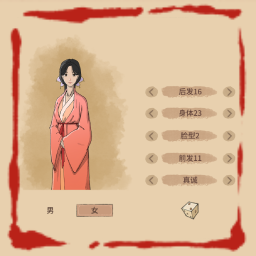
运行一次游戏生成配置后可在配置文件中自定义新成员的随机外观范围,包括后发、身体、脸型、前发、品性(眼睛)
可以将你喜欢的外观ID加入配置,删除你不喜欢的外观ID,不在配置列表内的外观将不会出现在本家族或其他世家新诞生成员身上
(外观ID就是开启新存档创建角色时捏人界面的后发、身体、脸型、前发对应数字,品性对应数字:1-骄傲 2-刚正 3-活泼 4-善良 5-真诚 6-洒脱 7-高冷 8-自卑 9-怯懦 10-腼腆 11-凶狠 12-善变 13-忧郁 14-多疑)
身体ID可以添加皇室服装(从30到49,一共30种,男女都有)
配置文件中可修改是否对其他世家新诞生成员生效
推荐使用模组管理器自动安装
手动安装
运行一次游戏后生成配置,位于:
BepInEx\config\cs.iccth.HoL.AppearanceCreateMod.cfg
修改完保存配置,需要重启游戏生效
Customize the appearance generation range for new family members.
After running the game once to generate the configuration, you can customize the range of random appearances for new family members in the config file. This includes back hair, body, face type, front hair, and personality (eye expression).
You can add the appearance IDs you like (these are the numbers shown in the character-creation screen when starting a new save for back hair, body, face type, and front hair) to the configuration, and remove the IDs you don't like. Any appearances not listed in the configuration will not appear on family members.
Body IDs can add royal outfits (from 30 to 49 — a total of 30 varieties).
Personality IDs: 1-Proud 2-Righteous 3-Lively 4-Kind 5-Honest 6-Carefree 7-Cold 8-Insecure 9-Timid 10-Shy 11-Mean 12-Fickle 13-Gloomy 14-Paranoid.
Use Mod Manager
Manual
The configuration file is generated after running the game once, located at:
BepInEx\config\cs.iccth.HoL.AppearanceCreateMod.cfg
Save the changes after modification and restart the game for them to take effect.