
CustomURLRadio
Play your own music from any URL on any in-game radio, synced for everyone.[center][size=5][b]Custom Radio[/b][/size] [i]Play your own music from any URL, right from any in-game radio.[/i][/center]
[center][color=#a874e8]━━━━━━━━━━━━━━━━━━━━━━━━━━━━━━━━━━━━━━━━━━━━[/color][/center]
[size=4][b]WHAT IT DOES[/b][/size]
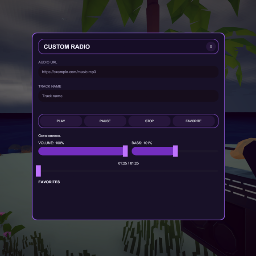
Ever wanted your in-game radio to play [i]your[/i] playlist instead of the built-in stations? This mod adds a custom radio menu to every radio in the world — paste a direct audio URL, hit play, and it streams for everyone nearby, synced over the network.
[list] [][b]Play any direct audio link[/b] (.mp3, .ogg, .wav, .aiff) on any radio in the game [][b]Fully multiplayer-synced[/b] — what you play, everyone hears (via networked RPCs) [][b]Volume & bass controls[/b] with a live low-pass bass filter [][b]Seek bar[/b] to scrub through the track [][b]Favorites list[/b] — save your go-to tracks and reload them with one click, persists between sessions [][b]Clean custom UI[/b] — no reliance on the game's default menus [/list]
[center][color=#a874e8]━━━━━━━━━━━━━━━━━━━━━━━━━━━━━━━━━━━━━━━━━━━━[/color][/center]
[size=4][b]HOW TO USE[/b][/size]
[list=1] []Pick up any radio in the world. []Press [b]Y[/b] (default, configurable) to open the Custom Radio menu. []Paste an audio URL into the [b]AUDIO URL[/b] field. []Optionally give it a [b]TRACK NAME[/b]. [*]Hit [b]PLAY[/b]. [/list]
[color=#f5c518][b]⭐ Tip:[/b][/color] hit the [b]FAVORITE[/b] button to save the current track to your favorites list at the bottom of the menu — click any saved track later to instantly reload and play it.
[color=#f5c518][b]⭐ Tip:[/b][/color] the [b]seek bar[/b] and [b]position[/b] sync too — pausing/resuming/seeking is shared with everyone listening to that radio.
[color=#f5c518][b]⭐ Tip:[/b][/color] not every link works — the source needs to serve a direct audio file (ending in [i].mp3, .ogg, .wav[/i], etc.), not a streaming platform page (YouTube/Spotify links won't work directly).
[center][color=#a874e8]━━━━━━━━━━━━━━━━━━━━━━━━━━━━━━━━━━━━━━━━━━━━[/color][/center]
[size=4][b]CONFIGURATION[/b][/size]
A config file is generated on first launch at: [code]BepInEx/config/neko.howtofish.customradio.cfg[/code]
[table] [tr][th]Section[/th][th]Setting[/th][th]Default[/th][th]Description[/th][/tr] [tr][td]General[/td][td]ToggleKey[/td][td]Y[/td][td]Key that opens/closes the radio menu. Change this if it conflicts with another mod.[/td][/tr] [tr][td]Audio[/td][td]DefaultVolume[/td][td]1.0[/td][td]Starting volume for a freshly opened radio (0.0–1.0). Only used the very first time, if [i]RememberLastSettings[/i] is on.[/td][/tr] [tr][td]Audio[/td][td]DefaultBass[/td][td]1.0[/td][td]Starting bass level (0.0–2.0). 1.0 = unmodified sound; higher values apply a stronger low-pass filter for a "boomier" sound.[/td][/tr] [tr][td]Audio[/td][td]RememberLastSettings[/td][td]true[/td][td]If enabled, the volume/bass you set on one radio carries over to every other radio you open in that play session.[/td][/tr] [tr][td]Menu[/td][td]CloseMenuOnEscape[/td][td]true[/td][td]Whether pressing Escape closes the radio menu.[/td][/tr] [/table]
[color=#f5c518][b]⭐ Tip:[/b][/color] if [b]Y[/b] clashes with another mod's hotkey, just edit [i]ToggleKey[/i] in the config to any other [url=https://docs.unity3d.com/ScriptReference/KeyCode.html]KeyCode[/url] name (e.g. [i]F6[/i], [i]Comma[/i], [i]Keypad0[/i]).
[center][color=#a874e8]━━━━━━━━━━━━━━━━━━━━━━━━━━━━━━━━━━━━━━━━━━━━[/color][/center]
[size=4][b]INSTALLATION[/b][/size]
[list=1] []Install [url=https://github.com/BepInEx/BepInEx]BepInEx[/url] for How To Fish, if you haven't already. []Drop the mod's [b].dll[/b] file into [code]BepInEx/plugins/[/code] [*]Launch the game once to generate the config file, then adjust settings if needed. [/list]
[center][color=#a874e8]━━━━━━━━━━━━━━━━━━━━━━━━━━━━━━━━━━━━━━━━━━━━[/color][/center]
[size=4][b]COMPATIBILITY & KNOWN ISSUES[/b][/size]
[list] []Multiplayer: playback is synced across the server — all connected players hear the same track, including those who join mid-song. []Favorites are saved locally per-player, not shared over the network. [*]Some CDNs/hosts block direct linking (CORS/hotlink protection) — if a URL won't load, try a different host. [/list]
If you run into bugs, please leave a comment with details (BepInEx log if possible) — happy to take a look!
[center][size=3][b]Enjoy the tunes! 🎶[/b][/size][/center]