
Drone Mod
A customizable sentry and FPV drone with smooth follow flight, mounted weapons, targeting, upgrades, colors, and multiplayer ownership.DRONE MOD
Personal sentry and FPV companion
Version 0.1.9 for How to Fish / BepInEx 5
DRONE MOD gives you a personal flying companion for exploration and island defense. Your drone can follow at your shoulder, hold position as an airborne sentry, or switch to a first-person camera that you pilot yourself. Equip it with a gun, improve its combat systems, give it a custom name, and recolor the body, propellers, and accents so it feels like your own machine.
Press F3 to open the violet-and-green Drone Control Center from anywhere. A drone costs $10,000, and each player may own one.
Controls and first flight
| Control or menu action | What it does |
|---|---|
| F3 | Opens or closes the Drone Control Center. |
| Buy Drone — $10,000 | Purchases your one personal drone and places it in an open inventory slot. |
| Hold E while holding your drone | Throws the drone forward, starts it up, and lets it right itself before it settles smoothly into the saved Follow position. |
| F3 → Recall Drone | Recalls your drone from any distance and returns it to its last configured Follow position. |
| F3 → Enter FPV | Transfers control and the camera to your deployed drone. Your character remains stationary. |
| W / A / S / D in FPV | Moves forward, left, backward, and right. |
| Space / Left Ctrl in FPV | Raises or lowers the drone. |
| Mouse in FPV | Aims and turns the drone camera and mounted gun. |
| Left mouse in FPV | Fires the equipped gun toward the center crosshair. Automatic targeting pauses during FPV control. |
| P in FPV | Toggles free-flight camera movement. Press P again to return to a level orientation. |
| Esc in FPV | Leaves FPV and returns control to your player. |
| Follow / Turret Mode | Makes the drone follow you or hold its current position as an airborne sentry. |
- Press F3 and purchase your drone for $10,000. Each player may own one.
- Hold the drone and hold E to launch it, or choose Follow mode in F3.
- Buy a weapon in the Main tab. Buying a different weapon replaces the equipped gun; buying the same equipped gun does not charge you twice.
- Set its follow leash radius, customize its colors, and select Follow, Turret, or FPV mode.
Drone Control Center
The F3 interface shows the drone’s name, owner, operating mode, current distance from its owner, weapon, ammunition, targeting tier, upgrade level, and safety status. Its Main tab controls the weapon, flight mode, follow leash radius, upgrades, targeting, and recall. The Colors tab has separate RGB controls for:
- Main body
- Propellers
- Accents and lights
The selected colors update immediately for the owner, host, and other players. They are saved with the drone and appear on its world model, held model, and hotbar icon.
You can rename the drone in the Main tab. Its name and owner appear above the flying drone so nearby players can identify it.
Follow and flight modes
Follow mode calculates its launch point from the activating player's live movement transform and camera direction. It initially places the drone front-right, about 3 meters away, and approximately 3 meters above that player. The F3 slider controls a player-centered leash radius from 1 to 5 meters. The drone remains at its current horizontal position while it is inside that radius. After the player moves outside the radius, the drone drifts toward the player-centered area until it reaches the halfway point of the leash, then settles there until the radius is crossed again. Vertical following continues so it stays above the player. Flying drones ignore world-item collision while leashed, preventing invisible walls, terrain, and scenery from trapping them. Flight positioning bypasses the stationary player network root and stale item or boat-local coordinates, so launching on another island cannot pull the drone back to an old location.
While carried, the drone rests between the player’s default hands like a normal two-handed item. Holding E launches it above and forward with a quick eased righting animation before it settles into the saved follow point. Its startup sound plays once at the same reduced volume level as the hum, then blends into the low-volume positional loop. Each flying drone has its own proximity audio, so it becomes quieter as you move away. During FPV, the owner’s hum is lowered and muffled further for comfort.
Turret mode locks the drone at its current airborne position while keeping automated targeting active. Recall works from any distance and restores the last Follow position.
FPV mode gives the player direct flight and weapon control. The camera and HUD switch through the game's active-camera system after the host confirms that the drone entered FPV mode; failed connections return cleanly to player control. Normal FPV movement stays level; Freecam allows movement and rotation on any plane. Automated targeting is disabled until FPV ends. A security-camera display adds subtle white corner framing, a blinking red REC marker, and a center-dot crosshair. The normal hotbar and other game HUD elements are hidden while health and hunger remain visible. The only control reminder shown over the feed is Press Esc to exit FPV mode.
Weapons and combat
Weapons are purchased through the F3 Main tab and mount beneath the drone. The weapon’s range follows its class:
| Weapon class | Base combat range |
|---|---|
| Shotgun | 25 m |
| Pistol | 45 m |
| SMG | 55 m |
| Assault rifle | 75 m |
| Sniper rifle | 120 m |
The drone has unlimited reserve ammunition but uses the equipped weapon’s magazine, firing cadence, reload timing, projectiles, effects, and sounds. Deployment starts with a full magazine. Ten upgrade levels compound damage, range, reload speed, and firing rate while narrowing the accuracy cone. When the drone finds a new target, it plays a quiet three-beep cue and waits one second before opening fire.
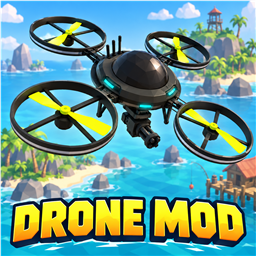
The compact world model uses a rounded low-poly body with four protected circular rotor guards, bright blades, cyan status lights, and a weapon assembly mounted beneath the center. It is roughly 60% of the original prototype's size. During idle scanning, the underside gun-and-hands assembly rotates like the turret mount at 30 degrees above horizontal, with the assembly rolled upside down for the drone's bottom mounting position.
Tier 1 targets living seagulls by default. Tier 2 adds loose fish for $20,000, and Tier 3 adds bosses for $100,000. Fish attached to a line, held by a player, or stored in inventory are ignored. Dead creatures and unrelated NPCs are never targeted.
Friendly-fire protection is enabled by default. Enabling friendly fire requires an extra confirmation.
Ownership, carrying, and selling
Only the owner can control, collect, or use a drone. Other players cannot operate it or claim it. The owner can recall the drone from the F3 menu whether it is flying, deployed, carried, or dropped.
The drone behaves as a physical inventory item when carried. It can be held with both hands, placed in a hotbar slot, dropped, and picked up. Selling it to a money vendor removes the drone record and pays its resale value, including its installed upgrades, targeting tiers, and equipped gun value.
Multiplayer and saves
The host stores drone data in BepInEx/config/DroneMod-worlds.json; the normal game save stores the physical item. Keep both saves together. Every co-op player should install the same DRONE MOD version so names, colors, flight state, weapons, targeting, and FPV movement synchronize correctly.
Installation
Install the Thunderstore package for How to Fish, enable DRONE MOD, and launch the game through the mod manager. Restart the game after updating the mod.