

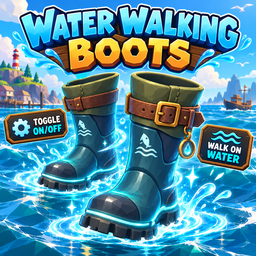
Water Walking Boots
Water Walking Boots with a new low-poly 3D boots model while preserving water walking, pickup, vendor, and hotbar behavior.Water Walking Boots — v0.3.10 Water Movement Fix
This build replaces the generic blue box with a simple low-poly pair of water-walking boots.

The Water Walking Boots as they appear when dropped and ready to pick up.
The boots have dark blue uppers, solid soles, cyan water treads and cuffs, ankle straps, and gold buckles. The same model appears in the player's hands and when dropped in the world.
This version prevents Better Oceans from identifying the boot renderers as stray water surfaces. The model retains its original blue, cyan, black, and gold materials.
The hotbar uses a tightly framed transparent preview of the blue and cyan boots. It replaces the image on the boots' built-in slot surface without creating UI overlays or effects, then restores the slot when another item enters it. Water Walking Boots can also be thrown into a money vendor's mouth and sold like another item for $7,500, half their $15,000 purchase price.
Dropping / picking the boots back up
Water Walking Boots should now behave like a normal dropped item again.
When the boots are not being held, the mod continuously restores the normal dropped-item state:
- pickup trigger enabled
- pickup trigger remains a trigger collider
- physical world collider enabled
- rigidbody becomes non-kinematic
- gravity enabled
- collisions enabled
- rigidbody wakes up after being dropped
The mod also refreshes this state immediately whenever the item's synced holder changes.
Unchanged working features
- Island 4 StoreClerc vendor
- $15,000 purchase price
- E activate/deactivate overlay
- water-surface walking/running/jumping
- static clean hotbar boots icon
- small solid green ON indicator
- low-poly boots first-person held model
- low-poly boots dropped world model
Controls
9  = Buy from Island 4 StoreClerc for $15,000
E  = Toggle boots ON/OFF while holding them
F8 = Host-only backup spawn
Test
- Buy or F8-spawn the boots.
- Pick them up.
- Hold/use them normally.
- Drop them on the ground.
- Walk back up to the dropped boots model.
- Confirm it can be picked up again exactly like a normal item.